Google プロフェッショナル クラウド デベロッパー コンピューティングおよびアプリ プラットフォームGoogle Professional Cloud Developer Compute and App Platforms

アプリケーションのランタイムと、Cloud Run、App Engine、Cloud Functions、Compute Engine、GKE、コンテナ、プラットフォーム レベルのスケーリングなどのホスティングの選択肢に使用します。Use for application runtimes and hosting choices such as Cloud Run, App Engine, Cloud Functions, Compute Engine, GKE, containers, and platform-level scaling.

試験Exams
PROFESSIONAL-CLOUD-DEVELOPER
問題数Questions
133
コメント数Comments
1204
1 133

表示中 133 / 133 問

1. PROFESSIONAL-CLOUD-DEVELOPER トピック 1 問題 21. PROFESSIONAL-CLOUD-DEVELOPER Topic 1 Question 2

問題Question

アプリケーションを Google Cloud Platform に移行し、既存のモニタリング プラットフォームを維持しました。時間が重要な問題に対して、通知システムが遅すぎることがわかりました。
どうすればいいでしょうか?

  • A. モニタリング プラットフォーム全体を Stackdriver に置き換えます。
  • B. Compute Engine インスタンスに Stackdriver エージェントをインストールします。
  • C. Stackdriver を使用してログをキャプチャしてアラートを作成し、既存のプラットフォームに送信します。
  • D. 一部のトラフィックを古いプラットフォームに移行し、2 つのプラットフォームで同時に AB テストを実行します。

You migrated your applications to Google Cloud Platform and kept your existing monitoring platform. You now find that your notification system is too slow for time critical problems.
What should you do?

  • A. Replace your entire monitoring platform with Stackdriver.
  • B. Install the Stackdriver agents on your Compute Engine instances.
  • C. Use Stackdriver to capture and alert on logs, then ship them to your existing platform.
  • D. Migrate some traffic back to your old platform and perform AB testing on the two platforms concurrently.

2. PROFESSIONAL-CLOUD-DEVELOPER トピック 1 問題 52. PROFESSIONAL-CLOUD-DEVELOPER Topic 1 Question 5

問題Question

ウェブサイトは Compute Engine にデプロイされています。マーケティング チームは、3 つの異なる Web サイト デザイン間のコンバージョン率をテストしたいと考えています。
どのアプローチを使用する必要がありますか?

  • A. ウェブサイトを App Engine にデプロイし、トラフィック分割を使用します。
  • B. ウェブサイトを 3 つの個別のサービスとして App Engine にデプロイします。
  • C. Web サイトを Cloud Functions にデプロイし、トラフィック分割を使用します。
  • D. Web サイトを 3 つの個別の機能として Cloud Functions にデプロイします。

Your website is deployed on Compute Engine. Your marketing team wants to test conversion rates between 3 different website designs.
Which approach should you use?

  • A. Deploy the website on App Engine and use traffic splitting.
  • B. Deploy the website on App Engine as three separate services.
  • C. Deploy the website on Cloud Functions and use traffic splitting.
  • D. Deploy the website on Cloud Functions as three separate functions.

3. PROFESSIONAL-CLOUD-DEVELOPER トピック 1 問題 63. PROFESSIONAL-CLOUD-DEVELOPER Topic 1 Question 6

問題Question

ディレクトリ local-script とそのすべての内容をローカル ワークステーションから Compute Engine 仮想マシン インスタンスにコピーする必要があります。
どのコマンドを使用すればよいでしょうか?

  • A. gsutil cp --project (my-gcp-project) -r ~/local-scripts/ gcp-instance-name:~/server-scripts/ --zone (us-east1-b)
  • B. gsutil cp --project (my-gcp-project) -R ~/local-scripts/ gcp-instance-name:~/server-scripts/ --zone (us-east1-b)
  • C. gcloud compute scp --project (my-gcp-project) --recurse ~/local-scripts/ gcp-instance-name:~/server-scripts/ --zone (us-east1-b)
  • D. gcloud compute mv --project (my-gcp-project) --recurse ~/local-scripts/ gcp-instance-name:~/server-scripts/ --zone (us-east1-b)

You need to copy directory local-scripts and all of its contents from your local workstation to a Compute Engine virtual machine instance.
Which command should you use?

  • A. gsutil cp --project ג€my-gcp-projectג€ -r ~/local-scripts/ gcp-instance-name:~/server-scripts/ --zone ג€us-east1-bג€
  • B. gsutil cp --project ג€my-gcp-projectג€ -R ~/local-scripts/ gcp-instance-name:~/server-scripts/ --zone ג€us-east1-bג€
  • C. gcloud compute scp --project ג€my-gcp-projectג€ --recurse ~/local-scripts/ gcp-instance-name:~/server-scripts/ --zone ג€us-east1-bג€
  • D. gcloud compute mv --project ג€my-gcp-projectג€ --recurse ~/local-scripts/ gcp-instance-name:~/server-scripts/ --zone ג€us-east1-bג€

4. PROFESSIONAL-CLOUD-DEVELOPER トピック 1 問題 74. PROFESSIONAL-CLOUD-DEVELOPER Topic 1 Question 7

問題Question

Stackdriver Monitoring Agent がインストールされている Compute Engine 仮想マシン インスタンスにアプリケーションをデプロイしています。アプリケーションはインスタンス上の Unix プロセスです。 UNIX プロセスが少なくとも 5 分間実行されなかった場合にアラートを受け取りたいとします。メトリクスまたはログを生成するようにアプリケーションを変更することはできません。
どのアラート条件を設定する必要がありますか?

  • A. 稼働時間チェック
  • B. プロセスの健全性
  • C. メトリクスの不在
  • D. メトリックのしきい値

You are deploying your application to a Compute Engine virtual machine instance with the Stackdriver Monitoring Agent installed. Your application is a unix process on the instance. You want to be alerted if the unix process has not run for at least 5 minutes. You are not able to change the application to generate metrics or logs.
Which alert condition should you configure?

  • A. Uptime check
  • B. Process health
  • C. Metric absence
  • D. Metric threshold

5. PROFESSIONAL-CLOUD-DEVELOPER トピック 1 問題 115. PROFESSIONAL-CLOUD-DEVELOPER Topic 1 Question 11

問題Question

500 MB のファイル サイズ制限が適用された内部ファイル アップロード API を App Engine に移行する必要があります。
どうすればいいでしょうか?

  • A. FTP を使用してファイルをアップロードします。
  • B. CPanel を使用してファイルをアップロードします。
  • C. ファイルをアップロードするには署名付き URL を使用します。
  • D. API をマルチパート ファイル アップロード API に変更します。

You need to migrate an internal file upload API with an enforced 500-MB file size limit to App Engine.
What should you do?

  • A. Use FTP to upload files.
  • B. Use CPanel to upload files.
  • C. Use signed URLs to upload files.
  • D. Change the API to be a multipart file upload API.

6. PROFESSIONAL-CLOUD-DEVELOPER トピック 1 問題 126. PROFESSIONAL-CLOUD-DEVELOPER Topic 1 Question 12

問題Question

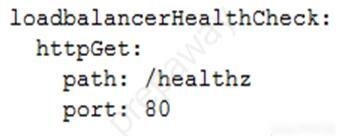
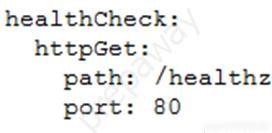
アプリケーションを Google Kubernetes Engine (GKE) クラスターにデプロイすることを計画しています。アプリケーションは、HTTP ベースのヘルスチェックを /healthz で公開します。このヘルス チェック エンドポイントを使用して、ロード バランサーによってトラフィックをポッドにルーティングする必要があるかどうかを判断します。
ポッド構成にどのコード スニペットを含める必要がありますか?
A.
image
B.
image
C.
image
D.
image

You are planning to deploy your application in a Google Kubernetes Engine (GKE) cluster. The application exposes an HTTP-based health check at /healthz. You want to use this health check endpoint to determine whether traffic should be routed to the pod by the load balancer.
Which code snippet should you include in your Pod configuration?
A.
image
B.
image
C.
image
D.
image

7. PROFESSIONAL-CLOUD-DEVELOPER トピック 1 問題 147. PROFESSIONAL-CLOUD-DEVELOPER Topic 1 Question 14

問題Question

あなたは、Google Kubernetes Engine (GKE) でホストされる JPEG 画像サイズ変更 API を開発しています。サービスの呼び出し元は同じ GKE クラスタ内に存在します。クライアントがサービスの IP アドレスを取得できるようにしたいとします。
どうすればいいでしょうか?

  • A. GKE サービスを定義します。クライアントは、Cloud DNS の A レコードの名前を使用して、サービスのクラスタ IP アドレスを見つける必要があります。
  • B. GKE サービスを定義します。クライアントは、URL 内のサービス名を使用してサービスに接続する必要があります。
  • C. GKE エンドポイントを定義します。クライアントは、クライアント コンテナ内の適切な環境変数からエンドポイント名を取得する必要があります。
  • D. GKE エンドポイントを定義します。クライアントは Cloud DNS からエンドポイント名を取得する必要があります。

You are developing a JPEG image-resizing API hosted on Google Kubernetes Engine (GKE). Callers of the service will exist within the same GKE cluster. You want clients to be able to get the IP address of the service.
What should you do?

  • A. Define a GKE Service. Clients should use the name of the A record in Cloud DNS to find the service's cluster IP address.
  • B. Define a GKE Service. Clients should use the service name in the URL to connect to the service.
  • C. Define a GKE Endpoint. Clients should get the endpoint name from the appropriate environment variable in the client container.
  • D. Define a GKE Endpoint. Clients should get the endpoint name from Cloud DNS.

8. PROFESSIONAL-CLOUD-DEVELOPER トピック 1 問題 168. PROFESSIONAL-CLOUD-DEVELOPER Topic 1 Question 16

問題Question

アプリケーションを Compute Engine 仮想マシン インスタンスにデプロイしています。アプリケーションはログ ファイルをディスクに書き込むように構成されています。アプリケーション コードを変更せずに Stackdriver Logging のログを表示したいと考えています。
どうすればいいでしょうか?

  • A. Stackdriver Logging Agent をインストールし、アプリケーション ログを送信するように構成します。
  • B. Stackdriver Logging ライブラリを使用して、アプリケーションから Stackdriver Logging に直接ログを記録します。
  • C. インスタンスのメタデータにログ ファイル フォルダーのパスを指定して、アプリケーション ログを送信するように構成します。
  • D. ログが自動的に Stackdriver Logging に送信されるように、/var/log にログを記録するようにアプリケーションを変更します。

You are deploying your application to a Compute Engine virtual machine instance. Your application is configured to write its log files to disk. You want to view the logs in Stackdriver Logging without changing the application code.
What should you do?

  • A. Install the Stackdriver Logging Agent and configure it to send the application logs.
  • B. Use a Stackdriver Logging Library to log directly from the application to Stackdriver Logging.
  • C. Provide the log file folder path in the metadata of the instance to configure it to send the application logs.
  • D. Change the application to log to /var/log so that its logs are automatically sent to Stackdriver Logging.

9. PROFESSIONAL-CLOUD-DEVELOPER トピック 1 問題 209. PROFESSIONAL-CLOUD-DEVELOPER Topic 1 Question 20

問題Question

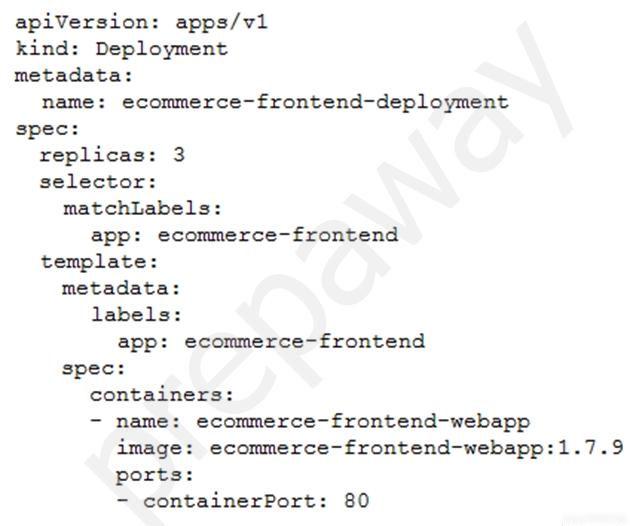
アプリケーションは Google Kubernetes Engine (GKE) クラスターにデプロイされます。アプリケーションの新しいバージョンがリリースされると、CI/CD ツールは spec.template.spec.containers[0].image 値を更新して、新しいアプリケーション バージョンの Docker イメージを参照します。デプロイメント オブジェクトが変更を適用するときは、新しいバージョンのレプリカを少なくとも 1 つデプロイし、新しいレプリカが正常になるまで以前のレプリカを維持する必要があります。
以下に示す GKE Deployment オブジェクトにどの変更を加える必要がありますか?
image

  • A. デプロイメント戦略を RollingUpdate に設定し、maxSurge を 0、maxUnavailable を 1 に設定します。
  • B. デプロイメント戦略を RollingUpdate に設定し、maxSurge を 1 に設定し、maxUnavailable を 0 に設定します。
  • C. デプロイメント戦略を「再作成」に設定し、maxSurge を 0、maxUnavailable を 1 に設定します。
  • D. デプロイメント戦略を「再作成」に設定し、maxSurge を 1 に設定し、maxUnavailable を 0 に設定します。

Your application is deployed in a Google Kubernetes Engine (GKE) cluster. When a new version of your application is released, your CI/CD tool updates the spec.template.spec.containers[0].image value to reference the Docker image of your new application version. When the Deployment object applies the change, you want to deploy at least 1 replica of the new version and maintain the previous replicas until the new replica is healthy.
Which change should you make to the GKE Deployment object shown below?
image

  • A. Set the Deployment strategy to RollingUpdate with maxSurge set to 0, maxUnavailable set to 1.
  • B. Set the Deployment strategy to RollingUpdate with maxSurge set to 1, maxUnavailable set to 0.
  • C. Set the Deployment strategy to Recreate with maxSurge set to 0, maxUnavailable set to 1.
  • D. Set the Deployment strategy to Recreate with maxSurge set to 1, maxUnavailable set to 0.

10. PROFESSIONAL-CLOUD-DEVELOPER トピック 1 問題 2110. PROFESSIONAL-CLOUD-DEVELOPER Topic 1 Question 21

問題Question

あなたは、インターネット上で利用できる単純な HTML アプリケーションを作成することを計画しています。このサイトには、アプリケーションに関する FAQ に関する情報が保管されています。アプリケーションは静的であり、画像、HTML、CSS、JavaScript が含まれています。できるだけ少ない手順で、このアプリケーションをインターネット上で利用できるようにしたいと考えています。
どうすればいいでしょうか?

  • A. アプリケーションを Cloud Storage にアップロードします。
  • B. アプリケーションを App Engine 環境にアップロードします。
  • C. Apache ウェブサーバーがインストールされた Compute Engine インスタンスを作成します。アプリケーションをホストするように Apache Web サーバーを構成します。
  • D. まずアプリケーションをコンテナ化します。このコンテナを Google Kubernetes Engine (GKE) にデプロイし、アプリケーションをホストしている GKE ポッドに外部 IP アドレスを割り当てます。

You plan to make a simple HTML application available on the internet. This site keeps information about FAQs for your application. The application is static and contains images, HTML, CSS, and Javascript. You want to make this application available on the internet with as few steps as possible.
What should you do?

  • A. Upload your application to Cloud Storage.
  • B. Upload your application to an App Engine environment.
  • C. Create a Compute Engine instance with Apache web server installed. Configure Apache web server to host the application.
  • D. Containerize your application first. Deploy this container to Google Kubernetes Engine (GKE) and assign an external IP address to the GKE pod hosting the application.

11. PROFESSIONAL-CLOUD-DEVELOPER トピック 1 問題 2211. PROFESSIONAL-CLOUD-DEVELOPER Topic 1 Question 22

問題Question

あなたの会社は、新しい API を App Engine スタンダード環境にデプロイしました。テスト中、API は期待どおりに動作しません。アプリケーションを再デプロイすることなく、アプリケーションを長期的に監視して、アプリケーション コード内の問題を診断したいと考えています。
どのツールを使用する必要がありますか?

  • A. Stackdriver トレース
  • B. Stackdriver モニタリング
  • C. Stackdriver デバッグ スナップショット
  • D. Stackdriver デバッグ ログポイント

Your company has deployed a new API to App Engine Standard environment. During testing, the API is not behaving as expected. You want to monitor the application over time to diagnose the problem within the application code without redeploying the application.
Which tool should you use?

  • A. Stackdriver Trace
  • B. Stackdriver Monitoring
  • C. Stackdriver Debug Snapshots
  • D. Stackdriver Debug Logpoints

12. PROFESSIONAL-CLOUD-DEVELOPER トピック 1 問題 2812. PROFESSIONAL-CLOUD-DEVELOPER Topic 1 Question 28

問題Question

Google Kubernetes Engine (GKE) クラスターを作成し、次のコマンドを実行します。
image
コマンドは次のエラーで失敗します。
image
あなたは問題を解決したいと考えています。どうすればいいでしょうか?

  • A. GCP Console で追加の GKE 割り当てをリクエストします。
  • B. GCP Console で追加の Compute Engine 割り当てをリクエストします。
  • C. サポート ケースを開いて追加の GKE 割り当てをリクエストします。
  • D. クラスター内のサービスを分離し、より少ないコアで機能するように新しいクラスターを書き直します。

You are creating a Google Kubernetes Engine (GKE) cluster and run this command:
image
The command fails with the error:
image
You want to resolve the issue. What should you do?

  • A. Request additional GKE quota in the GCP Console.
  • B. Request additional Compute Engine quota in the GCP Console.
  • C. Open a support case to request additional GKE quota.
  • D. Decouple services in the cluster, and rewrite new clusters to function with fewer cores.

13. PROFESSIONAL-CLOUD-DEVELOPER トピック 1 問題 3313. PROFESSIONAL-CLOUD-DEVELOPER Topic 1 Question 33

問題Question

アプリケーションはマネージド インスタンス グループによって制御されます。マネージド インスタンス グループ内のすべてのインスタンス間で大規模な読み取り専用データ セットを共有したいと考えています。各インスタンスが迅速に起動し、非常に低い遅延でファイル システム経由でデータ セットにアクセスできることを確認したいと考えています。また、ソリューションの総コストを最小限に抑えたいと考えています。
どうすればいいでしょうか?

  • A. データを Cloud Storage バケットに移動し、Cloud Storage FUSE を使用してバケットをファイルシステムにマウントします。
  • B. データを Cloud Storage バケットに移動し、起動スクリプトを介してインスタンスのブートディスクにデータをコピーします。
  • C. データを Compute Engine 永続ディスクに移動し、そのディスクを読み取り専用モードで複数の Compute Engine 仮想マシン インスタンスに接続します。
  • D. データを Compute Engine 永続ディスクに移動し、スナップショットを取得し、スナップショットから複数のディスクを作成して、各ディスクを独自のインスタンスに接続します。

Your application is controlled by a managed instance group. You want to share a large read-only data set between all the instances in the managed instance group. You want to ensure that each instance can start quickly and can access the data set via its filesystem with very low latency. You also want to minimize the total cost of the solution.
What should you do?

  • A. Move the data to a Cloud Storage bucket, and mount the bucket on the filesystem using Cloud Storage FUSE.
  • B. Move the data to a Cloud Storage bucket, and copy the data to the boot disk of the instance via a startup script.
  • C. Move the data to a Compute Engine persistent disk, and attach the disk in read-only mode to multiple Compute Engine virtual machine instances.
  • D. Move the data to a Compute Engine persistent disk, take a snapshot, create multiple disks from the snapshot, and attach each disk to its own instance.

14. PROFESSIONAL-CLOUD-DEVELOPER トピック 1 問題 3614. PROFESSIONAL-CLOUD-DEVELOPER Topic 1 Question 36

問題Question

モノリシック アプリケーションを再構築して、マイクロサービス モデルに従うようにしたいと考えています。この変更によるビジネスへの影響を最小限に抑えながら、これを効率的に達成したいと考えています。
どのアプローチを取るべきですか?

  • A. アプリケーションを Compute Engine にデプロイし、自動スケーリングをオンにします。
  • B. アプリケーションの機能を段階的に適切なマイクロサービスに置き換えます。
  • C. 適切なマイクロサービスを使用してモノリシック アプリケーションを 1 回の作業でリファクタリングし、デプロイします。
  • D. モノリスとは別に適切なマイクロサービスを使用して新しいアプリケーションを構築し、完成したら置き換えます。

You want to re-architect a monolithic application so that it follows a microservices model. You want to accomplish this efficiently while minimizing the impact of this change to the business.
Which approach should you take?

  • A. Deploy the application to Compute Engine and turn on autoscaling.
  • B. Replace the application's features with appropriate microservices in phases.
  • C. Refactor the monolithic application with appropriate microservices in a single effort and deploy it.
  • D. Build a new application with the appropriate microservices separate from the monolith and replace it when it is complete.

15. PROFESSIONAL-CLOUD-DEVELOPER トピック 1 問題 3815. PROFESSIONAL-CLOUD-DEVELOPER Topic 1 Question 38

問題Question

新しい API を構築しています。保存コストを最小限に抑え、画像提供の待ち時間を短縮したいと考えています。
どのアーキテクチャを使用する必要がありますか?

  • A. Cloud Storage を利用した App Engine
  • B. Persistent Disk を利用した Compute Engine
  • C. Cloud Filestore を利用した Transfer Appliance
  • D. クラウド ストレージを基盤としたクラウド コンテンツ配信ネットワーク (CDN)

You are building a new API. You want to minimize the cost of storing and reduce the latency of serving images.
Which architecture should you use?

  • A. App Engine backed by Cloud Storage
  • B. Compute Engine backed by Persistent Disk
  • C. Transfer Appliance backed by Cloud Filestore
  • D. Cloud Content Delivery Network (CDN) backed by Cloud Storage

16. PROFESSIONAL-CLOUD-DEVELOPER トピック 1 問題 4016. PROFESSIONAL-CLOUD-DEVELOPER Topic 1 Question 40

問題Question

アプリケーションを Google Kubernetes Engine (GKE) クラスターにデプロイすることを計画しています。アプリケーションは水平方向に拡張でき、アプリケーションの各インスタンスには安定したネットワーク ID と独自の永続ディスクが必要です。
どの GKE オブジェクトを使用する必要がありますか?

  • A. 導入
  • B. ステートフルセット
  • C. レプリカセット
  • D. レプリカコントローラー

You are planning to deploy your application in a Google Kubernetes Engine (GKE) cluster. Your application can scale horizontally, and each instance of your application needs to have a stable network identity and its own persistent disk.
Which GKE object should you use?

  • A. Deployment
  • B. StatefulSet
  • C. ReplicaSet
  • D. ReplicaController

17. PROFESSIONAL-CLOUD-DEVELOPER トピック 1 問題 4317. PROFESSIONAL-CLOUD-DEVELOPER Topic 1 Question 43

問題Question

ケーススタディ -
これはケーススタディです。ケーススタディは個別に時間が設定されるわけではありません。各ケースを完了したいだけ試験時間を費やすことができます。ただし、この試験には追加のケーススタディやセクションが存在する場合があります。この試験に含まれるすべての質問を指定された時間内に完了できるように時間を管理する必要があります。
ケーススタディに含まれる質問に答えるには、ケーススタディで提供される情報を参照する必要があります。ケース スタディには、ケース スタディで説明されているシナリオに関する詳細情報を提供する展示やその他のリソースが含まれる場合があります。このケーススタディでは、各質問は他の質問から独立しています。
このケーススタディの最後に、レビュー画面が表示されます。この画面では、試験の次のセクションに進む前に、回答を確認し、変更を加えることができます。新しいセクションを開始した後は、このセクションに戻ることはできません。

ケーススタディを開始するには -
このケーススタディの最初の質問を表示するには、「次へ」ボタンをクリックします。質問に答える前に、左側のペインのボタンを使用してケーススタディの内容を調べてください。これらのボタンをクリックすると、ビジネス要件、既存の環境、問題の説明などの情報が表示されます。ケーススタディに
[すべての情報] タブでは、表示される情報が後続のタブに表示される情報と同じであることに注意してください。質問に答える準備ができたら、「質問」ボタンをクリックして質問に戻ります。

会社概要 -
HipLocal は、近くにいる人々の間のコミュニケーションを促進するように設計されたコミュニティ アプリケーションです。スポーツイベントの企画や開催、企業が地域社会とつながるために利用されています。 HipLocal は最近ダラスのいくつかの地域でサービスを開始し、急速に世界的な現象に成長しています。ハイパーローカルなコミュニティコミュニケーションとビジネスアウトリーチのユニークなスタイルは、世界中で需要があります。

エグゼクティブステートメント -
私たちはナンバーワンのローカルコミュニティアプリです。地域コミュニティ サービスをグローバルに展開する時が来ました。私たちのベンチャー キャピタルの投資家は、メンバーが互いに 10 マイルまたは 10,000 マイル離れていても、急速な成長と、オンラインに登場する新しいローカル コミュニティや仮想コミュニティに同様の素晴らしい体験を提供したいと考えています。

ソリューションコンセプト -
HipLocal は、世界中の顧客により良いサービスを提供するために、最新の機能を備えた既存のサービスを新しい地域で拡張したいと考えています。彼らは、これらの地域をタイムゾーンでサポートするための新しいチームを雇用してトレーニングしたいと考えています。アプリケーションがスムーズに拡張され、明確な稼働時間データが提供されることを確認する必要があります。

既存の技術環境 -
HipLocal の環境は、オンプレミスのハードウェアと Google Cloud Platform で実行されるインフラストラクチャが混在しています。 HipLocal チームはアプリケーションをよく理解していますが、世界規模のアプリケーションの経験は限られています。現在の技術環境は次のとおりです。
* 既存の API は、GCP でホストされている Compute Engine 仮想マシン インスタンス上で実行されます。
* 状態は GCP の単一インスタンスの MySQL データベースに保存されます。
* データはオンプレミスの Teradata/Vertica データ ウェアハウスにエクスポートされます。
* データ分析はオンプレミスの Hadoop 環境で実行されます。
※アプリケーションにはログ記録がありません。
* 稼働時間の基本的な指標があります。 API が応答しない場合、アラートが頻繁に発生します。

ビジネス要件 -
HipLocal の投資家は、その拠点を拡大し、見られる需要の増加をサポートしたいと考えています。彼らの要件は次のとおりです。
* アプリケーションの利用可能性を新しい地域に拡大します。
* サポートできる同時ユーザー数を増やします。
* ユーザーが異なる地域に旅行する場合でも、一貫したエクスペリエンスを確保します。
* ユーザーのアクティビティ指標を取得して、製品を収益化する方法をより深く理解します。
* 新しい地域の規制 (GDPR など) への準拠を確保します。
* インフラストラクチャ管理の時間とコストを削減します。
* Google が推奨するクラウド コンピューティングのプラクティスを採用します。

技術的要件 -
* アプリケーションとバックエンドは、使用状況のメトリクスとモニタリングを提供する必要があります。
* API には強力な認証と承認が必要です。
* ログ記録を増やし、データをクラウド分析プラットフォームに保存する必要があります。
* 柔軟なスケーリングを容易にするためにサーバーレス アーキテクチャに移行します。
* 安全な方法で内部アプリへの承認されたアクセスを提供します。
HipLocal の .net ベースの認証サービスは、断続的な負荷がかかると失敗します。
彼らは何をすべきでしょうか?

  • A. 自動スケーリングには App Engine を使用します。
  • B. 自動スケーリングには Cloud Functions を使用します。
  • C. サービスには Compute Engine クラスタを使用します。
  • D. サービスには専用の Compute Engine 仮想マシン インスタンスを使用します。

Case study -
This is a case study. Case studies are not timed separately. You can use as much exam time as you would like to complete each case. However, there may be additional case studies and sections on this exam. You must manage your time to ensure that you are able to complete all questions included on this exam in the time provided.
To answer the questions included in a case study, you will need to reference information that is provided in the case study. Case studies might contain exhibits and other resources that provide more information about the scenario that is described in the case study. Each question is independent of the other questions in this case study.
At the end of this case study, a review screen will appear. This screen allows you to review your answers and to make changes before you move to the next section of the exam. After you begin a new section, you cannot return to this section.

To start the case study -
To display the first question in this case study, click the Next button. Use the buttons in the left pane to explore the content of the case study before you answer the questions. Clicking these buttons displays information such as business requirements, existing environment, and problem statements. If the case study has an
All Information tab, note that the information displayed is identical to the information displayed on the subsequent tabs. When you are ready to answer a question, click the Question button to return to the question.

Company Overview -
HipLocal is a community application designed to facilitate communication between people in close proximity. It is used for event planning and organizing sporting events, and for businesses to connect with their local communities. HipLocal launched recently in a few neighborhoods in Dallas and is rapidly growing into a global phenomenon. Its unique style of hyper-local community communication and business outreach is in demand around the world.

Executive Statement -
We are the number one local community app; it's time to take our local community services global. Our venture capital investors want to see rapid growth and the same great experience for new local and virtual communities that come online, whether their members are 10 or 10000 miles away from each other.

Solution Concept -
HipLocal wants to expand their existing service, with updated functionality, in new regions to better serve their global customers. They want to hire and train a new team to support these regions in their time zones. They will need to ensure that the application scales smoothly and provides clear uptime data.

Existing Technical Environment -
HipLocal's environment is a mix of on-premises hardware and infrastructure running in Google Cloud Platform. The HipLocal team understands their application well, but has limited experience in global scale applications. Their existing technical environment is as follows:
* Existing APIs run on Compute Engine virtual machine instances hosted in GCP.
* State is stored in a single instance MySQL database in GCP.
* Data is exported to an on-premises Teradata/Vertica data warehouse.
* Data analytics is performed in an on-premises Hadoop environment.
* The application has no logging.
* There are basic indicators of uptime; alerts are frequently fired when the APIs are unresponsive.

Business Requirements -
HipLocal's investors want to expand their footprint and support the increase in demand they are seeing. Their requirements are:
* Expand availability of the application to new regions.
* Increase the number of concurrent users that can be supported.
* Ensure a consistent experience for users when they travel to different regions.
* Obtain user activity metrics to better understand how to monetize their product.
* Ensure compliance with regulations in the new regions (for example, GDPR).
* Reduce infrastructure management time and cost.
* Adopt the Google-recommended practices for cloud computing.

Technical Requirements -
* The application and backend must provide usage metrics and monitoring.
* APIs require strong authentication and authorization.
* Logging must be increased, and data should be stored in a cloud analytics platform.
* Move to serverless architecture to facilitate elastic scaling.
* Provide authorized access to internal apps in a secure manner.
HipLocal's .net-based auth service fails under intermittent load.
What should they do?

  • A. Use App Engine for autoscaling.
  • B. Use Cloud Functions for autoscaling.
  • C. Use a Compute Engine cluster for the service.
  • D. Use a dedicated Compute Engine virtual machine instance for the service.

18. PROFESSIONAL-CLOUD-DEVELOPER トピック 1 問題 4618. PROFESSIONAL-CLOUD-DEVELOPER Topic 1 Question 46

問題Question

ケーススタディ -
これはケーススタディです。ケーススタディは個別に時間が設定されるわけではありません。各ケースを完了したいだけ試験時間を費やすことができます。ただし、この試験には追加のケーススタディやセクションが存在する場合があります。この試験に含まれるすべての質問を指定された時間内に完了できるように時間を管理する必要があります。
ケーススタディに含まれる質問に答えるには、ケーススタディで提供される情報を参照する必要があります。ケース スタディには、ケース スタディで説明されているシナリオに関する詳細情報を提供する展示やその他のリソースが含まれる場合があります。このケーススタディでは、各質問は他の質問から独立しています。
このケーススタディの最後に、レビュー画面が表示されます。この画面では、試験の次のセクションに進む前に、回答を確認し、変更を加えることができます。新しいセクションを開始した後は、このセクションに戻ることはできません。

ケーススタディを開始するには -
このケーススタディの最初の質問を表示するには、「次へ」ボタンをクリックします。質問に答える前に、左側のペインのボタンを使用してケーススタディの内容を調べてください。これらのボタンをクリックすると、ビジネス要件、既存の環境、問題の説明などの情報が表示されます。ケーススタディに
[すべての情報] タブでは、表示される情報が後続のタブに表示される情報と同じであることに注意してください。質問に答える準備ができたら、「質問」ボタンをクリックして質問に戻ります。

会社概要 -
HipLocal は、近くにいる人々の間のコミュニケーションを促進するように設計されたコミュニティ アプリケーションです。スポーツイベントの企画や開催、企業が地域社会とつながるために利用されています。 HipLocal は最近ダラスのいくつかの地域でサービスを開始し、急速に世界的な現象に成長しています。ハイパーローカルなコミュニティコミュニケーションとビジネスアウトリーチのユニークなスタイルは、世界中で需要があります。

エグゼクティブステートメント -
私たちはナンバーワンのローカルコミュニティアプリです。地域コミュニティ サービスをグローバルに展開する時が来ました。私たちのベンチャー キャピタルの投資家は、メンバーが互いに 10 マイルまたは 10,000 マイル離れていても、急速な成長と、オンラインに登場する新しいローカル コミュニティや仮想コミュニティに同様の素晴らしい体験を提供したいと考えています。

ソリューションコンセプト -
HipLocal は、世界中の顧客により良いサービスを提供するために、最新の機能を備えた既存のサービスを新しい地域で拡張したいと考えています。彼らは、これらの地域をタイムゾーンでサポートするための新しいチームを雇用してトレーニングしたいと考えています。アプリケーションがスムーズに拡張され、明確な稼働時間データが提供されることを確認する必要があります。

既存の技術環境 -
HipLocal の環境は、オンプレミスのハードウェアと Google Cloud Platform で実行されるインフラストラクチャが混在しています。 HipLocal チームはアプリケーションをよく理解していますが、世界規模のアプリケーションの経験は限られています。現在の技術環境は次のとおりです。
* 既存の API は、GCP でホストされている Compute Engine 仮想マシン インスタンス上で実行されます。
* 状態は GCP の単一インスタンスの MySQL データベースに保存されます。
* データはオンプレミスの Teradata/Vertica データ ウェアハウスにエクスポートされます。
* データ分析はオンプレミスの Hadoop 環境で実行されます。
※アプリケーションにはログ記録がありません。
* 稼働時間の基本的な指標があります。 API が応答しない場合、アラートが頻繁に発生します。

ビジネス要件 -
HipLocal の投資家は、その拠点を拡大し、見られる需要の増加をサポートしたいと考えています。彼らの要件は次のとおりです。
* アプリケーションの利用可能性を新しい地域に拡大します。
* サポートできる同時ユーザー数を増やします。
* ユーザーが異なる地域に旅行する場合でも、一貫したエクスペリエンスを確保します。
* ユーザーのアクティビティ指標を取得して、製品を収益化する方法をより深く理解します。
* 新しい地域の規制 (GDPR など) への準拠を確保します。
* インフラストラクチャ管理の時間とコストを削減します。
* Google が推奨するクラウド コンピューティングのプラクティスを採用します。

技術的要件 -
* アプリケーションとバックエンドは、使用状況のメトリクスとモニタリングを提供する必要があります。
* API には強力な認証と承認が必要です。
* ログ記録を増やし、データをクラウド分析プラットフォームに保存する必要があります。
* 柔軟なスケーリングを容易にするためにサーバーレス アーキテクチャに移行します。
* 安全な方法で内部アプリへの承認されたアクセスを提供します。
HipLocal が内部アプリにアクセスできるようにするにはどのサービスを使用する必要がありますか?

  • A. クラウドVPN
  • B. クラウドアーマー
  • C. 仮想プライベートクラウド
  • D. クラウドアイデンティティ認識プロキシ

Case study -
This is a case study. Case studies are not timed separately. You can use as much exam time as you would like to complete each case. However, there may be additional case studies and sections on this exam. You must manage your time to ensure that you are able to complete all questions included on this exam in the time provided.
To answer the questions included in a case study, you will need to reference information that is provided in the case study. Case studies might contain exhibits and other resources that provide more information about the scenario that is described in the case study. Each question is independent of the other questions in this case study.
At the end of this case study, a review screen will appear. This screen allows you to review your answers and to make changes before you move to the next section of the exam. After you begin a new section, you cannot return to this section.

To start the case study -
To display the first question in this case study, click the Next button. Use the buttons in the left pane to explore the content of the case study before you answer the questions. Clicking these buttons displays information such as business requirements, existing environment, and problem statements. If the case study has an
All Information tab, note that the information displayed is identical to the information displayed on the subsequent tabs. When you are ready to answer a question, click the Question button to return to the question.

Company Overview -
HipLocal is a community application designed to facilitate communication between people in close proximity. It is used for event planning and organizing sporting events, and for businesses to connect with their local communities. HipLocal launched recently in a few neighborhoods in Dallas and is rapidly growing into a global phenomenon. Its unique style of hyper-local community communication and business outreach is in demand around the world.

Executive Statement -
We are the number one local community app; it's time to take our local community services global. Our venture capital investors want to see rapid growth and the same great experience for new local and virtual communities that come online, whether their members are 10 or 10000 miles away from each other.

Solution Concept -
HipLocal wants to expand their existing service, with updated functionality, in new regions to better serve their global customers. They want to hire and train a new team to support these regions in their time zones. They will need to ensure that the application scales smoothly and provides clear uptime data.

Existing Technical Environment -
HipLocal's environment is a mix of on-premises hardware and infrastructure running in Google Cloud Platform. The HipLocal team understands their application well, but has limited experience in global scale applications. Their existing technical environment is as follows:
* Existing APIs run on Compute Engine virtual machine instances hosted in GCP.
* State is stored in a single instance MySQL database in GCP.
* Data is exported to an on-premises Teradata/Vertica data warehouse.
* Data analytics is performed in an on-premises Hadoop environment.
* The application has no logging.
* There are basic indicators of uptime; alerts are frequently fired when the APIs are unresponsive.

Business Requirements -
HipLocal's investors want to expand their footprint and support the increase in demand they are seeing. Their requirements are:
* Expand availability of the application to new regions.
* Increase the number of concurrent users that can be supported.
* Ensure a consistent experience for users when they travel to different regions.
* Obtain user activity metrics to better understand how to monetize their product.
* Ensure compliance with regulations in the new regions (for example, GDPR).
* Reduce infrastructure management time and cost.
* Adopt the Google-recommended practices for cloud computing.

Technical Requirements -
* The application and backend must provide usage metrics and monitoring.
* APIs require strong authentication and authorization.
* Logging must be increased, and data should be stored in a cloud analytics platform.
* Move to serverless architecture to facilitate elastic scaling.
* Provide authorized access to internal apps in a secure manner.
Which service should HipLocal use to enable access to internal apps?

  • A. Cloud VPN
  • B. Cloud Armor
  • C. Virtual Private Cloud
  • D. Cloud Identity-Aware Proxy

19. PROFESSIONAL-CLOUD-DEVELOPER トピック 1 問題 4719. PROFESSIONAL-CLOUD-DEVELOPER Topic 1 Question 47

問題Question

ケーススタディ -
これはケーススタディです。ケーススタディは個別に時間が設定されるわけではありません。各ケースを完了したいだけ試験時間を費やすことができます。ただし、この試験には追加のケーススタディやセクションが存在する場合があります。この試験に含まれるすべての質問を指定された時間内に完了できるように時間を管理する必要があります。
ケーススタディに含まれる質問に答えるには、ケーススタディで提供される情報を参照する必要があります。ケース スタディには、ケース スタディで説明されているシナリオに関する詳細情報を提供する展示やその他のリソースが含まれる場合があります。このケーススタディでは、各質問は他の質問から独立しています。
このケーススタディの最後に、レビュー画面が表示されます。この画面では、試験の次のセクションに進む前に、回答を確認し、変更を加えることができます。新しいセクションを開始した後は、このセクションに戻ることはできません。

ケーススタディを開始するには -
このケーススタディの最初の質問を表示するには、「次へ」ボタンをクリックします。質問に答える前に、左側のペインのボタンを使用してケーススタディの内容を調べてください。これらのボタンをクリックすると、ビジネス要件、既存の環境、問題の説明などの情報が表示されます。ケーススタディに
[すべての情報] タブでは、表示される情報が後続のタブに表示される情報と同じであることに注意してください。質問に答える準備ができたら、「質問」ボタンをクリックして質問に戻ります。

会社概要 -
HipLocal は、近くにいる人々の間のコミュニケーションを促進するように設計されたコミュニティ アプリケーションです。スポーツイベントの企画や開催、企業が地域社会とつながるために利用されています。 HipLocal は最近ダラスのいくつかの地域でサービスを開始し、急速に世界的な現象に成長しています。ハイパーローカルなコミュニティコミュニケーションとビジネスアウトリーチのユニークなスタイルは、世界中で需要があります。

エグゼクティブステートメント -
私たちはナンバーワンのローカルコミュニティアプリです。地域コミュニティ サービスをグローバルに展開する時が来ました。私たちのベンチャー キャピタルの投資家は、メンバーが互いに 10 マイルまたは 10,000 マイル離れていても、急速な成長と、オンラインに登場する新しいローカル コミュニティや仮想コミュニティに同様の素晴らしい体験を提供したいと考えています。

ソリューションコンセプト -
HipLocal は、世界中の顧客により良いサービスを提供するために、最新の機能を備えた既存のサービスを新しい地域で拡張したいと考えています。彼らは、これらの地域をタイムゾーンでサポートするための新しいチームを雇用してトレーニングしたいと考えています。アプリケーションがスムーズに拡張され、明確な稼働時間データが提供されることを確認する必要があります。

既存の技術環境 -
HipLocal の環境は、オンプレミスのハードウェアと Google Cloud Platform で実行されるインフラストラクチャが混在しています。 HipLocal チームはアプリケーションをよく理解していますが、世界規模のアプリケーションの経験は限られています。現在の技術環境は次のとおりです。
* 既存の API は、GCP でホストされている Compute Engine 仮想マシン インスタンス上で実行されます。
* 状態は GCP の単一インスタンスの MySQL データベースに保存されます。
* データはオンプレミスの Teradata/Vertica データ ウェアハウスにエクスポートされます。
* データ分析はオンプレミスの Hadoop 環境で実行されます。
※アプリケーションにはログ記録がありません。
* 稼働時間の基本的な指標があります。 API が応答しない場合、アラートが頻繁に発生します。

ビジネス要件 -
HipLocal の投資家は、その拠点を拡大し、見られる需要の増加をサポートしたいと考えています。彼らの要件は次のとおりです。
* アプリケーションの利用可能性を新しい地域に拡大します。
* サポートできる同時ユーザー数を増やします。
* ユーザーが異なる地域に旅行する場合でも、一貫したエクスペリエンスを確保します。
* ユーザーのアクティビティ指標を取得して、製品を収益化する方法をより深く理解します。
* 新しい地域の規制 (GDPR など) への準拠を確保します。
* インフラストラクチャ管理の時間とコストを削減します。
* Google が推奨するクラウド コンピューティングのプラクティスを採用します。

技術的要件 -
* アプリケーションとバックエンドは、使用状況のメトリクスとモニタリングを提供する必要があります。
* API には強力な認証と承認が必要です。
* ログ記録を増やし、データをクラウド分析プラットフォームに保存する必要があります。
* 柔軟なスケーリングを容易にするためにサーバーレス アーキテクチャに移行します。
* 安全な方法で内部アプリへの承認されたアクセスを提供します。
HipLocal は、オンコール エンジニアの数を減らし、手動によるスケーリングを排除したいと考えています。
どの 2 つのサービスを選択すべきでしょうか? (2つお選びください。)

  • A. Google App Engine サービスを使用します。
  • B. サーバーレスの Google Cloud Functions を使用します。
  • C. Knative を使用して、サーバーレス アプリケーションを構築およびデプロイします。
  • D. 自動デプロイには Google Kubernetes Engine を使用します。
  • E. デプロイには大規模な Google Compute Engine クラスタを使用します。

Case study -
This is a case study. Case studies are not timed separately. You can use as much exam time as you would like to complete each case. However, there may be additional case studies and sections on this exam. You must manage your time to ensure that you are able to complete all questions included on this exam in the time provided.
To answer the questions included in a case study, you will need to reference information that is provided in the case study. Case studies might contain exhibits and other resources that provide more information about the scenario that is described in the case study. Each question is independent of the other questions in this case study.
At the end of this case study, a review screen will appear. This screen allows you to review your answers and to make changes before you move to the next section of the exam. After you begin a new section, you cannot return to this section.

To start the case study -
To display the first question in this case study, click the Next button. Use the buttons in the left pane to explore the content of the case study before you answer the questions. Clicking these buttons displays information such as business requirements, existing environment, and problem statements. If the case study has an
All Information tab, note that the information displayed is identical to the information displayed on the subsequent tabs. When you are ready to answer a question, click the Question button to return to the question.

Company Overview -
HipLocal is a community application designed to facilitate communication between people in close proximity. It is used for event planning and organizing sporting events, and for businesses to connect with their local communities. HipLocal launched recently in a few neighborhoods in Dallas and is rapidly growing into a global phenomenon. Its unique style of hyper-local community communication and business outreach is in demand around the world.

Executive Statement -
We are the number one local community app; it's time to take our local community services global. Our venture capital investors want to see rapid growth and the same great experience for new local and virtual communities that come online, whether their members are 10 or 10000 miles away from each other.

Solution Concept -
HipLocal wants to expand their existing service, with updated functionality, in new regions to better serve their global customers. They want to hire and train a new team to support these regions in their time zones. They will need to ensure that the application scales smoothly and provides clear uptime data.

Existing Technical Environment -
HipLocal's environment is a mix of on-premises hardware and infrastructure running in Google Cloud Platform. The HipLocal team understands their application well, but has limited experience in global scale applications. Their existing technical environment is as follows:
* Existing APIs run on Compute Engine virtual machine instances hosted in GCP.
* State is stored in a single instance MySQL database in GCP.
* Data is exported to an on-premises Teradata/Vertica data warehouse.
* Data analytics is performed in an on-premises Hadoop environment.
* The application has no logging.
* There are basic indicators of uptime; alerts are frequently fired when the APIs are unresponsive.

Business Requirements -
HipLocal's investors want to expand their footprint and support the increase in demand they are seeing. Their requirements are:
* Expand availability of the application to new regions.
* Increase the number of concurrent users that can be supported.
* Ensure a consistent experience for users when they travel to different regions.
* Obtain user activity metrics to better understand how to monetize their product.
* Ensure compliance with regulations in the new regions (for example, GDPR).
* Reduce infrastructure management time and cost.
* Adopt the Google-recommended practices for cloud computing.

Technical Requirements -
* The application and backend must provide usage metrics and monitoring.
* APIs require strong authentication and authorization.
* Logging must be increased, and data should be stored in a cloud analytics platform.
* Move to serverless architecture to facilitate elastic scaling.
* Provide authorized access to internal apps in a secure manner.
HipLocal wants to reduce the number of on-call engineers and eliminate manual scaling.
Which two services should they choose? (Choose two.)

  • A. Use Google App Engine services.
  • B. Use serverless Google Cloud Functions.
  • C. Use Knative to build and deploy serverless applications.
  • D. Use Google Kubernetes Engine for automated deployments.
  • E. Use a large Google Compute Engine cluster for deployments.

20. PROFESSIONAL-CLOUD-DEVELOPER トピック 1 問題 4920. PROFESSIONAL-CLOUD-DEVELOPER Topic 1 Question 49

問題Question

ケーススタディ -
これはケーススタディです。ケーススタディは個別に時間が設定されるわけではありません。各ケースを完了したいだけ試験時間を費やすことができます。ただし、この試験には追加のケーススタディやセクションが存在する場合があります。この試験に含まれるすべての質問を指定された時間内に完了できるように時間を管理する必要があります。
ケーススタディに含まれる質問に答えるには、ケーススタディで提供される情報を参照する必要があります。ケース スタディには、ケース スタディで説明されているシナリオに関する詳細情報を提供する展示やその他のリソースが含まれる場合があります。このケーススタディでは、各質問は他の質問から独立しています。
このケーススタディの最後に、レビュー画面が表示されます。この画面では、試験の次のセクションに進む前に、回答を確認し、変更を加えることができます。新しいセクションを開始した後は、このセクションに戻ることはできません。

ケーススタディを開始するには -
このケーススタディの最初の質問を表示するには、「次へ」ボタンをクリックします。質問に答える前に、左側のペインのボタンを使用してケーススタディの内容を調べてください。これらのボタンをクリックすると、ビジネス要件、既存の環境、問題の説明などの情報が表示されます。ケーススタディに
[すべての情報] タブでは、表示される情報が後続のタブに表示される情報と同じであることに注意してください。質問に答える準備ができたら、「質問」ボタンをクリックして質問に戻ります。

会社概要 -
HipLocal は、近くにいる人々の間のコミュニケーションを促進するように設計されたコミュニティ アプリケーションです。スポーツイベントの企画や開催、企業が地域社会とつながるために利用されています。 HipLocal は最近ダラスのいくつかの地域でサービスを開始し、急速に世界的な現象に成長しています。ハイパーローカルなコミュニティコミュニケーションとビジネスアウトリーチのユニークなスタイルは、世界中で需要があります。

エグゼクティブステートメント -
私たちはナンバーワンのローカルコミュニティアプリです。地域コミュニティ サービスをグローバルに展開する時が来ました。私たちのベンチャー キャピタルの投資家は、メンバーが互いに 10 マイルまたは 10,000 マイル離れていても、急速な成長と、オンラインに登場する新しいローカル コミュニティや仮想コミュニティに同様の素晴らしい体験を提供したいと考えています。

ソリューションコンセプト -
HipLocal は、世界中の顧客により良いサービスを提供するために、最新の機能を備えた既存のサービスを新しい地域で拡張したいと考えています。彼らは、これらの地域をタイムゾーンでサポートするための新しいチームを雇用してトレーニングしたいと考えています。アプリケーションがスムーズに拡張され、明確な稼働時間データが提供されることを確認する必要があります。

既存の技術環境 -
HipLocal の環境は、オンプレミスのハードウェアと Google Cloud Platform で実行されるインフラストラクチャが混在しています。 HipLocal チームはアプリケーションをよく理解していますが、世界規模のアプリケーションの経験は限られています。現在の技術環境は次のとおりです。
* 既存の API は、GCP でホストされている Compute Engine 仮想マシン インスタンス上で実行されます。
* 状態は GCP の単一インスタンスの MySQL データベースに保存されます。
* データはオンプレミスの Teradata/Vertica データ ウェアハウスにエクスポートされます。
* データ分析はオンプレミスの Hadoop 環境で実行されます。
※アプリケーションにはログ記録がありません。
* 稼働時間の基本的な指標があります。 API が応答しない場合、アラートが頻繁に発生します。

ビジネス要件 -
HipLocal の投資家は、その拠点を拡大し、見られる需要の増加をサポートしたいと考えています。彼らの要件は次のとおりです。
* アプリケーションの利用可能性を新しい地域に拡大します。
* サポートできる同時ユーザー数を増やします。
* ユーザーが異なる地域に旅行する場合でも、一貫したエクスペリエンスを確保します。
* ユーザーのアクティビティ指標を取得して、製品を収益化する方法をより深く理解します。
* 新しい地域の規制 (GDPR など) への準拠を確保します。
* インフラストラクチャ管理の時間とコストを削減します。
* Google が推奨するクラウド コンピューティングのプラクティスを採用します。

技術的要件 -
* アプリケーションとバックエンドは、使用状況のメトリクスとモニタリングを提供する必要があります。
* API には強力な認証と承認が必要です。
* ログ記録を増やし、データをクラウド分析プラットフォームに保存する必要があります。
* 柔軟なスケーリングを容易にするためにサーバーレス アーキテクチャに移行します。
* 安全な方法で内部アプリへの承認されたアクセスを提供します。
HipLocal はパブリック API にどのサービスを使用する必要がありますか?

  • A. クラウドアーマー
  • B. クラウド機能
  • C. クラウドエンドポイント
  • D. シールドされた仮想マシン

Case study -
This is a case study. Case studies are not timed separately. You can use as much exam time as you would like to complete each case. However, there may be additional case studies and sections on this exam. You must manage your time to ensure that you are able to complete all questions included on this exam in the time provided.
To answer the questions included in a case study, you will need to reference information that is provided in the case study. Case studies might contain exhibits and other resources that provide more information about the scenario that is described in the case study. Each question is independent of the other questions in this case study.
At the end of this case study, a review screen will appear. This screen allows you to review your answers and to make changes before you move to the next section of the exam. After you begin a new section, you cannot return to this section.

To start the case study -
To display the first question in this case study, click the Next button. Use the buttons in the left pane to explore the content of the case study before you answer the questions. Clicking these buttons displays information such as business requirements, existing environment, and problem statements. If the case study has an
All Information tab, note that the information displayed is identical to the information displayed on the subsequent tabs. When you are ready to answer a question, click the Question button to return to the question.

Company Overview -
HipLocal is a community application designed to facilitate communication between people in close proximity. It is used for event planning and organizing sporting events, and for businesses to connect with their local communities. HipLocal launched recently in a few neighborhoods in Dallas and is rapidly growing into a global phenomenon. Its unique style of hyper-local community communication and business outreach is in demand around the world.

Executive Statement -
We are the number one local community app; it's time to take our local community services global. Our venture capital investors want to see rapid growth and the same great experience for new local and virtual communities that come online, whether their members are 10 or 10000 miles away from each other.

Solution Concept -
HipLocal wants to expand their existing service, with updated functionality, in new regions to better serve their global customers. They want to hire and train a new team to support these regions in their time zones. They will need to ensure that the application scales smoothly and provides clear uptime data.

Existing Technical Environment -
HipLocal's environment is a mix of on-premises hardware and infrastructure running in Google Cloud Platform. The HipLocal team understands their application well, but has limited experience in global scale applications. Their existing technical environment is as follows:
* Existing APIs run on Compute Engine virtual machine instances hosted in GCP.
* State is stored in a single instance MySQL database in GCP.
* Data is exported to an on-premises Teradata/Vertica data warehouse.
* Data analytics is performed in an on-premises Hadoop environment.
* The application has no logging.
* There are basic indicators of uptime; alerts are frequently fired when the APIs are unresponsive.

Business Requirements -
HipLocal's investors want to expand their footprint and support the increase in demand they are seeing. Their requirements are:
* Expand availability of the application to new regions.
* Increase the number of concurrent users that can be supported.
* Ensure a consistent experience for users when they travel to different regions.
* Obtain user activity metrics to better understand how to monetize their product.
* Ensure compliance with regulations in the new regions (for example, GDPR).
* Reduce infrastructure management time and cost.
* Adopt the Google-recommended practices for cloud computing.

Technical Requirements -
* The application and backend must provide usage metrics and monitoring.
* APIs require strong authentication and authorization.
* Logging must be increased, and data should be stored in a cloud analytics platform.
* Move to serverless architecture to facilitate elastic scaling.
* Provide authorized access to internal apps in a secure manner.
Which service should HipLocal use for their public APIs?

  • A. Cloud Armor
  • B. Cloud Functions
  • C. Cloud Endpoints
  • D. Shielded Virtual Machines

21. PROFESSIONAL-CLOUD-DEVELOPER トピック 1 問題 5121. PROFESSIONAL-CLOUD-DEVELOPER Topic 1 Question 51

問題Question

アプリケーションは複数の Google Kubernetes Engine クラスタで実行されています。これは、各クラスターのデプロイメントによって管理されます。デプロイメントにより、各クラスターにポッドの複数のレプリカが作成されました。すべてのクラスターのデプロイメント内のすべてのレプリカの標準出力に送信されたログを表示したいと考えています。
どのコマンドを使用すればよいでしょうか?

  • A. kubectl ログ [PARAM]
  • B. gcloud ロギング読み取り [PARAM]
  • C. kubectl exec ג€"it [PARAM]journalctl
  • D. gcloud compute ssh [PARAM] -command= sudojournalctlג€

Your application is running in multiple Google Kubernetes Engine clusters. It is managed by a Deployment in each cluster. The Deployment has created multiple replicas of your Pod in each cluster. You want to view the logs sent to stdout for all of the replicas in your Deployment in all clusters.
Which command should you use?

  • A. kubectl logs [PARAM]
  • B. gcloud logging read [PARAM]
  • C. kubectl exec ג€"it [PARAM] journalctl
  • D. gcloud compute ssh [PARAM] ג€"-command= ג€sudo journalctlג€

22. PROFESSIONAL-CLOUD-DEVELOPER トピック 1 問題 5422. PROFESSIONAL-CLOUD-DEVELOPER Topic 1 Question 54

問題Question

Compute Engine にデプロイされたアプリケーションのメモリ使用量を表示したいと考えています。
どうすればいいでしょうか?

  • A. Stackdriver クライアント ライブラリをインストールします。
  • B. Stackdriver Monitoring Agent をインストールします。
  • C. Stackdriver Metrics Explorer を使用します。
  • D. Google Cloud Platform コンソールを使用します。

You want to view the memory usage of your application deployed on Compute Engine.
What should you do?

  • A. Install the Stackdriver Client Library.
  • B. Install the Stackdriver Monitoring Agent.
  • C. Use the Stackdriver Metrics Explorer.
  • D. Use the Google Cloud Platform Console.

23. PROFESSIONAL-CLOUD-DEVELOPER トピック 1 問題 5723. PROFESSIONAL-CLOUD-DEVELOPER Topic 1 Question 57

問題Question

App Engine 上に 1 つのウェブサイトをデプロイしており、URL http://www.altostrat.com/ 経由でアクセスできる必要があります。
どうすればいいでしょうか?

  • A. ウェブマスター セントラルでドメインの所有権を確認します。 App Engine の正規名 ghs.googlehosted.com を指す DNS CNAME レコードを作成します。
  • B. ウェブマスター セントラルでドメインの所有権を確認します。単一のグローバル App Engine IP アドレスを指す A レコードを定義します。
  • C. ドメイン www.altostrat.com が App Engine サービスを指すように、dispatch.yaml でマッピングを定義します。 App Engine の正規名 ghs.googlehosted.com を指す DNS CNAME レコードを作成します。
  • D. ドメイン www.altostrat.com が App Engine サービスを指すように、dispatch.yaml でマッピングを定義します。単一のグローバル App Engine IP アドレスを指す A レコードを定義します。

You are deploying a single website on App Engine that needs to be accessible via the URL http://www.altostrat.com/.
What should you do?

  • A. Verify domain ownership with Webmaster Central. Create a DNS CNAME record to point to the App Engine canonical name ghs.googlehosted.com.
  • B. Verify domain ownership with Webmaster Central. Define an A record pointing to the single global App Engine IP address.
  • C. Define a mapping in dispatch.yaml to point the domain www.altostrat.com to your App Engine service. Create a DNS CNAME record to point to the App Engine canonical name ghs.googlehosted.com.
  • D. Define a mapping in dispatch.yaml to point the domain www.altostrat.com to your App Engine service. Define an A record pointing to the single global App Engine IP address.

24. PROFESSIONAL-CLOUD-DEVELOPER トピック 1 問題 6024. PROFESSIONAL-CLOUD-DEVELOPER Topic 1 Question 60

問題Question

アプリケーションはカスタム マシン イメージとして構築されます。マシン イメージの一意の展開が複数あります。各デプロイは、独自のテンプレートを持つ個別のマネージド インスタンス グループです。各展開には、一意の構成値のセットが必要です。これらの一意の値を各展開に提供し、すべての展開で同じカスタム マシン イメージを使用したいと考えています。 Compute Engine のすぐに使える機能を使用したいと考えています。
どうすればいいでしょうか?

  • A. 一意の構成値を永続ディスクに配置します。
  • B. 一意の構成値を Cloud Bigtable テーブルに配置します。
  • C. インスタンス テンプレートの起動スクリプトに一意の構成値を配置します。
  • D. インスタンス テンプレートのインスタンス メタデータに一意の構成値を配置します。

Your application is built as a custom machine image. You have multiple unique deployments of the machine image. Each deployment is a separate managed instance group with its own template. Each deployment requires a unique set of configuration values. You want to provide these unique values to each deployment but use the same custom machine image in all deployments. You want to use out-of-the-box features of Compute Engine.
What should you do?

  • A. Place the unique configuration values in the persistent disk.
  • B. Place the unique configuration values in a Cloud Bigtable table.
  • C. Place the unique configuration values in the instance template startup script.
  • D. Place the unique configuration values in the instance template instance metadata.

25. PROFESSIONAL-CLOUD-DEVELOPER トピック 1 問題 6225. PROFESSIONAL-CLOUD-DEVELOPER Topic 1 Question 62

問題Question

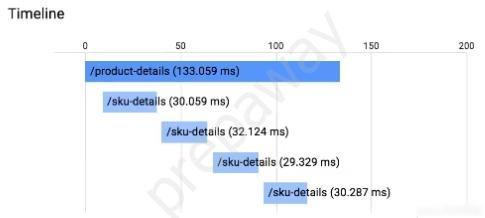
App Engine でアプリケーションを実行しています。アプリケーションには Stackdriver Trace が組み込まれています。 /product-details リクエストは、以下に示すように、/sku-details にある 4 つの既知の固有の製品に関する詳細を報告します。リクエストが完了するまでにかかる時間を短縮したいと考えています。
どうすればいいでしょうか?
image

  • A. インスタンスクラスのサイズを大きくします。
  • B. 永続ディスクの種類を SSD に変更します。
  • C. /product-details を変更して、リクエストを並行して実行します。
  • D. /sku-details 情報をデータベースに保存し、Web サービス呼び出しをデータベース クエリに置き換えます。

You have an application running in App Engine. Your application is instrumented with Stackdriver Trace. The /product-details request reports details about four known unique products at /sku-details as shown below. You want to reduce the time it takes for the request to complete.
What should you do?
image

  • A. Increase the size of the instance class.
  • B. Change the Persistent Disk type to SSD.
  • C. Change /product-details to perform the requests in parallel.
  • D. Store the /sku-details information in a database, and replace the webservice call with a database query.

26. PROFESSIONAL-CLOUD-DEVELOPER トピック 1 問題 6426. PROFESSIONAL-CLOUD-DEVELOPER Topic 1 Question 64

問題Question

App Engine の標準構成は次のとおりです。
サービス: 生産
インスタンスクラス: B1
アプリケーションを 5 つのインスタンスに制限したいとします。
どのコード スニペットを構成に含めるべきですか?

  • A. Manual_scaling: インスタンス: 5 min_pending_latency: 30ms
  • B. 手動スケーリング: 最大インスタンス: 5 アイドルタイムアウト: 10 分
  • C. Basic_scaling: インスタンス: 5 min_pending_latency: 30ms
  • D. Basic_scaling: max_instances: 5 idle_timeout: 10m

Your App Engine standard configuration is as follows:
service: production
instance_class: B1
You want to limit the application to 5 instances.
Which code snippet should you include in your configuration?

  • A. manual_scaling: instances: 5 min_pending_latency: 30ms
  • B. manual_scaling: max_instances: 5 idle_timeout: 10m
  • C. basic_scaling: instances: 5 min_pending_latency: 30ms
  • D. basic_scaling: max_instances: 5 idle_timeout: 10m

27. PROFESSIONAL-CLOUD-DEVELOPER トピック 1 問題 6627. PROFESSIONAL-CLOUD-DEVELOPER Topic 1 Question 66

問題Question

アプリケーションは Compute Engine 上で実行されており、少数のリクエストに対して継続的なエラーが発生しています。原因を 1 つに絞り込みました
Compute Engine インスタンスがありますが、インスタンスは SSH に応答しません。
次に何をすべきでしょうか?

  • A. マシンを再起動します。
  • B. シリアルポート出力を有効にして確認します。
  • C. マシンを削除し、新しいマシンを作成します。
  • D. ディスクのスナップショットを作成し、それを新しいマシンに接続します。

Your application is running on Compute Engine and is showing sustained failures for a small number of requests. You have narrowed the cause down to a single
Compute Engine instance, but the instance is unresponsive to SSH.
What should you do next?

  • A. Reboot the machine.
  • B. Enable and check the serial port output.
  • C. Delete the machine and create a new one.
  • D. Take a snapshot of the disk and attach it to a new machine.

28. PROFESSIONAL-CLOUD-DEVELOPER トピック 1 問題 6728. PROFESSIONAL-CLOUD-DEVELOPER Topic 1 Question 67

問題Question

全体的な CPU 使用率に応じて自動的にスケーリングするように Compute Engine インスタンス グループを構成しました。ただし、クラスターがインスタンスの追加を完了する前に、アプリケーションの応答遅延が急激に増加します。インスタンス グループ オートスケーラーの構成を変更することで、エンド ユーザーにより一貫したレイテンシ エクスペリエンスを提供したいと考えています。
どの 2 つの構成変更を行う必要がありますか? (2つお選びください。)

  • A. ラベル「AUTOSCALE」をインスタンス グループ テンプレートに追加します。
  • B. グループに追加されたインスタンスのクールダウン期間を短縮します。
  • C. インスタンス グループ オートスケーラーのターゲット CPU 使用率を増やします。
  • D. インスタンス グループ オートスケーラーのターゲット CPU 使用率を減らします。
  • E. インスタンス グループ内の個々の VM のヘルスチェックを削除します。

You configured your Compute Engine instance group to scale automatically according to overall CPU usage. However, your application's response latency increases sharply before the cluster has finished adding up instances. You want to provide a more consistent latency experience for your end users by changing the configuration of the instance group autoscaler.
Which two configuration changes should you make? (Choose two.)

  • A. Add the label ג€AUTOSCALEג€ to the instance group template.
  • B. Decrease the cool-down period for instances added to the group.
  • C. Increase the target CPU usage for the instance group autoscaler.
  • D. Decrease the target CPU usage for the instance group autoscaler.
  • E. Remove the health-check for individual VMs in the instance group.

29. PROFESSIONAL-CLOUD-DEVELOPER トピック 1 問題 6829. PROFESSIONAL-CLOUD-DEVELOPER Topic 1 Question 68

問題Question

マネージド インスタンス グループによって制御されるアプリケーションがあります。新しいバージョンのアプリケーションをデプロイするときは、コストを最小限に抑え、インスタンスの数を増やさないようにする必要があります。新しいインスタンスが作成されるたびに、新しいインスタンスが正常な場合にのみデプロイメントが続行されるようにしたいと考えています。
どうすればいいでしょうか?

  • A. maxSurge を 1 に設定し、maxUnavailable を 0 に設定してローリング アクションを実行します。
  • B. maxSurge を 0 に設定し、maxUnavailable を 1 に設定してローリング アクションを実行します。
  • C. maxHealthy を 1 に設定し、maxUnhealthy を 0 に設定してローリング アクションを実行します。
  • D. maxHealthy を 0 に設定し、maxUnhealthy を 1 に設定してローリング アクションを実行します。

You have an application controlled by a managed instance group. When you deploy a new version of the application, costs should be minimized and the number of instances should not increase. You want to ensure that, when each new instance is created, the deployment only continues if the new instance is healthy.
What should you do?

  • A. Perform a rolling-action with maxSurge set to 1, maxUnavailable set to 0.
  • B. Perform a rolling-action with maxSurge set to 0, maxUnavailable set to 1
  • C. Perform a rolling-action with maxHealthy set to 1, maxUnhealthy set to 0.
  • D. Perform a rolling-action with maxHealthy set to 0, maxUnhealthy set to 1.

30. PROFESSIONAL-CLOUD-DEVELOPER トピック 1 問題 7430. PROFESSIONAL-CLOUD-DEVELOPER Topic 1 Question 74

問題Question

あなたの会社は、レポートを Cloud Storage バケットにアップロードするアプリケーションを作成しました。レポートがバケットにアップロードされたら、メッセージを Cloud Pub/Sub トピックに公開したいとします。実装に多少の労力がかかるソリューションを実装したいと考えています。
どうすればいいでしょうか?

  • A. オブジェクトが変更されたときに Cloud Pub/Sub 通知をトリガーするように Cloud Storage バケットを構成します。
  • B. ファイルを受信する App Engine アプリケーションを作成します。メッセージを受信したら、Cloud Pub/Sub トピックにメッセージをパブリッシュします。
  • C. Cloud Storage バケットによってトリガーされる Cloud Function を作成します。 Cloud Function で、Cloud Pub/Sub トピックにメッセージをパブリッシュします。
  • D. ファイルを受信するために、Google Kubernetes Engine クラスタにデプロイされたアプリケーションを作成します。メッセージを受信したら、Cloud Pub/Sub トピックにメッセージをパブリッシュします。

Your company has created an application that uploads a report to a Cloud Storage bucket. When the report is uploaded to the bucket, you want to publish a message to a Cloud Pub/Sub topic. You want to implement a solution that will take a small amount to effort to implement.
What should you do?

  • A. Configure the Cloud Storage bucket to trigger Cloud Pub/Sub notifications when objects are modified.
  • B. Create an App Engine application to receive the file; when it is received, publish a message to the Cloud Pub/Sub topic.
  • C. Create a Cloud Function that is triggered by the Cloud Storage bucket. In the Cloud Function, publish a message to the Cloud Pub/Sub topic.
  • D. Create an application deployed in a Google Kubernetes Engine cluster to receive the file; when it is received, publish a message to the Cloud Pub/Sub topic.

31. PROFESSIONAL-CLOUD-DEVELOPER トピック 1 問題 7631. PROFESSIONAL-CLOUD-DEVELOPER Topic 1 Question 76

問題Question

あなたの会社では、ソース コードを Cloud Source Repositories リポジトリに保存しています。あなたの会社は、リポジトリにコミットされたソース コードごとにコードを構築してテストしたいと考えており、管理され、操作オーバーヘッドが最小限のソリューションを必要としています。
どの方法を使用する必要がありますか?

  • A. ソースコードのコミットごとにトリガーを構成して Cloud Build を使用します。
  • B. Google Cloud Platform Marketplace 経由でデプロイされた Jenkins を使用し、ソース コードのコミットを監視するように構成します。
  • C. ソースコードのコミットを監視するように構成された、オープンソースの継続的統合ツールを備えた Compute Engine 仮想マシン インスタンスを使用します。
  • D. ソース コードのコミット トリガーを使用して、App Engine サービスをトリガーしてソース コードをビルドする Cloud Pub/Sub トピックにメッセージをプッシュします。

Your company stores their source code in a Cloud Source Repositories repository. Your company wants to build and test their code on each source code commit to the repository and requires a solution that is managed and has minimal operations overhead.
Which method should they use?

  • A. Use Cloud Build with a trigger configured for each source code commit.
  • B. Use Jenkins deployed via the Google Cloud Platform Marketplace, configured to watch for source code commits.
  • C. Use a Compute Engine virtual machine instance with an open source continuous integration tool, configured to watch for source code commits.
  • D. Use a source code commit trigger to push a message to a Cloud Pub/Sub topic that triggers an App Engine service to build the source code.

32. PROFESSIONAL-CLOUD-DEVELOPER トピック 1 問題 8132. PROFESSIONAL-CLOUD-DEVELOPER Topic 1 Question 81

問題Question

ケーススタディ -
これはケーススタディです。ケーススタディは個別に時間が設定されるわけではありません。各ケースを完了したいだけ試験時間を費やすことができます。ただし、この試験には追加のケーススタディやセクションが存在する場合があります。この試験に含まれるすべての質問を指定された時間内に完了できるように時間を管理する必要があります。
ケーススタディに含まれる質問に答えるには、ケーススタディで提供される情報を参照する必要があります。ケース スタディには、ケース スタディで説明されているシナリオに関する詳細情報を提供する展示やその他のリソースが含まれる場合があります。このケーススタディでは、各質問は他の質問から独立しています。
このケーススタディの最後に、レビュー画面が表示されます。この画面では、試験の次のセクションに進む前に、回答を確認し、変更を加えることができます。新しいセクションを開始した後は、このセクションに戻ることはできません。

ケーススタディを開始するには -
このケーススタディの最初の質問を表示するには、「次へ」ボタンをクリックします。質問に答える前に、左側のペインのボタンを使用してケーススタディの内容を調べてください。これらのボタンをクリックすると、ビジネス要件、既存の環境、問題の説明などの情報が表示されます。ケーススタディに
[すべての情報] タブでは、表示される情報が後続のタブに表示される情報と同じであることに注意してください。質問に答える準備ができたら、「質問」ボタンをクリックして質問に戻ります。

会社概要 -
HipLocal は、近くにいる人々の間のコミュニケーションを促進するように設計されたコミュニティ アプリケーションです。スポーツイベントの企画や開催、企業が地域社会とつながるために利用されています。 HipLocal は最近ダラスのいくつかの地域でサービスを開始し、急速に世界的な現象に成長しています。ハイパーローカルなコミュニティコミュニケーションとビジネスアウトリーチのユニークなスタイルは、世界中で需要があります。

エグゼクティブステートメント -
私たちはナンバーワンのローカルコミュニティアプリです。地域コミュニティ サービスをグローバルに展開する時が来ました。私たちのベンチャー キャピタルの投資家は、メンバーが互いに 10 マイルまたは 10,000 マイル離れていても、急速な成長と、オンラインに登場する新しいローカル コミュニティや仮想コミュニティに同様の素晴らしい体験を提供したいと考えています。

ソリューションコンセプト -
HipLocal は、世界中の顧客により良いサービスを提供するために、最新の機能を備えた既存のサービスを新しい地域で拡張したいと考えています。彼らは、これらの地域をタイムゾーンでサポートするための新しいチームを雇用してトレーニングしたいと考えています。アプリケーションがスムーズに拡張され、明確な稼働時間データが提供されることを確認する必要があります。

既存の技術環境 -
HipLocal の環境は、オンプレミスのハードウェアと Google Cloud Platform で実行されるインフラストラクチャが混在しています。 HipLocal チームはアプリケーションをよく理解していますが、世界規模のアプリケーションの経験は限られています。現在の技術環境は次のとおりです。
* 既存の API は、GCP でホストされている Compute Engine 仮想マシン インスタンス上で実行されます。
* 状態は GCP の単一インスタンスの MySQL データベースに保存されます。
* データはオンプレミスの Teradata/Vertica データ ウェアハウスにエクスポートされます。
* データ分析はオンプレミスの Hadoop 環境で実行されます。
※アプリケーションにはログ記録がありません。
* 稼働時間の基本的な指標があります。 API が応答しない場合、アラートが頻繁に発生します。

ビジネス要件 -
HipLocal の投資家は、その拠点を拡大し、見られる需要の増加をサポートしたいと考えています。彼らの要件は次のとおりです。
* アプリケーションの利用可能性を新しい地域に拡大します。
* サポートできる同時ユーザー数を増やします。
* ユーザーが異なる地域に旅行する場合でも、一貫したエクスペリエンスを確保します。
* ユーザーのアクティビティ指標を取得して、製品を収益化する方法をより深く理解します。
* 新しい地域の規制 (GDPR など) への準拠を確保します。
* インフラストラクチャ管理の時間とコストを削減します。
* Google が推奨するクラウド コンピューティングのプラクティスを採用します。

技術的要件 -
* アプリケーションとバックエンドは、使用状況のメトリクスとモニタリングを提供する必要があります。
* API には強力な認証と承認が必要です。
* ログ記録を増やし、データをクラウド分析プラットフォームに保存する必要があります。
* 柔軟なスケーリングを容易にするためにサーバーレス アーキテクチャに移行します。
* 安全な方法で内部アプリへの承認されたアクセスを提供します。
HipLocal はアクセス制御を構成しています。
どのファイアウォール構成を実装する必要がありますか?

  • A. ポート 443 上のすべてのトラフィックをブロックします。
  • B. ネットワークへのすべてのトラフィックを許可します。
  • C. 特定のタグのポート 443 でのトラフィックを許可します。
  • D. ポート 443 上のすべてのトラフィックをネットワークに許可します。

Case study -
This is a case study. Case studies are not timed separately. You can use as much exam time as you would like to complete each case. However, there may be additional case studies and sections on this exam. You must manage your time to ensure that you are able to complete all questions included on this exam in the time provided.
To answer the questions included in a case study, you will need to reference information that is provided in the case study. Case studies might contain exhibits and other resources that provide more information about the scenario that is described in the case study. Each question is independent of the other questions in this case study.
At the end of this case study, a review screen will appear. This screen allows you to review your answers and to make changes before you move to the next section of the exam. After you begin a new section, you cannot return to this section.

To start the case study -
To display the first question in this case study, click the Next button. Use the buttons in the left pane to explore the content of the case study before you answer the questions. Clicking these buttons displays information such as business requirements, existing environment, and problem statements. If the case study has an
All Information tab, note that the information displayed is identical to the information displayed on the subsequent tabs. When you are ready to answer a question, click the Question button to return to the question.

Company Overview -
HipLocal is a community application designed to facilitate communication between people in close proximity. It is used for event planning and organizing sporting events, and for businesses to connect with their local communities. HipLocal launched recently in a few neighborhoods in Dallas and is rapidly growing into a global phenomenon. Its unique style of hyper-local community communication and business outreach is in demand around the world.

Executive Statement -
We are the number one local community app; it's time to take our local community services global. Our venture capital investors want to see rapid growth and the same great experience for new local and virtual communities that come online, whether their members are 10 or 10000 miles away from each other.

Solution Concept -
HipLocal wants to expand their existing service, with updated functionality, in new regions to better serve their global customers. They want to hire and train a new team to support these regions in their time zones. They will need to ensure that the application scales smoothly and provides clear uptime data.

Existing Technical Environment -
HipLocal's environment is a mix of on-premises hardware and infrastructure running in Google Cloud Platform. The HipLocal team understands their application well, but has limited experience in global scale applications. Their existing technical environment is as follows:
* Existing APIs run on Compute Engine virtual machine instances hosted in GCP.
* State is stored in a single instance MySQL database in GCP.
* Data is exported to an on-premises Teradata/Vertica data warehouse.
* Data analytics is performed in an on-premises Hadoop environment.
* The application has no logging.
* There are basic indicators of uptime; alerts are frequently fired when the APIs are unresponsive.

Business Requirements -
HipLocal's investors want to expand their footprint and support the increase in demand they are seeing. Their requirements are:
* Expand availability of the application to new regions.
* Increase the number of concurrent users that can be supported.
* Ensure a consistent experience for users when they travel to different regions.
* Obtain user activity metrics to better understand how to monetize their product.
* Ensure compliance with regulations in the new regions (for example, GDPR).
* Reduce infrastructure management time and cost.
* Adopt the Google-recommended practices for cloud computing.

Technical Requirements -
* The application and backend must provide usage metrics and monitoring.
* APIs require strong authentication and authorization.
* Logging must be increased, and data should be stored in a cloud analytics platform.
* Move to serverless architecture to facilitate elastic scaling.
* Provide authorized access to internal apps in a secure manner.
HipLocal is configuring their access controls.
Which firewall configuration should they implement?

  • A. Block all traffic on port 443.
  • B. Allow all traffic into the network.
  • C. Allow traffic on port 443 for a specific tag.
  • D. Allow all traffic on port 443 into the network.

33. PROFESSIONAL-CLOUD-DEVELOPER トピック 1 問題 8533. PROFESSIONAL-CLOUD-DEVELOPER Topic 1 Question 85

問題Question

既存の Apache/MySQL/PHP アプリケーション スタックを単一マシンから Google に移植しています。
Kubernetes エンジン。アプリケーションをコンテナ化する方法を決定する必要があります。アプローチは、可用性に関して Google が推奨するベスト プラクティスに従う必要があります。
どうすればいいでしょうか?

  • A. 各コンポーネントを別のコンテナにパッケージ化します。 readiness プローブと liveness プローブを実装します。
  • B. アプリケーションを単一のコンテナーにパッケージ化します。プロセス管理ツールを使用して各コンポーネントを管理します。
  • C. 各コンポーネントを別のコンテナにパッケージ化します。スクリプトを使用してコンポーネントの起動を調整します。
  • D. アプリケーションを単一のコンテナーにパッケージ化します。 bash スクリプトをコンテナーへのエントリポイントとして使用し、各コンポーネントをバックグラウンド ジョブとして生成します。

You are porting an existing Apache/MySQL/PHP application stack from a single machine to Google
Kubernetes Engine. You need to determine how to containerize the application. Your approach should follow Google-recommended best practices for availability.
What should you do?

  • A. Package each component in a separate container. Implement readiness and liveness probes.
  • B. Package the application in a single container. Use a process management tool to manage each component.
  • C. Package each component in a separate container. Use a script to orchestrate the launch of the components.
  • D. Package the application in a single container. Use a bash script as an entrypoint to the container, and then spawn each component as a background job.

34. PROFESSIONAL-CLOUD-DEVELOPER トピック 1 問題 8634. PROFESSIONAL-CLOUD-DEVELOPER Topic 1 Question 86

問題Question

あなたは、Compute Engine インスタンス上で複数の異なるプロジェクトに起動されるアプリケーションを開発しています。各プロジェクトは、ソフトウェア開発プロセス(開発、QA、ステージング、本番)の環境に対応しています。各プロジェクトのインスタンスは同じアプリケーション コードを持ちますが、構成が異なります。デプロイメント中に、各インスタンスは、サービスを提供する環境に基づいてアプリケーションの構成を受け取る必要があります。このフローを構成する手順の数を最小限に抑えたいと考えています。どうすればいいでしょうか?

  • A. インスタンスを作成するときは、gcloud コマンドを使用して起動スクリプトを構成し、正しい環境を示すプロジェクト名を決定します。
  • B. 各プロジェクトで、メタデータ キー「環境」を構成します。このキーの値は、サービスを提供する環境です。デプロイメント ツールを使用してインスタンスのメタデータをクエリし、「環境」値に基づいてアプリケーションを構成します。
  • C. 選択したデプロイメント ツールを各プロジェクトのインスタンスにデプロイします。デプロイメント ジョブを使用して、バージョン管理システムから適切な構成ファイルを取得し、各インスタンスにアプリケーションをデプロイするときにその構成を適用します。
  • D. 各インスタンスの起動時に、「environment」という名前のインスタンスのカスタム メタデータ キーを構成します。このキーの値は、インスタンスが提供する環境です。デプロイメント ツールを使用してインスタンスのメタデータをクエリし、「環境」値に基づいてアプリケーションを構成します。

You are developing an application that will be launched on Compute Engine instances into multiple distinct projects, each corresponding to the environments in your software development process (development, QA, staging, and production). The instances in each project have the same application code but a different configuration. During deployment, each instance should receive the application's configuration based on the environment it serves. You want to minimize the number of steps to configure this flow. What should you do?

  • A. When creating your instances, configure a startup script using the gcloud command to determine the project name that indicates the correct environment.
  • B. In each project, configure a metadata key ג€environmentג€ whose value is the environment it serves. Use your deployment tool to query the instance metadata and configure the application based on the ג€environmentג€ value.
  • C. Deploy your chosen deployment tool on an instance in each project. Use a deployment job to retrieve the appropriate configuration file from your version control system, and apply the configuration when deploying the application on each instance.
  • D. During each instance launch, configure an instance custom-metadata key named ג€environmentג€ whose value is the environment the instance serves. Use your deployment tool to query the instance metadata, and configure the application based on the ג€environmentג€ value.

35. PROFESSIONAL-CLOUD-DEVELOPER トピック 1 問題 9535. PROFESSIONAL-CLOUD-DEVELOPER Topic 1 Question 95

問題Question

あなたは、Google Cloud 上で実行される主要なステートレス ウェブ アプリケーションを開発しています。受信ユーザー トラフィックのレートは予測不可能で、トラフィックがない日もあれば、トラフィックが大幅に急増する日もあると予想されます。アプリケーションを自動的にスケールアップおよびスケールダウンする必要があり、アプリケーションの実行に関連するコストを最小限に抑える必要があります。どうすればいいでしょうか?

  • A. Firestore をデータベースとして使用して、Python でアプリケーションを構築します。アプリケーションを Cloud Run にデプロイします。
  • B. Firestore をデータベースとして使用し、C# でアプリケーションを構築します。アプリケーションを App Engine フレキシブル環境にデプロイします。
  • C. CloudSQL をデータベースとして使用して、Python でアプリケーションを構築します。アプリケーションを App Engine スタンダード環境にデプロイします。
  • D. Firestore をデータベースとして使用して、Python でアプリケーションを構築します。自動スケーリングを使用して、アプリケーションを Compute Engine マネージド インスタンス グループにデプロイします。

You are developing a marquee stateless web application that will run on Google Cloud. The rate of the incoming user traffic is expected to be unpredictable, with no traffic on some days and large spikes on other days. You need the application to automatically scale up and down, and you need to minimize the cost associated with running the application. What should you do?

  • A. Build the application in Python with Firestore as the database. Deploy the application to Cloud Run.
  • B. Build the application in C# with Firestore as the database. Deploy the application to App Engine flexible environment.
  • C. Build the application in Python with CloudSQL as the database. Deploy the application to App Engine standard environment.
  • D. Build the application in Python with Firestore as the database. Deploy the application to a Compute Engine managed instance group with autoscaling.

36. PROFESSIONAL-CLOUD-DEVELOPER トピック 1 問題 9736. PROFESSIONAL-CLOUD-DEVELOPER Topic 1 Question 97

問題Question

あなたは、Google Kubernetes Engine (GKE) クラスター内の顧客に専用のブログ ソフトウェアをデプロイする SaaS プロバイダーです。あなたは、各顧客が自分のブログにのみアクセスでき、他の顧客のワークロードに影響を与えないように、安全なマルチテナント プラットフォームを構成したいと考えています。どうすればいいでしょうか?

  • A. GKE クラスタでアプリケーション層のシークレットを有効にして、クラスタを保護します。
  • B. テナントごとに名前空間を展開し、各ブログ展開でネットワーク ポリシーを使用します。
  • C. GKE 監査ログを使用して、悪意のあるコンテナを特定し、発見時に削除します。
  • D. ブログ ソフトウェアのカスタム イメージを構築し、Binary Authorization を使用して、信頼できないイメージの展開を防ぎます。

You are a SaaS provider deploying dedicated blogging software to customers in your Google Kubernetes Engine (GKE) cluster. You want to configure a secure multi-tenant platform to ensure that each customer has access to only their own blog and can't affect the workloads of other customers. What should you do?

  • A. Enable Application-layer Secrets on the GKE cluster to protect the cluster.
  • B. Deploy a namespace per tenant and use Network Policies in each blog deployment.
  • C. Use GKE Audit Logging to identify malicious containers and delete them on discovery.
  • D. Build a custom image of the blogging software and use Binary Authorization to prevent untrusted image deployments.

37. PROFESSIONAL-CLOUD-DEVELOPER トピック 1 問題 9837. PROFESSIONAL-CLOUD-DEVELOPER Topic 1 Question 98

問題Question

Compute Engine アプリケーションを Google Kubernetes Engine に移行することにしました。コンテナ イメージを構築し、Cloud Build を使用して Artifact Registry にプッシュする必要があります。どうすればいいでしょうか? (2つお選びください。)

  • A. アプリケーションのソース コードが含まれるディレクトリで gcloud builds submit を実行します。
  • B. アプリケーションのソース コードが含まれるディレクトリで gcloud rundeploy app-name --image gcr.io/$PROJECT_ID/app-name を実行します。
  • C. アプリケーションのソース コードが含まれるディレクトリで gcloud コンテナ イメージ add-tag gcr.io/$PROJECT_ID/app-name gcr.io/$PROJECT_ID/app-name:latest を実行します。
  • D. アプリケーションのソース ディレクトリに、次の内容を含む Cloudbuild.yaml という名前のファイルを作成します。 image
  • E. アプリケーションのソース ディレクトリに、次の内容を含む Cloudbuild.yaml という名前のファイルを作成します。 image

You have decided to migrate your Compute Engine application to Google Kubernetes Engine. You need to build a container image and push it to Artifact Registry using Cloud Build. What should you do? (Choose two.)

  • A. Run gcloud builds submit in the directory that contains the application source code.
  • B. Run gcloud run deploy app-name --image gcr.io/$PROJECT_ID/app-name in the directory that contains the application source code.
  • C. Run gcloud container images add-tag gcr.io/$PROJECT_ID/app-name gcr.io/$PROJECT_ID/app-name:latest in the directory that contains the application source code.
  • D. In the application source directory, create a file named cloudbuild.yaml that contains the following contents: image
  • E. In the application source directory, create a file named cloudbuild.yaml that contains the following contents: image

38. PROFESSIONAL-CLOUD-DEVELOPER トピック 1 問題 10338. PROFESSIONAL-CLOUD-DEVELOPER Topic 1 Question 103

問題Question

アプリケーション用に「完全にベイクされた」または「ゴールデン」な Compute Engine イメージを作成したいと考えています。アプリケーションが実行されている環境 (テスト、ステージング、運用) に応じて、アプリケーションをブートストラップして適切なデータベースに接続する必要があります。どうすればいいでしょうか?

  • A. 適切なデータベース接続文字列をイメージに埋め込みます。環境ごとに異なるイメージを作成します。
  • B. Compute Engine インスタンスを作成するときに、接続するデータベースの名前を含むタグを追加します。アプリケーションで、Compute Engine API にクエリを実行して現在のインスタンスのタグを取得し、そのタグを使用して適切なデータベース接続文字列を構築します。
  • C. Compute Engine インスタンスを作成するときは、「DATABASE」のキーと適切なデータベース接続文字列の値を持つメタデータ アイテムを作成します。アプリケーションで「DATABASE」環境変数を読み取り、その値を使用して適切なデータベースに接続します。
  • D. Compute Engine インスタンスを作成するときは、「DATABASE」のキーと適切なデータベース接続文字列の値を持つメタデータ アイテムを作成します。アプリケーションで、メタデータ サーバーに「DATABASE」値をクエリし、その値を使用して適切なデータベースに接続します。

You want to create `fully baked` or `golden` Compute Engine images for your application. You need to bootstrap your application to connect to the appropriate database according to the environment the application is running on (test, staging, production). What should you do?

  • A. Embed the appropriate database connection string in the image. Create a different image for each environment.
  • B. When creating the Compute Engine instance, add a tag with the name of the database to be connected. In your application, query the Compute Engine API to pull the tags for the current instance, and use the tag to construct the appropriate database connection string.
  • C. When creating the Compute Engine instance, create a metadata item with a key of ג€DATABASEג€ and a value for the appropriate database connection string. In your application, read the ג€DATABASEג€ environment variable, and use the value to connect to the appropriate database.
  • D. When creating the Compute Engine instance, create a metadata item with a key of ג€DATABASEג€ and a value for the appropriate database connection string. In your application, query the metadata server for the ג€DATABASEג€ value, and use the value to connect to the appropriate database.

39. PROFESSIONAL-CLOUD-DEVELOPER トピック 1 問題 10639. PROFESSIONAL-CLOUD-DEVELOPER Topic 1 Question 106

問題Question

あなたのチームは、Google Kubernetes Engine (GKE) 上で実行されるステートレス サービスを開発しています。 GKE クラスタ内で実行されている他のサービスのみがアクセスできる新しいサービスをデプロイする必要があります。負荷の変化に対応するには、サービスをできるだけ早く拡張する必要があります。どうすればいいでしょうか?

  • A. 垂直ポッド オートスケーラーを使用してコンテナーをスケーリングし、ClusterIP サービス経由でコンテナーを公開します。
  • B. 垂直ポッド オートスケーラーを使用してコンテナーをスケーリングし、NodePort サービス経由で公開します。
  • C. 水平ポッド オートスケーラーを使用してコンテナーをスケーリングし、ClusterIP サービス経由でコンテナーを公開します。
  • D. 水平ポッド オートスケーラーを使用してコンテナをスケーリングし、NodePort サービス経由で公開します。

Your team develops stateless services that run on Google Kubernetes Engine (GKE). You need to deploy a new service that will only be accessed by other services running in the GKE cluster. The service will need to scale as quickly as possible to respond to changing load. What should you do?

  • A. Use a Vertical Pod Autoscaler to scale the containers, and expose them via a ClusterIP Service.
  • B. Use a Vertical Pod Autoscaler to scale the containers, and expose them via a NodePort Service.
  • C. Use a Horizontal Pod Autoscaler to scale the containers, and expose them via a ClusterIP Service.
  • D. Use a Horizontal Pod Autoscaler to scale the containers, and expose them via a NodePort Service.

40. PROFESSIONAL-CLOUD-DEVELOPER トピック 1 問題 11140. PROFESSIONAL-CLOUD-DEVELOPER Topic 1 Question 111

問題Question

Compute Engine インスタンスで実行されるアプリケーションを管理します。また、Compute Engine インスタンスで実行されているスタンドアロン Docker コンテナで複数のバックエンド サービスが実行されている場合もあります。バックエンド サービスをサポートする Compute Engine インスタンスは、複数のリージョンのマネージド インスタンス グループによってスケーリングされます。呼び出し側アプリケーションを疎結合にしたいと考えています。リクエストに含まれる HTTP ヘッダーの値に基づいて選択される個別のサービス実装を呼び出すことができる必要があります。バックエンド サービスを呼び出すには、どの Google Cloud 機能を使用する必要がありますか?

  • A. 交通ディレクター
  • B. サービスディレクトリ
  • C. Anthos サービス メッシュ
  • D. 内部 HTTP(S) ロード バランシング

You manage an application that runs in a Compute Engine instance. You also have multiple backend services executing in stand-alone Docker containers running in Compute Engine instances. The Compute Engine instances supporting the backend services are scaled by managed instance groups in multiple regions. You want your calling application to be loosely coupled. You need to be able to invoke distinct service implementations that are chosen based on the value of an HTTP header found in the request. Which Google Cloud feature should you use to invoke the backend services?

  • A. Traffic Director
  • B. Service Directory
  • C. Anthos Service Mesh
  • D. Internal HTTP(S) Load Balancing

41. PROFESSIONAL-CLOUD-DEVELOPER トピック 1 問題 11341. PROFESSIONAL-CLOUD-DEVELOPER Topic 1 Question 113

問題Question

あなたは、Google Kubernetes Engine クラスタ内のさまざまなチームが使用するアプリケーションのリソース共有ポリシーを設計しています。すべてのアプリケーションが実行に必要なリソースにアクセスできることを確認する必要があります。どうすればいいでしょうか? (2つお選びください。)

  • A. オブジェクト仕様でリソース制限とリクエストを指定します。
  • B. チームごとに名前空間を作成し、各名前空間にリソース クォータを割り当てます。
  • C. LimitRange を作成して、各名前空間のデフォルトのコンピューティング リソース要件を指定します。
  • D. アプリケーションごとに Kubernetes サービス アカウント (KSA) を作成し、各 KSA を名前空間に割り当てます。
  • E. Anthos Policy Controller を使用して、すべての名前空間にラベル アノテーションを適用します。テイントと許容を使用して、名前空間のリソース共有を可能にします。

You are designing a resource-sharing policy for applications used by different teams in a Google Kubernetes Engine cluster. You need to ensure that all applications can access the resources needed to run. What should you do? (Choose two.)

  • A. Specify the resource limits and requests in the object specifications.
  • B. Create a namespace for each team, and attach resource quotas to each namespace.
  • C. Create a LimitRange to specify the default compute resource requirements for each namespace.
  • D. Create a Kubernetes service account (KSA) for each application, and assign each KSA to the namespace.
  • E. Use the Anthos Policy Controller to enforce label annotations on all namespaces. Use taints and tolerations to allow resource sharing for namespaces.

42. PROFESSIONAL-CLOUD-DEVELOPER トピック 1 問題 11442. PROFESSIONAL-CLOUD-DEVELOPER Topic 1 Question 114

問題Question

次の設計要件を持つ新しいアプリケーションを開発しています。
✑ アプリケーション インフラストラクチャの作成と変更はバージョン管理され、監査可能です。
✑ アプリケーションと導入インフラストラクチャは、可能な限り Google が管理するサービスを使用します。
✑ アプリケーションはサーバーレス コンピューティング プラットフォーム上で実行されます。
アプリケーションのアーキテクチャをどのように設計すればよいでしょうか?

  • A. 1. アプリケーションとインフラストラクチャのソース コードを Git リポジトリに保存します。 2. Cloud Build を使用して、Terraform でアプリケーション インフラストラクチャをデプロイします。 3. アプリケーションをパイプライン ステップとして Cloud Function にデプロイします。
  • B. 1. Google Cloud Marketplace から Jenkins をデプロイし、Jenkins で継続的統合パイプラインを定義します。 2. Git リポジトリからアプリケーションのソース コードをプルするパイプライン ステップを構成します。 3. アプリケーションのソース コードをパイプライン ステップとして App Engine にデプロイします。
  • C. 1. Cloud Build で継続的統合パイプラインを作成し、Deployment Manager テンプレートを使用してアプリケーション インフラストラクチャをデプロイするようにパイプラインを構成します。 2. パイプライン ステップを構成して、最新のアプリケーション ソース コードを使用してコンテナーを作成します。 3. パイプライン ステップとしてコンテナを Compute Engine インスタンスにデプロイします。
  • D. 1. gcloud コマンドを使用してアプリケーション インフラストラクチャをデプロイします。 2. Cloud Build を使用して、アプリケーションのソース コードを変更するための継続的統合パイプラインを定義します。 3. Git リポジトリからアプリケーションのソース コードをプルし、コンテナ化されたアプリケーションを作成するパイプライン ステップを構成します。 4. 新しいコンテナをパイプライン ステップとして Cloud Run にデプロイします。

You are developing a new application that has the following design requirements:
✑ Creation and changes to the application infrastructure are versioned and auditable.
✑ The application and deployment infrastructure uses Google-managed services as much as possible.
✑ The application runs on a serverless compute platform.
How should you design the application's architecture?

  • A. 1. Store the application and infrastructure source code in a Git repository. 2. Use Cloud Build to deploy the application infrastructure with Terraform. 3. Deploy the application to a Cloud Function as a pipeline step.
  • B. 1. Deploy Jenkins from the Google Cloud Marketplace, and define a continuous integration pipeline in Jenkins. 2. Configure a pipeline step to pull the application source code from a Git repository. 3. Deploy the application source code to App Engine as a pipeline step.
  • C. 1. Create a continuous integration pipeline on Cloud Build, and configure the pipeline to deploy the application infrastructure using Deployment Manager templates. 2. Configure a pipeline step to create a container with the latest application source code. 3. Deploy the container to a Compute Engine instance as a pipeline step.
  • D. 1. Deploy the application infrastructure using gcloud commands. 2. Use Cloud Build to define a continuous integration pipeline for changes to the application source code. 3. Configure a pipeline step to pull the application source code from a Git repository, and create a containerized application. 4. Deploy the new container on Cloud Run as a pipeline step.

43. PROFESSIONAL-CLOUD-DEVELOPER トピック 1 問題 11543. PROFESSIONAL-CLOUD-DEVELOPER Topic 1 Question 115

問題Question

あなたは、Google Cloud のさまざまなプロジェクトにわたってコンテナを作成して実行しています。開発しているアプリケーションは、Google Kubernetes Engine (GKE) 内から Google Cloud サービスにアクセスする必要があります。どうすればいいでしょうか?

  • A. Google サービス アカウントを GKE ノードに割り当てます。
  • B. Google サービス アカウントを使用して、Workload Identity でポッドを実行します。
  • C. Google サービス アカウントの認証情報を Kubernetes Secret として保存します。
  • D. GKE ロールベースのアクセス制御 (RBAC) を備えた Google サービス アカウントを使用します。

You are creating and running containers across different projects in Google Cloud. The application you are developing needs to access Google Cloud services from within Google Kubernetes Engine (GKE). What should you do?

  • A. Assign a Google service account to the GKE nodes.
  • B. Use a Google service account to run the Pod with Workload Identity.
  • C. Store the Google service account credentials as a Kubernetes Secret.
  • D. Use a Google service account with GKE role-based access control (RBAC).

44. PROFESSIONAL-CLOUD-DEVELOPER トピック 1 問題 11644. PROFESSIONAL-CLOUD-DEVELOPER Topic 1 Question 116

問題Question

NFS 共有に構成を保存するレガシー アプリケーションをコンテナ化しました。このアプリケーションを Google Kubernetes Engine にデプロイする必要があります
(GKE)構成が取得されるまでアプリケーションがトラフィックを処理しないようにしたいと考えています。どうすればいいでしょうか?

  • A. gsutil ユーティリティを使用して、起動時に Docker コンテナ内からファイルをコピーし、ENTRYPOINT スクリプトを使用してサービスを開始します。
  • B. GKE クラスタに PersistentVolumeClaim を作成します。ボリュームから構成ファイルにアクセスし、ENTRYPOINT スクリプトを使用してサービスを開始します。
  • C. Dockerfile で COPY ステートメントを使用して、構成をコンテナー イメージにロードします。構成が利用可能であることを確認し、ENTRYPOINT スクリプトを使用してサービスを開始します。
  • D. 起動スクリプトを GKE インスタンス グループに追加して、ノード起動時に NFS 共有をマウントします。構成ファイルをコンテナーにコピーし、ENTRYPOINT スクリプトを使用してサービスを開始します。

You have containerized a legacy application that stores its configuration on an NFS share. You need to deploy this application to Google Kubernetes Engine
(GKE) and do not want the application serving traffic until after the configuration has been retrieved. What should you do?

  • A. Use the gsutil utility to copy files from within the Docker container at startup, and start the service using an ENTRYPOINT script.
  • B. Create a PersistentVolumeClaim on the GKE cluster. Access the configuration files from the volume, and start the service using an ENTRYPOINT script.
  • C. Use the COPY statement in the Dockerfile to load the configuration into the container image. Verify that the configuration is available, and start the service using an ENTRYPOINT script.
  • D. Add a startup script to the GKE instance group to mount the NFS share at node startup. Copy the configuration files into the container, and start the service using an ENTRYPOINT script.

45. PROFESSIONAL-CLOUD-DEVELOPER トピック 1 問題 12445. PROFESSIONAL-CLOUD-DEVELOPER Topic 1 Question 124

問題Question

あなたは、Google Kubernetes Engine の採用と、VS Code や IntelliJ などの開発環境との統合を促進するための開発者ツールを評価しています。どうすればいいでしょうか?

  • A. Cloud Code を使用してアプリケーションを開発します。
  • B. Cloud Shell に統合されたコード エディターを使用して、コードと構成ファイルを編集します。
  • C. Cloud Notebook インスタンスを使用して、データを取り込んで処理し、モデルをデプロイします。
  • D. Cloud Shell を使用して、コマンドラインからインフラストラクチャとアプリケーションを管理します。

You are evaluating developer tools to help drive Google Kubernetes Engine adoption and integration with your development environment, which includes VS Code and IntelliJ. What should you do?

  • A. Use Cloud Code to develop applications.
  • B. Use the Cloud Shell integrated Code Editor to edit code and configuration files.
  • C. Use a Cloud Notebook instance to ingest and process data and deploy models.
  • D. Use Cloud Shell to manage your infrastructure and applications from the command line.

46. PROFESSIONAL-CLOUD-DEVELOPER トピック 1 問題 12746. PROFESSIONAL-CLOUD-DEVELOPER Topic 1 Question 127

問題Question

あなたは Compute Engine にアプリケーションをデプロイしています。 Compute Engine インスタンスの 1 つが起動に失敗しました。どうすればいいでしょうか? (2つお選びください。)

  • A. ファイル システムが破損していないかどうかを確認します。
  • B. 別の SSH ユーザーとして Compute Engine にアクセスします。
  • C. インスタンス上のファイアウォール ルールまたはルートのトラブルシューティングを行います。
  • D. インスタンスのブートディスクが完全にいっぱいかどうかを確認してください。
  • E. インスタンスとの間のネットワーク トラフィックがドロップされているかどうかを確認します。

You are deploying your applications on Compute Engine. One of your Compute Engine instances failed to launch. What should you do? (Choose two.)

  • A. Determine whether your file system is corrupted.
  • B. Access Compute Engine as a different SSH user.
  • C. Troubleshoot firewall rules or routes on an instance.
  • D. Check whether your instance boot disk is completely full.
  • E. Check whether network traffic to or from your instance is being dropped.

47. PROFESSIONAL-CLOUD-DEVELOPER トピック 1 問題 12847. PROFESSIONAL-CLOUD-DEVELOPER Topic 1 Question 128

問題Question

Web アプリケーションが企業イントラネットに展開されます。ウェブ アプリケーションを Google Cloud に移行する必要があります。 Web アプリケーションは、会社の従業員のみが利用可能であり、従業員が旅行中にアクセスできる必要があります。アプリケーションの変更を最小限に抑えながら、Web アプリケーションのセキュリティとアクセシビリティを確保する必要があります。どうすればいいでしょうか?

  • A. アプリケーションへの各 HTTP(S) リクエストの認証資格情報を確認するようにアプリケーションを構成します。
  • B. Identity-Aware Proxy を構成して、従業員がパブリック IP アドレスを介してアプリケーションにアクセスできるようにします。
  • C. ユーザーに企業アカウントへのログインを要求する Compute Engine インスタンスを構成します。プロキシ Compute Engine インスタンスを指すようにウェブ アプリケーションの DNS を変更します。認証後、Compute Engine インスタンスはウェブ アプリケーションとの間でリクエストを転送します。
  • D. ユーザーに企業アカウントへのログインを要求する Compute Engine インスタンスを構成します。プロキシ Compute Engine インスタンスを指すようにウェブ アプリケーションの DNS を変更します。認証後、Compute Engine はウェブ アプリケーションをホストしているパブリック IP アドレスへの HTTP リダイレクトを発行します。

Your web application is deployed to the corporate intranet. You need to migrate the web application to Google Cloud. The web application must be available only to company employees and accessible to employees as they travel. You need to ensure the security and accessibility of the web application while minimizing application changes. What should you do?

  • A. Configure the application to check authentication credentials for each HTTP(S) request to the application.
  • B. Configure Identity-Aware Proxy to allow employees to access the application through its public IP address.
  • C. Configure a Compute Engine instance that requests users to log in to their corporate account. Change the web application DNS to point to the proxy Compute Engine instance. After authenticating, the Compute Engine instance forwards requests to and from the web application.
  • D. Configure a Compute Engine instance that requests users to log in to their corporate account. Change the web application DNS to point to the proxy Compute Engine instance. After authenticating, the Compute Engine issues an HTTP redirect to a public IP address hosting the web application.

48. PROFESSIONAL-CLOUD-DEVELOPER トピック 1 問題 12948. PROFESSIONAL-CLOUD-DEVELOPER Topic 1 Question 129

問題Question

HTTP クラウド関数を使用して、デスクトップ ブラウザーとモバイル アプリケーション クライアントの両方からのユーザー アクティビティを処理するアプリケーションがあります。この関数は、HTTP POST を使用したすべてのメトリクス送信のエンドポイントとして機能します。
従来の制限により、この機能は、Web セッションまたはモバイル セッションでユーザーが要求したドメインとは別のドメインにマッピングする必要があります。 Cloud Function のドメインは https://fn.example.com です。デスクトップおよびモバイル クライアントは、ドメイン https://www.example.com を使用します。関数にヘッダーを追加する必要があります
HTTP 応答により、これらのブラウザーとモバイル セッションのみがメトリクスを Cloud Function に送信できるようになります。どの応答ヘッダーを追加する必要がありますか?

  • A. アクセス制御許可オリジン: *
  • B. アクセス制御許可オリジン: https://*.example.com
  • C. アクセス制御許可オリジン: https://fn.example.com
  • D. アクセス制御許可オリジン: https://www.example.com

You have an application that uses an HTTP Cloud Function to process user activity from both desktop browser and mobile application clients. This function will serve as the endpoint for all metric submissions using HTTP POST.
Due to legacy restrictions, the function must be mapped to a domain that is separate from the domain requested by users on web or mobile sessions. The domain for the Cloud Function is https://fn.example.com. Desktop and mobile clients use the domain https://www.example.com. You need to add a header to the function's
HTTP response so that only those browser and mobile sessions can submit metrics to the Cloud Function. Which response header should you add?

  • A. Access-Control-Allow-Origin: *
  • B. Access-Control-Allow-Origin: https://*.example.com
  • C. Access-Control-Allow-Origin: https://fn.example.com
  • D. Access-Control-Allow-origin: https://www.example.com

49. PROFESSIONAL-CLOUD-DEVELOPER トピック 1 問題 13149. PROFESSIONAL-CLOUD-DEVELOPER Topic 1 Question 131

問題Question

セキュリティ チームは、Google Kubernetes Engine で実行されているすべてのデプロイされたアプリケーションを監査しています。監査の完了後、チームは、一部のアプリケーションがクラスター内でトラフィックをクリア テキストで送信していることを発見しました。アプリケーションへの変更を最小限に抑え、Google からのサポートを維持しながら、すべてのアプリケーション トラフィックができるだけ早く暗号化されるようにする必要があります。どうすればいいでしょうか?

  • A. ネットワーク ポリシーを使用して、アプリケーション間のトラフィックをブロックします。
  • B. Istio をインストールし、アプリケーション名前空間でプロキシ インジェクションを有効にしてから、mTLS を有効にします。
  • C. アプリケーション内で信頼できるネットワーク範囲を定義し、それらのネットワークからのトラフィックのみを許可するようにアプリケーションを構成します。
  • D. 自動プロセスを使用して、アプリケーションの SSL 証明書を Let's Encrypt に要求し、アプリケーションに追加します。

Your security team is auditing all deployed applications running in Google Kubernetes Engine. After completing the audit, your team discovers that some of the applications send traffic within the cluster in clear text. You need to ensure that all application traffic is encrypted as quickly as possible while minimizing changes to your applications and maintaining support from Google. What should you do?

  • A. Use Network Policies to block traffic between applications.
  • B. Install Istio, enable proxy injection on your application namespace, and then enable mTLS.
  • C. Define Trusted Network ranges within the application, and configure the applications to allow traffic only from those networks.
  • D. Use an automated process to request SSL Certificates for your applications from Let's Encrypt and add them to your applications.

50. PROFESSIONAL-CLOUD-DEVELOPER トピック 1 問題 14050. PROFESSIONAL-CLOUD-DEVELOPER Topic 1 Question 140

問題Question

Cloud Build を使用して継続的統合パイプラインを構成し、Google Kubernetes Engine (GKE) への新しいコンテナ イメージのデプロイを自動化しています。パイプラインはソース コードからアプリケーションを構築し、単体テストと統合テストを別の手順で実行して、コンテナーを Container Registry にプッシュします。アプリケーションは Python Web サーバー上で実行されます。

Dockerfileは次のとおりです。


Python から:3.7-alpine -

コピー 。 /アプリ -

WORKDIR /app -
pip install -r required.txt を実行します。
CMD [ "gunicorn"、"-w 4"、"main:app" ]

Cloud Build の実行が完了するまでに予想よりも時間がかかっていることに気づきました。ビルド時間を短縮したい。どうすればいいでしょうか? (2つお選びください。)

  • A. Cloud Build を実行するには、より高い CPU を備えた仮想マシン(VM)サイズを選択します。
  • B. VPC 内の Compute Engine VM に Container Registry をデプロイし、それを使用して最終イメージを保存します。
  • C. ビルド構成ファイルの --cache-from 引数を使用して、後続のビルドのために Docker イメージをキャッシュします。
  • D. Dockerfile のベース イメージを ubuntu:latest に変更し、パッケージ マネージャー ユーティリティを使用して Python 3.7 をインストールします。
  • E. アプリケーションのソース コードを Cloud Storage に保存し、gsutil を使用してソース コードをダウンロードするようにパイプラインを構成します。

You are configuring a continuous integration pipeline using Cloud Build to automate the deployment of new container images to Google Kubernetes Engine (GKE). The pipeline builds the application from its source code, runs unit and integration tests in separate steps, and pushes the container to Container Registry. The application runs on a Python web server.

The Dockerfile is as follows:


FROM python:3.7-alpine -

COPY . /app -

WORKDIR /app -
RUN pip install -r requirements.txt
CMD [ "gunicorn", "-w 4", "main:app" ]

You notice that Cloud Build runs are taking longer than expected to complete. You want to decrease the build time. What should you do? (Choose two.)

  • A. Select a virtual machine (VM) size with higher CPU for Cloud Build runs.
  • B. Deploy a Container Registry on a Compute Engine VM in a VPC, and use it to store the final images.
  • C. Cache the Docker image for subsequent builds using the -- cache-from argument in your build config file.
  • D. Change the base image in the Dockerfile to ubuntu:latest, and install Python 3.7 using a package manager utility.
  • E. Store application source code on Cloud Storage, and configure the pipeline to use gsutil to download the source code.

51. PROFESSIONAL-CLOUD-DEVELOPER トピック 1 問題 14151. PROFESSIONAL-CLOUD-DEVELOPER Topic 1 Question 141

問題Question

あなたは、バージョン管理システム、Cloud Build、Container Registry で構成される CI/CD パイプラインを構築しています。新しいタグがリポジトリにプッシュされるたびに、Cloud Build ジョブがトリガーされ、新しいコードに対して単体テストが実行され、新しい Docker コンテナ イメージが構築され、それが Container Registry にプッシュされます。パイプラインの最後のステップでは、新しいコンテナを本番環境の Google Kubernetes Engine (GKE) クラスタにデプロイする必要があります。次の要件を満たすツールと展開戦略を選択する必要があります。
• ダウンタイムが発生しない
• テストは完全に自動化されています
• ユーザーに展開する前にテストが可能
• 必要に応じてすぐにロールバックできる

どうすればいいでしょうか?

  • A. 新しいコードの A/B テストとして構成された Spinnaker パイプラインをトリガーし、成功した場合はコンテナーを運用環境にデプロイします。
  • B. 新しいコードのカナリア テストとして構成された Spinnaker パイプラインをトリガーし、成功した場合はコンテナーを運用環境にデプロイします。
  • C. Kubernetes CLI ツールを使用する別の Cloud Build ジョブをトリガーして、新しいコンテナを GKE クラスタにデプロイします。そこでカナリア テストを実行できます。
  • D. Kubernetes CLI ツールを使用する別の Cloud Build ジョブをトリガーして、新しいコンテナを GKE クラスタにデプロイします。そこでシャドウ テストを実行できます。

You are building a CI/CD pipeline that consists of a version control system, Cloud Build, and Container Registry. Each time a new tag is pushed to the repository, a Cloud Build job is triggered, which runs unit tests on the new code builds a new Docker container image, and pushes it into Container Registry. The last step of your pipeline should deploy the new container to your production Google Kubernetes Engine (GKE) cluster. You need to select a tool and deployment strategy that meets the following requirements:
• Zero downtime is incurred
• Testing is fully automated
• Allows for testing before being rolled out to users
• Can quickly rollback if needed

What should you do?

  • A. Trigger a Spinnaker pipeline configured as an A/B test of your new code and, if it is successful, deploy the container to production.
  • B. Trigger a Spinnaker pipeline configured as a canary test of your new code and, if it is successful, deploy the container to production.
  • C. Trigger another Cloud Build job that uses the Kubernetes CLI tools to deploy your new container to your GKE cluster, where you can perform a canary test.
  • D. Trigger another Cloud Build job that uses the Kubernetes CLI tools to deploy your new container to your GKE cluster, where you can perform a shadow test.

52. PROFESSIONAL-CLOUD-DEVELOPER トピック 1 問題 14452. PROFESSIONAL-CLOUD-DEVELOPER Topic 1 Question 144

問題Question

あなたは、ユーザーが昼夜を問わずゲームを操作するため、予測できないトラフィック パターンを持つシングルプレイヤー モバイル ゲーム バックエンドを開発しています。リクエストを処理するのに十分なリソースを確保しながら、過剰なプロビジョニングを最小限に抑えることで、コストを最適化したいと考えています。また、システムがトラフィックの急増を効率的に処理できるようにすることも必要です。どのコンピューティング プラットフォームを使用する必要がありますか?

  • A. クラウドラン
  • B. Compute Engine とマネージド インスタンス グループ
  • C. 非マネージド インスタンス グループを使用した Compute Engine
  • D. クラスタ自動スケーリングを使用した Google Kubernetes Engine

You are developing a single-player mobile game backend that has unpredictable traffic patterns as users interact with the game throughout the day and night. You want to optimize costs by ensuring that you have enough resources to handle requests, but minimize over-provisioning. You also want the system to handle traffic spikes efficiently. Which compute platform should you use?

  • A. Cloud Run
  • B. Compute Engine with managed instance groups
  • C. Compute Engine with unmanaged instance groups
  • D. Google Kubernetes Engine using cluster autoscaling

53. PROFESSIONAL-CLOUD-DEVELOPER トピック 1 問題 14653. PROFESSIONAL-CLOUD-DEVELOPER Topic 1 Question 146

問題Question

あなたの会社の製品チームは、顧客の要求に基づいて、Google Kubernetes Engine (GKE) ダスターで実行されるステートレスな分散サービスを自動スケーリングするという新しい要件を抱えています。この機能は 2 週間後に公開されるため、変更を最小限に抑えるソリューションを見つけたいと考えています。どうすればいいでしょうか?

  • A. 垂直ポッド オートスケーラーをデプロイし、CPU 負荷に基づいてスケーリングします。
  • B. 垂直ポッド オートスケーラーをデプロイし、カスタム メトリックに基づいてスケーリングします。
  • C. 水平ポッド オートスケーラーをデプロイし、CPU に基づいてスケーリングします。
  • D. 水平ポッド オートスケーラーをデプロイし、カスタム メトリックに基づいてスケーリングします。

Your company’s product team has a new requirement based on customer demand to autoscale your stateless and distributed service running in a Google Kubernetes Engine (GKE) duster. You want to find a solution that minimizes changes because this feature will go live in two weeks. What should you do?

  • A. Deploy a Vertical Pod Autoscaler, and scale based on the CPU load.
  • B. Deploy a Vertical Pod Autoscaler, and scale based on a custom metric.
  • C. Deploy a Horizontal Pod Autoscaler, and scale based on the CPU toad.
  • D. Deploy a Horizontal Pod Autoscaler, and scale based on a custom metric.

54. PROFESSIONAL-CLOUD-DEVELOPER トピック 1 問題 14754. PROFESSIONAL-CLOUD-DEVELOPER Topic 1 Question 147

問題Question

アプリケーションは、Compute Engine 上で実行されるコードによって調整された、疎結合された一連のサービスで構成されます。アプリケーションで、サービスの特定のバージョンを検索して使用する新しい Compute Engine インスタンスを簡単に起動できるようにしたいと考えています。これはどのように設定すればよいのでしょうか?

  • A. サービス エンドポイント情報をメタデータとして定義します。メタデータは実行時に取得され、目的のサービスに接続するために使用されます。
  • B. サービス エンドポイント情報を、実行時に取得され、目的のサービスに接続するために使用されるラベル データとして定義します。
  • C. 実行時に環境変数から取得され、目的のサービスへの接続に使用されるサービス エンドポイント情報を定義します。
  • D. 固定のホスト名とポートを使用して目的のサービスに接続するようにサービスを定義します。エンドポイントのサービスを新しいバージョンに置き換えます。

Your application is composed of a set of loosely coupled services orchestrated by code executed on Compute Engine. You want your application to easily bring up new Compute Engine instances that find and use a specific version of a service. How should this be configured?

  • A. Define your service endpoint information as metadata that is retrieved at runtime and used to connect to the desired service.
  • B. Define your service endpoint information as label data that is retrieved at runtime and used to connect to the desired service.
  • C. Define your service endpoint information to be retrieved from an environment variable at runtime and used to connect to the desired service.
  • D. Define your service to use a fixed hostname and port to connect to the desired service. Replace the service at the endpoint with your new version.

55. PROFESSIONAL-CLOUD-DEVELOPER トピック 1 問題 14955. PROFESSIONAL-CLOUD-DEVELOPER Topic 1 Question 149

問題Question

開発チームは、.NET レガシー アプリケーションを保守する任務を負っています。アプリケーションは時折変更され、最近更新されました。目標は、アプリケーションが CI/CD パイプラインを介して環境間を移動する際に、一貫した結果を提供できるようにすることです。外部要因やホスティング環境間の依存関係に問題がないようにしながら、導入コストを最小限に抑えたいと考えています。コンテナーは組織内でまだ承認されていません。どうすればいいでしょうか?

  • A. .NET Core を使用してアプリケーションを書き直し、Cloud Run にデプロイします。リビジョンを使用して環境を分離します。
  • B. Cloud Build を使用して、ビルドごとにアプリケーションを新しい Compute Engine イメージとしてデプロイします。このイメージを各環境で使用してください。
  • C. MS Web Deploy を使用してアプリケーションをデプロイし、Compute Engine ではパッチが適用された最新の MS Windows Server ベース イメージを常に使用するようにしてください。
  • D. Cloud Build を使用してアプリケーションをパッケージ化し、Google Kubernetes Engine クラスタにデプロイします。名前空間を使用して環境を分離します。

Your development team has been tasked with maintaining a .NET legacy application. The application incurs occasional changes and was recently updated. Your goal is to ensure that the application provides consistent results while moving through the CI/CD pipeline from environment to environment. You want to minimize the cost of deployment while making sure that external factors and dependencies between hosting environments are not problematic. Containers are not yet approved in your organization. What should you do?

  • A. Rewrite the application using .NET Core, and deploy to Cloud Run. Use revisions to separate the environments.
  • B. Use Cloud Build to deploy the application as a new Compute Engine image for each build. Use this image in each environment.
  • C. Deploy the application using MS Web Deploy, and make sure to always use the latest, patched MS Windows Server base image in Compute Engine.
  • D. Use Cloud Build to package the application, and deploy to a Google Kubernetes Engine cluster. Use namespaces to separate the environments.

56. PROFESSIONAL-CLOUD-DEVELOPER トピック 1 問題 15156. PROFESSIONAL-CLOUD-DEVELOPER Topic 1 Question 151

問題Question

ユーザーは、トラフィックの急増時に Cloud Run でホストされているウェブサイトの応答が遅すぎると不満を抱いています。トラフィックのピーク時に、より良いユーザー エクスペリエンスを提供したいと考えています。どうすればいいでしょうか?

  • A. アプリケーションの起動時にデータベースからアプリケーション構成と静的データを読み取ります。
  • B. ビルド時にアプリケーション構成と静的データをアプリケーション イメージにパッケージ化します。
  • C. 応答がユーザーに返された後、バックグラウンドで可能な限り多くの作業を実行します。
  • D. タイムアウト例外とエラーによって Cloud Run インスタンスがすぐに終了し、代替インスタンスを起動できるようにしてください。

Users are complaining that your Cloud Run-hosted website responds too slowly during traffic spikes. You want to provide a better user experience during traffic peaks. What should you do?

  • A. Read application configuration and static data from the database on application startup.
  • B. Package application configuration and static data into the application image during build time.
  • C. Perform as much work as possible in the background after the response has been returned to the user.
  • D. Ensure that timeout exceptions and errors cause the Cloud Run instance to exit quickly so a replacement instance can be started.

57. PROFESSIONAL-CLOUD-DEVELOPER トピック 1 問題 15257. PROFESSIONAL-CLOUD-DEVELOPER Topic 1 Question 152

問題Question

あなたは、給与処理用の内部アプリケーションを開発している開発者です。従業員がタイムシートを送信できるようにするアプリケーションのコンポーネントを構築しています。これにより、次のいくつかのステップが開始されます。

• タイムシートが提出されたことを通知する電子メールが従業員とマネージャーに送信されます。
• タイムシートはベンダーの API の給与処理に送信されます。
• 従業員数計画のためにタイムシートがデータ ウェアハウスに送信されます。

これらの手順は相互に依存しておらず、任意の順序で完了できます。新しいステップが検討されており、さまざまな開発チームによって実装される予定です。各開発チームは、自分たちのステップに固有のエラー処理を実装します。どうすればいいでしょうか?

  • A. 必要なアクションを完了するために、対応するダウンストリーム システムを呼び出すステップごとに Cloud Function をデプロイします。
  • B. ステップごとに Pub/Sub トピックを作成します。各ダウンストリーム開発チームのサブスクリプションを作成して、そのステップのトピックをサブスクライブします。
  • C. タイムシート送信用の Pub/Sub トピックを作成します。各ダウンストリーム開発チームのサブスクリプションを作成して、トピックをサブスクライブします。
  • D. Google Kubernetes Engine にデプロイされるタイムシート マイクロサービスを作成します。マイクロサービスは各ダウンストリーム ステップを呼び出し、成功した応答を待ってから次のステップを呼び出します。

You are a developer working on an internal application for payroll processing. You are building a component of the application that allows an employee to submit a timesheet, which then initiates several steps:

• An email is sent to the employee and manager, notifying them that the timesheet was submitted.
• A timesheet is sent to payroll processing for the vendor's API.
• A timesheet is sent to the data warehouse for headcount planning.

These steps are not dependent on each other and can be completed in any order. New steps are being considered and will be implemented by different development teams. Each development team will implement the error handling specific to their step. What should you do?

  • A. Deploy a Cloud Function for each step that calls the corresponding downstream system to complete the required action.
  • B. Create a Pub/Sub topic for each step. Create a subscription for each downstream development team to subscribe to their step's topic.
  • C. Create a Pub/Sub topic for timesheet submissions. Create a subscription for each downstream development team to subscribe to the topic.
  • D. Create a timesheet microservice deployed to Google Kubernetes Engine. The microservice calls each downstream step and waits for a successful response before calling the next step.

58. PROFESSIONAL-CLOUD-DEVELOPER トピック 1 問題 15358. PROFESSIONAL-CLOUD-DEVELOPER Topic 1 Question 153

問題Question

あなたは、マイクロサービス アーキテクチャを使用するアプリケーションを設計しています。アプリケーションをクラウドとオンプレミスにデプロイすることを計画しています。アプリケーションがオンデマンドでスケールアップできることを確認し、可能な限りマネージド サービスも使用できるようにする必要があります。どうすればいいでしょうか?

  • A. Anthos によって管理される複数の Google Kubernetes Engine (GKE) クラスタ上のマルチクラスタ デプロイにオープンソース Istio をデプロイします。
  • B. Anthos を使用して各環境に GKE クラスタを作成し、Cloud Run for Anthos を使用してアプリケーションを各クラスタにデプロイします。
  • C. Anthos を使用して各環境に GKE クラスタをインストールし、Cloud Build を使用して各クラスタにアプリケーションのデプロイを作成します。
  • D. クラウドに GKE クラスタを作成し、オープンソースの Kubernetes をオンプレミスにインストールします。外部ロード バランサー サービスを使用して、2 つの環境間でトラフィックを分散します。

You are designing an application that uses a microservices architecture. You are planning to deploy the application in the cloud and on-premises. You want to make sure the application can scale up on demand and also use managed services as much as possible. What should you do?

  • A. Deploy open source Istio in a multi-cluster deployment on multiple Google Kubernetes Engine (GKE) clusters managed by Anthos.
  • B. Create a GKE cluster in each environment with Anthos, and use Cloud Run for Anthos to deploy your application to each cluster.
  • C. Install a GKE cluster in each environment with Anthos, and use Cloud Build to create a Deployment for your application in each cluster.
  • D. Create a GKE cluster in the cloud and install open-source Kubernetes on-premises. Use an external load balancer service to distribute traffic across the two environments.

59. PROFESSIONAL-CLOUD-DEVELOPER トピック 1 問題 15459. PROFESSIONAL-CLOUD-DEVELOPER Topic 1 Question 154

問題Question

Knative で実行されているオンプレミス コンテナを Google Cloud に移行したいと考えています。移行がアプリケーションの展開戦略に影響を与えないことを確認する必要があり、フルマネージド サービスを使用したいと考えています。コンテナをデプロイするにはどの Google Cloud サービスを使用する必要がありますか?

  • A. クラウドラン
  • B. コンピューティング エンジン
  • C. Google Kubernetes エンジン
  • D. App Engine フレキシブル環境

You want to migrate an on-premises container running in Knative to Google Cloud. You need to make sure that the migration doesn't affect your application's deployment strategy, and you want to use a fully managed service. Which Google Cloud service should you use to deploy your container?

  • A. Cloud Run
  • B. Compute Engine
  • C. Google Kubernetes Engine
  • D. App Engine flexible environment

60. PROFESSIONAL-CLOUD-DEVELOPER トピック 1 問題 15660. PROFESSIONAL-CLOUD-DEVELOPER Topic 1 Question 156

問題Question

あなたの会社では、ゾーン障害による Google Kubernetes Engine (GKE) API の停止が発生しました。将来ゾーン障害が発生した場合にユーザーへのサービスの中断を最小限に抑える、高可用性の GKE アーキテクチャをデプロイしたいと考えています。どうすればいいでしょうか?

  • A. ゾーンクラスターの展開
  • B. リージョンクラスターの展開
  • C. マルチゾーンクラスターの展開
  • D. GKE オンプレミス クラスタをデプロイする

Your company just experienced a Google Kubernetes Engine (GKE) API outage due to a zone failure. You want to deploy a highly available GKE architecture that minimizes service interruption to users in the event of a future zone failure. What should you do?

  • A. Deploy Zonal clusters
  • B. Deploy Regional clusters
  • C. Deploy Multi-Zone clusters
  • D. Deploy GKE on-premises clusters

61. PROFESSIONAL-CLOUD-DEVELOPER トピック 1 問題 16261. PROFESSIONAL-CLOUD-DEVELOPER Topic 1 Question 162

問題Question

アプリケーションは、複数のゾーンのマネージド インスタンス グループ (MIG) 内の数百の Compute Engine インスタンスにデプロイされます。重大な脆弱性を直ちに修正するには、新しいインスタンス テンプレートをデプロイする必要がありますが、サービスへの影響は避けなければなりません。インスタンス テンプレートを更新した後、MIG にどのような設定を行う必要がありますか?

  • A. 最大サージを 100% に設定します。
  • B. 更新モードを日和見に設定します。
  • C. [最大利用不可] を 100% に設定します。
  • D. 最小待機時間を 0 秒に設定します。

Your application is deployed on hundreds of Compute Engine instances in a managed instance group (MIG) in multiple zones. You need to deploy a new instance template to fix a critical vulnerability immediately but must avoid impact to your service. What setting should be made to the MIG after updating the instance template?

  • A. Set the Max Surge to 100%.
  • B. Set the Update mode to Opportunistic.
  • C. Set the Maximum Unavailable to 100%.
  • D. Set the Minimum Wait time to 0 seconds.

62. PROFESSIONAL-CLOUD-DEVELOPER トピック 1 問題 16362. PROFESSIONAL-CLOUD-DEVELOPER Topic 1 Question 163

問題Question

低レベルの Linux 構成ファイルにタイプミスがあり、Compute Engine インスタンスが通常の実行レベルで起動できなくなりました。今日 Compute Engine インスタンスを作成したばかりで、ファイルの調整以外のメンテナンスは何も行っていません。このエラーをどのように修正すればよいでしょうか?

  • A. scp を使用してファイルをダウンロードし、ファイルを変更して、変更したバージョンをアップロードします。
  • B. SSH 経由で Compute Engine インスタンスを構成してログインし、ファイルを変更します
  • C. Compute Engine インスタンスを構成してシリアル ポート経由でログインし、ファイルを変更します
  • D. リモート デスクトップ クライアントを使用して Compute Engine インスタンスを構成してログインし、ファイルを変更します

You made a typo in a low-level Linux configuration file that prevents your Compute Engine instance from booting to a normal run level. You just created the Compute Engine instance today and have done no other maintenance on it, other than tweaking files. How should you correct this error?

  • A. Download the file using scp, change the file, and then upload the modified version
  • B. Configure and log in to the Compute Engine instance through SSH, and change the file
  • C. Configure and log in to the Compute Engine instance through the serial port, and change the file
  • D. Configure and log in to the Compute Engine instance using a remote desktop client, and change the file

63. PROFESSIONAL-CLOUD-DEVELOPER トピック 1 問題 16663. PROFESSIONAL-CLOUD-DEVELOPER Topic 1 Question 166

問題Question

Google Kubernetes Engine (GKE) にデプロイされたアプリケーションの 1 つで断続的なパフォーマンスの問題が発生しています。あなたのチームはサードパーティのログ ソリューションを使用しています。このソリューションを GKE クラスタ内の各ノードにインストールして、ログを表示できるようにしたいと考えています。どうすればいいでしょうか?

  • A. サードパーティのソリューションを DaemonSet としてデプロイする
  • B. コンテナー イメージを変更して監視ソフトウェアを含める
  • C. SSH を使用して GKE ノードに接続し、ソフトウェアを手動でインストールします
  • D. Terraform を使用してサードパーティ ソリューションをデプロイし、ログ記録ポッドを Kubernetes デプロイメントとしてデプロイします。

One of your deployed applications in Google Kubernetes Engine (GKE) is having intermittent performance issues. Your team uses a third-party logging solution. You want to install this solution on each node in your GKE cluster so you can view the logs. What should you do?

  • A. Deploy the third-party solution as a DaemonSet
  • B. Modify your container image to include the monitoring software
  • C. Use SSH to connect to the GKE node, and install the software manually
  • D. Deploy the third-party solution using Terraform and deploy the logging Pod as a Kubernetes Deployment

64. PROFESSIONAL-CLOUD-DEVELOPER トピック 1 問題 16764. PROFESSIONAL-CLOUD-DEVELOPER Topic 1 Question 167

問題Question

ケーススタディ -

これはケーススタディです。ケーススタディは個別に時間が設定されるわけではありません。各ケースを完了したいだけ試験時間を費やすことができます。ただし、この試験には追加のケーススタディやセクションが存在する場合があります。この試験に含まれるすべての質問を指定された時間内に完了できるように時間を管理する必要があります。

ケーススタディに含まれる質問に答えるには、ケーススタディで提供される情報を参照する必要があります。ケース スタディには、ケース スタディで説明されているシナリオに関する詳細情報を提供する展示やその他のリソースが含まれる場合があります。このケーススタディでは、各質問は他の質問から独立しています。

このケーススタディの最後に、レビュー画面が表示されます。この画面では、試験の次のセクションに進む前に、回答を確認し、変更を加えることができます。新しいセクションを開始した後は、このセクションに戻ることはできません。


ケーススタディを開始するには -
このケーススタディの最初の質問を表示するには、「次へ」ボタンをクリックします。質問に答える前に、左側のペインのボタンを使用してケーススタディの内容を調べてください。これらのボタンをクリックすると、ビジネス要件、既存の環境、問題の説明などの情報が表示されます。ケーススタディに [すべての情報] タブがある場合、表示される情報は後続のタブに表示される情報と同じであることに注意してください。質問に答える準備ができたら、「質問」ボタンをクリックして質問に戻ります。


会社概要 -
HipLocal は、近くにいる人々の間のコミュニケーションを促進するように設計されたコミュニティ アプリケーションです。スポーツイベントの企画や開催、企業が地域社会とつながるために利用されています。 HipLocal は最近ダラスのいくつかの地域でサービスを開始し、急速に世界的な現象に成長しています。ハイパーローカルなコミュニティコミュニケーションとビジネスアウトリーチのユニークなスタイルは、世界中で需要があります。


エグゼクティブステートメント -
私たちはナンバーワンのローカルコミュニティアプリです。地域コミュニティ サービスをグローバルに展開する時が来ました。私たちのベンチャー キャピタルの投資家は、メンバーが互いに 10 マイルまたは 10,000 マイル離れていても、急速な成長と、オンラインに登場する新しいローカル コミュニティや仮想コミュニティに同様の素晴らしい体験を提供したいと考えています。


ソリューションコンセプト -
HipLocal は、世界中の顧客により良いサービスを提供するために、最新の機能を備えた既存のサービスを新しい地域で拡張したいと考えています。彼らは、これらの地域をタイムゾーンでサポートするための新しいチームを雇用してトレーニングしたいと考えています。アプリケーションがスムーズに拡張され、明確な稼働時間データが提供されることを確認し、発生した問題を分析して対応する必要があります。


既存の技術環境 -
HipLocal の環境は、オンプレミスのハードウェアと Google Cloud Platform で実行されるインフラストラクチャが混在しています。 HipLocal チームはアプリケーションをよく理解していますが、世界規模のアプリケーションの経験は限られています。現在の技術環境は次のとおりです。
• 既存の API は、GCP でホストされている Compute Engine 仮想マシン インスタンス上で実行されます。
• 状態は、GCP の単一インスタンスの MySQL データベースに保存されます。
• リリース サイクルには、QA テストを可能にする開発の凍結が含まれます。
• アプリケーションにはログが記録されません。
• アプリケーションは、平日の夕方のトラフィックが少ない時間帯に、インフラストラクチャ エンジニアによって手動で展開されます。
• 稼働時間の基本的な指標があります。 API が応答しない場合、アラートが頻繁に発生します。


ビジネス要件 -
HipLocal の投資家は、その拠点を拡大し、見られる需要の増加をサポートしたいと考えています。彼らの要件は次のとおりです。
• アプリケーションの利用可能性を新しい地域に拡大します。
• 10 倍の同時ユーザーをサポートします。
• ユーザーが異なる地域に旅行する場合でも、一貫したエクスペリエンスを確保します。
• ユーザーアクティビティの指標を取得して、製品を収益化する方法をより深く理解します。
• 新しい地域の規制 (GDPR など) への準拠を確保します。
• インフラストラクチャ管理の時間とコストを削減します。
• Google が推奨するクラウド コンピューティングのプラクティスを採用します。
○ アプリケーションのライフサイクル管理に関する標準化されたワークフローとプロセスを開発します。
○ サービス レベル指標 (SLI) とサービス レベル目標 (SLO) を定義します。


技術的要件 -
• オンプレミスのデータセンターとクラウドでホストされているアプリケーションおよびインフラストラクチャの間で安全な通信を提供します。
• アプリケーションは使用状況のメトリクスと監視を提供する必要があります。
• API には認証と認可が必要です。
• 新しい機能のより迅速かつ正確な検証を実装します。
• ロギングとパフォーマンスのメトリクスは、デバッグ情報とアラートを提供できるように実用的な情報を提供する必要があります。
• ユーザーの需要に合わせて拡張する必要があります。


この質問については、HipLocal のケーススタディを参照してください。

HipLocal は、ユーザーの大幅な増加に対応できるようにアプリケーションを拡張するには、アーキテクチャをどのように再設計すればよいでしょうか?

  • A. Google Kubernetes Engine (GKE) を使用して、アプリケーションをマイクロサービスとして実行します。 MySQL データベースを専用の GKE ノードで実行します。
  • B. 複数の Compute Engine インスタンスを使用して MySQL を実行し、状態情報を保存します。 Google Cloud が管理するロードバランサを使用して、インスタンス間の負荷を分散します。スケーリングにはマネージド インスタンス グループを使用します。
  • C. Memorystore を使用してセッション情報を保存し、CloudSQL を使用して状態情報を保存します。 Google Cloud が管理するロードバランサを使用して、インスタンス間の負荷を分散します。スケーリングにはマネージド インスタンス グループを使用します。
  • D. Cloud Storage バケットを使用してアプリケーションを静的ウェブサイトとして提供し、別の Cloud Storage バケットを使用してユーザー状態情報を保存します。

Case study -

This is a case study. Case studies are not timed separately. You can use as much exam time as you would like to complete each case. However, there may be additional case studies and sections on this exam. You must manage your time to ensure that you are able to complete all questions included on this exam in the time provided.

To answer the questions included in a case study, you will need to reference information that is provided in the case study. Case studies might contain exhibits and other resources that provide more information about the scenario that is described in the case study. Each question is independent of the other questions in this case study.

At the end of this case study, a review screen will appear. This screen allows you to review your answers and to make changes before you move to the next section of the exam. After you begin a new section, you cannot return to this section.


To start the case study -
To display the first question in this case study, click the Next button. Use the buttons in the left pane to explore the content of the case study before you answer the questions. Clicking these buttons displays information such as business requirements, existing environment, and problem statements. If the case study has an All Information tab, note that the information displayed is identical to the information displayed on the subsequent tabs. When you are ready to answer a question, click the Question button to return to the question.


Company Overview -
HipLocal is a community application designed to facilitate communication between people in close proximity. It is used for event planning and organizing sporting events, and for businesses to connect with their local communities. HipLocal launched recently in a few neighborhoods in Dallas and is rapidly growing into a global phenomenon. Its unique style of hyper-local community communication and business outreach is in demand around the world.


Executive Statement -
We are the number one local community app; it's time to take our local community services global. Our venture capital investors want to see rapid growth and the same great experience for new local and virtual communities that come online, whether their members are 10 or 10000 miles away from each other.


Solution Concept -
HipLocal wants to expand their existing service, with updated functionality, in new regions to better serve their global customers. They want to hire and train a new team to support these regions in their time zones. They will need to ensure that the application scales smoothly and provides clear uptime data, and that they analyze and respond to any issues that occur.


Existing Technical Environment -
HipLocal's environment is a mix of on-premises hardware and infrastructure running in Google Cloud Platform. The HipLocal team understands their application well, but has limited experience in global scale applications. Their existing technical environment is as follows:
• Existing APIs run on Compute Engine virtual machine instances hosted in GCP.
• State is stored in a single instance MySQL database in GCP.
• Release cycles include development freezes to allow for QA testing.
• The application has no logging.
• Applications are manually deployed by infrastructure engineers during periods of slow traffic on weekday evenings.
• There are basic indicators of uptime; alerts are frequently fired when the APIs are unresponsive.


Business Requirements -
HipLocal's investors want to expand their footprint and support the increase in demand they are seeing. Their requirements are:
• Expand availability of the application to new regions.
• Support 10x as many concurrent users.
• Ensure a consistent experience for users when they travel to different regions.
• Obtain user activity metrics to better understand how to monetize their product.
• Ensure compliance with regulations in the new regions (for example, GDPR).
• Reduce infrastructure management time and cost.
• Adopt the Google-recommended practices for cloud computing.
○ Develop standardized workflows and processes around application lifecycle management.
○ Define service level indicators (SLIs) and service level objectives (SLOs).


Technical Requirements -
• Provide secure communications between the on-premises data center and cloud-hosted applications and infrastructure.
• The application must provide usage metrics and monitoring.
• APIs require authentication and authorization.
• Implement faster and more accurate validation of new features.
• Logging and performance metrics must provide actionable information to be able to provide debugging information and alerts.
• Must scale to meet user demand.


For this question, refer to the HipLocal case study.

How should HipLocal redesign their architecture to ensure that the application scales to support a large increase in users?

  • A. Use Google Kubernetes Engine (GKE) to run the application as a microservice. Run the MySQL database on a dedicated GKE node.
  • B. Use multiple Compute Engine instances to run MySQL to store state information. Use a Google Cloud-managed load balancer to distribute the load between instances. Use managed instance groups for scaling.
  • C. Use Memorystore to store session information and CloudSQL to store state information. Use a Google Cloud-managed load balancer to distribute the load between instances. Use managed instance groups for scaling.
  • D. Use a Cloud Storage bucket to serve the application as a static website, and use another Cloud Storage bucket to store user state information.
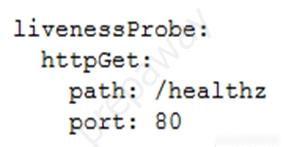
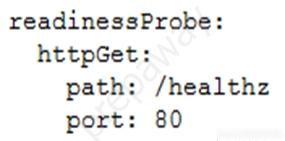
65. PROFESSIONAL-CLOUD-DEVELOPER トピック 1 問題 16865. PROFESSIONAL-CLOUD-DEVELOPER Topic 1 Question 168

問題Question

ケーススタディ -

これはケーススタディです。ケーススタディは個別に時間が設定されるわけではありません。各ケースを完了したいだけ試験時間を費やすことができます。ただし、この試験には追加のケーススタディやセクションが存在する場合があります。この試験に含まれるすべての質問を指定された時間内に完了できるように時間を管理する必要があります。

ケーススタディに含まれる質問に答えるには、ケーススタディで提供される情報を参照する必要があります。ケース スタディには、ケース スタディで説明されているシナリオに関する詳細情報を提供する展示やその他のリソースが含まれる場合があります。このケーススタディでは、各質問は他の質問から独立しています。

このケーススタディの最後に、レビュー画面が表示されます。この画面では、試験の次のセクションに進む前に、回答を確認し、変更を加えることができます。新しいセクションを開始した後は、このセクションに戻ることはできません。


ケーススタディを開始するには -
このケーススタディの最初の質問を表示するには、「次へ」ボタンをクリックします。質問に答える前に、左側のペインのボタンを使用してケーススタディの内容を調べてください。これらのボタンをクリックすると、ビジネス要件、既存の環境、問題の説明などの情報が表示されます。ケーススタディに [すべての情報] タブがある場合、表示される情報は後続のタブに表示される情報と同じであることに注意してください。質問に答える準備ができたら、「質問」ボタンをクリックして質問に戻ります。


会社概要 -
HipLocal は、近くにいる人々の間のコミュニケーションを促進するように設計されたコミュニティ アプリケーションです。スポーツイベントの企画や開催、企業が地域社会とつながるために利用されています。 HipLocal は最近ダラスのいくつかの地域でサービスを開始し、急速に世界的な現象に成長しています。ハイパーローカルなコミュニティコミュニケーションとビジネスアウトリーチのユニークなスタイルは、世界中で需要があります。


エグゼクティブステートメント -
私たちはナンバーワンのローカルコミュニティアプリです。地域コミュニティ サービスをグローバルに展開する時が来ました。私たちのベンチャー キャピタルの投資家は、メンバーが互いに 10 マイルまたは 10,000 マイル離れていても、急速な成長と、オンラインに登場する新しいローカル コミュニティや仮想コミュニティに同様の素晴らしい体験を提供したいと考えています。


ソリューションコンセプト -
HipLocal は、世界中の顧客により良いサービスを提供するために、最新の機能を備えた既存のサービスを新しい地域で拡張したいと考えています。彼らは、これらの地域をタイムゾーンでサポートするための新しいチームを雇用してトレーニングしたいと考えています。アプリケーションがスムーズに拡張され、明確な稼働時間データが提供されることを確認し、発生した問題を分析して対応する必要があります。


既存の技術環境 -
HipLocal の環境は、オンプレミスのハードウェアと Google Cloud Platform で実行されるインフラストラクチャが混在しています。 HipLocal チームはアプリケーションをよく理解していますが、世界規模のアプリケーションの経験は限られています。現在の技術環境は次のとおりです。
• 既存の API は、GCP でホストされている Compute Engine 仮想マシン インスタンス上で実行されます。
• 状態は、GCP の単一インスタンスの MySQL データベースに保存されます。
• リリース サイクルには、QA テストを可能にする開発の凍結が含まれます。
• アプリケーションにはログが記録されません。
• アプリケーションは、平日の夕方のトラフィックが少ない時間帯に、インフラストラクチャ エンジニアによって手動で展開されます。
• 稼働時間の基本的な指標があります。 API が応答しない場合、アラートが頻繁に発生します。


ビジネス要件 -
HipLocal の投資家は、その拠点を拡大し、見られる需要の増加をサポートしたいと考えています。彼らの要件は次のとおりです。
• アプリケーションの利用可能性を新しい地域に拡大します。
• 10 倍の同時ユーザーをサポートします。
• ユーザーが異なる地域に旅行する場合でも、一貫したエクスペリエンスを確保します。
• ユーザーアクティビティの指標を取得して、製品を収益化する方法をより深く理解します。
• 新しい地域の規制 (GDPR など) への準拠を確保します。
• インフラストラクチャ管理の時間とコストを削減します。
• Google が推奨するクラウド コンピューティングのプラクティスを採用します。
○ アプリケーションのライフサイクル管理に関する標準化されたワークフローとプロセスを開発します。
○ サービス レベル指標 (SLI) とサービス レベル目標 (SLO) を定義します。


技術的要件 -
• オンプレミスのデータセンターとクラウドでホストされているアプリケーションおよびインフラストラクチャの間で安全な通信を提供します。
• アプリケーションは使用状況のメトリクスと監視を提供する必要があります。
• API には認証と認可が必要です。
• 新しい機能のより迅速かつ正確な検証を実装します。
• ロギングとパフォーマンスのメトリクスは、デバッグ情報とアラートを提供できるように実用的な情報を提供する必要があります。
• ユーザーの需要に合わせて拡張する必要があります。


この質問については、HipLocal のケーススタディを参照してください。

HipLocal は、機能要件を満たす安定したテスト環境を QA チームに提供し続けながら、API 開発速度をどのように向上させるべきでしょうか?

  • A. コードに単体テストを含め、すべてのテストが合格ステータスになるまで QA への展開を防ぎます。
  • B. コードにパフォーマンス テストを組み込み、すべてのテストが合格ステータスになるまで QA へのデプロイを禁止します。
  • C. QA 環境のヘルスチェックを作成し、環境が異常な場合は後で API を再デプロイします。
  • D. トラフィック分割を使用して API を App Engine に再デプロイします。エラーが見つかった場合は、QA トラフィックを新しいバージョンに移動しないでください。

Case study -

This is a case study. Case studies are not timed separately. You can use as much exam time as you would like to complete each case. However, there may be additional case studies and sections on this exam. You must manage your time to ensure that you are able to complete all questions included on this exam in the time provided.

To answer the questions included in a case study, you will need to reference information that is provided in the case study. Case studies might contain exhibits and other resources that provide more information about the scenario that is described in the case study. Each question is independent of the other questions in this case study.

At the end of this case study, a review screen will appear. This screen allows you to review your answers and to make changes before you move to the next section of the exam. After you begin a new section, you cannot return to this section.


To start the case study -
To display the first question in this case study, click the Next button. Use the buttons in the left pane to explore the content of the case study before you answer the questions. Clicking these buttons displays information such as business requirements, existing environment, and problem statements. If the case study has an All Information tab, note that the information displayed is identical to the information displayed on the subsequent tabs. When you are ready to answer a question, click the Question button to return to the question.


Company Overview -
HipLocal is a community application designed to facilitate communication between people in close proximity. It is used for event planning and organizing sporting events, and for businesses to connect with their local communities. HipLocal launched recently in a few neighborhoods in Dallas and is rapidly growing into a global phenomenon. Its unique style of hyper-local community communication and business outreach is in demand around the world.


Executive Statement -
We are the number one local community app; it's time to take our local community services global. Our venture capital investors want to see rapid growth and the same great experience for new local and virtual communities that come online, whether their members are 10 or 10000 miles away from each other.


Solution Concept -
HipLocal wants to expand their existing service, with updated functionality, in new regions to better serve their global customers. They want to hire and train a new team to support these regions in their time zones. They will need to ensure that the application scales smoothly and provides clear uptime data, and that they analyze and respond to any issues that occur.


Existing Technical Environment -
HipLocal's environment is a mix of on-premises hardware and infrastructure running in Google Cloud Platform. The HipLocal team understands their application well, but has limited experience in global scale applications. Their existing technical environment is as follows:
• Existing APIs run on Compute Engine virtual machine instances hosted in GCP.
• State is stored in a single instance MySQL database in GCP.
• Release cycles include development freezes to allow for QA testing.
• The application has no logging.
• Applications are manually deployed by infrastructure engineers during periods of slow traffic on weekday evenings.
• There are basic indicators of uptime; alerts are frequently fired when the APIs are unresponsive.


Business Requirements -
HipLocal's investors want to expand their footprint and support the increase in demand they are seeing. Their requirements are:
• Expand availability of the application to new regions.
• Support 10x as many concurrent users.
• Ensure a consistent experience for users when they travel to different regions.
• Obtain user activity metrics to better understand how to monetize their product.
• Ensure compliance with regulations in the new regions (for example, GDPR).
• Reduce infrastructure management time and cost.
• Adopt the Google-recommended practices for cloud computing.
○ Develop standardized workflows and processes around application lifecycle management.
○ Define service level indicators (SLIs) and service level objectives (SLOs).


Technical Requirements -
• Provide secure communications between the on-premises data center and cloud-hosted applications and infrastructure.
• The application must provide usage metrics and monitoring.
• APIs require authentication and authorization.
• Implement faster and more accurate validation of new features.
• Logging and performance metrics must provide actionable information to be able to provide debugging information and alerts.
• Must scale to meet user demand.


For this question, refer to the HipLocal case study.

How should HipLocal increase their API development speed while continuing to provide the QA team with a stable testing environment that meets feature requirements?

  • A. Include unit tests in their code, and prevent deployments to QA until all tests have a passing status.
  • B. Include performance tests in their code, and prevent deployments to QA until all tests have a passing status.
  • C. Create health checks for the QA environment, and redeploy the APIs at a later time if the environment is unhealthy.
  • D. Redeploy the APIs to App Engine using Traffic Splitting. Do not move QA traffic to the new versions if errors are found.

66. PROFESSIONAL-CLOUD-DEVELOPER トピック 1 問題 17066. PROFESSIONAL-CLOUD-DEVELOPER Topic 1 Question 170

問題Question

オンプレミス データセンターから Google Cloud への移行は最終段階にあります。締め切りが間近に迫っていると、廃止予定のサーバー上で Web API が実行されていることがわかりました。 Google Cloud への移行中にこの API を最新化するソリューションを推奨する必要があります。最新化された Web API は、次の要件を満たす必要があります。

• 毎月末のトラフィックの多い時間帯に自動スケーリング
• Python 3.xで書かれています
• 開発者は、頻繁なコード変更に対応して新しいバージョンを迅速に展開できなければなりません。

この移行のコスト、労力、運用オーバーヘッドを最小限に抑えたいと考えています。どうすればいいでしょうか?

  • A. コードを最新化し、App Engine フレキシブル環境にデプロイします。
  • B. コードを最新化して App Engine スタンダード環境にデプロイします。
  • C. 最新化されたアプリケーションを n1-standard-1 Compute Engine インスタンスにデプロイします。
  • D. 開発チームに、Google Kubernetes Engine 上で Docker コンテナとして実行されるようにアプリケーションを書き直すように依頼します。

You are in the final stage of migrating an on-premises data center to Google Cloud. You are quickly approaching your deadline, and discover that a web API is running on a server slated for decommissioning. You need to recommend a solution to modernize this API while migrating to Google Cloud. The modernized web API must meet the following requirements:

• Autoscales during high traffic periods at the end of each month
• Written in Python 3.x
• Developers must be able to rapidly deploy new versions in response to frequent code changes

You want to minimize cost, effort, and operational overhead of this migration. What should you do?

  • A. Modernize and deploy the code on App Engine flexible environment.
  • B. Modernize and deploy the code on App Engine standard environment.
  • C. Deploy the modernized application to an n1-standard-1 Compute Engine instance.
  • D. Ask the development team to re-write the application to run as a Docker container on Google Kubernetes Engine.

67. PROFESSIONAL-CLOUD-DEVELOPER トピック 1 問題 17167. PROFESSIONAL-CLOUD-DEVELOPER Topic 1 Question 171

問題Question

あなたは、Google Kubernetes Engine クラスタ内で実行される複数のマイクロサービスで構成されるアプリケーションを開発しています。 1 つのマイクロサービスは、オンプレミスで実行されているサードパーティのデータベースに接続する必要があります。認証情報をデータベースに保存し、セキュリティのベスト プラクティスに従ってこれらの認証情報をローテーションできるようにする必要があります。どうすればいいでしょうか?

  • A. 資格情報をサイドカー コンテナ プロキシに保存し、それを使用してサードパーティ データベースに接続します。
  • B. サービス メッシュを構成して、マイクロサービス内のポッドからデータベースへのトラフィックを許可または制限します。
  • C. 認証情報を暗号化されたボリューム マウントに保存し、Persistent Volume Claim をクライアント ポッドに関連付けます。
  • D. 認証情報を Kubernetes Secret として保存し、Cloud Key Management Service プラグインを使用して暗号化と復号化を処理します。

You are developing an application that consists of several microservices running in a Google Kubernetes Engine cluster. One microservice needs to connect to a third-party database running on-premises. You need to store credentials to the database and ensure that these credentials can be rotated while following security best practices. What should you do?

  • A. Store the credentials in a sidecar container proxy, and use it to connect to the third-party database.
  • B. Configure a service mesh to allow or restrict traffic from the Pods in your microservice to the database.
  • C. Store the credentials in an encrypted volume mount, and associate a Persistent Volume Claim with the client Pod.
  • D. Store the credentials as a Kubernetes Secret, and use the Cloud Key Management Service plugin to handle encryption and decryption.

68. PROFESSIONAL-CLOUD-DEVELOPER トピック 1 問題 17468. PROFESSIONAL-CLOUD-DEVELOPER Topic 1 Question 174

問題Question

オンプレミスの Linux 仮想マシン(VM)で実行されているスタンドアロン Java アプリケーションを、費用対効果の高い方法で Google Cloud に移行する必要があります。あなたは、リフトアンドシフトのアプローチを採用しないことを決定し、代わりにアプリケーションをコンテナに変換することによって最新化することを計画しています。このタスクをどのように実行する必要がありますか?

  • A. Migrate for Anthos を使用して、VM をコンテナとして Google Kubernetes Engine (GKE) クラスタに移行します。
  • B. VM を RAW ディスクとしてエクスポートし、イメージとしてインポートします。インポートされたイメージから Compute Engine インスタンスを作成します。
  • C. Migrate for Compute Engine を使用して VM を Compute Engine インスタンスに移行し、Cloud Build を使用してコンテナに変換します。
  • D. Jib を使用してソース コードから Docker イメージを構築し、Artifact Registry にアップロードします。 GKE クラスタにアプリケーションをデプロイし、アプリケーションをテストします。

You need to migrate a standalone Java application running in an on-premises Linux virtual machine (VM) to Google Cloud in a cost-effective manner. You decide not to take the lift-and-shift approach, and instead you plan to modernize the application by converting it to a container. How should you accomplish this task?

  • A. Use Migrate for Anthos to migrate the VM to your Google Kubernetes Engine (GKE) cluster as a container.
  • B. Export the VM as a raw disk and import it as an image. Create a Compute Engine instance from the Imported image.
  • C. Use Migrate for Compute Engine to migrate the VM to a Compute Engine instance, and use Cloud Build to convert it to a container.
  • D. Use Jib to build a Docker image from your source code, and upload it to Artifact Registry. Deploy the application in a GKE cluster, and test the application.

69. PROFESSIONAL-CLOUD-DEVELOPER トピック 1 問題 17569. PROFESSIONAL-CLOUD-DEVELOPER Topic 1 Question 175

問題Question

あなたの組織は最近、レガシー アプリケーションを Google Kubernetes Engine に再プラットフォーム化する取り組みを開始しました。モノリシック アプリケーションをマイクロサービスに分解する必要があります。複数のインスタンスには、共有ファイル システムに保存されている構成ファイルへの読み取りおよび書き込みアクセス権があります。この移行の管理に必要な労力を最小限に抑え、アプリケーション コードの書き換えを避けたいと考えています。どうすればいいでしょうか?

  • A. 新しい Cloud Storage バケットを作成し、FUSE 経由でコンテナにマウントします。
  • B. 新しい永続ディスクを作成し、そのボリュームを共有 Persistent Volume としてマウントします。
  • C. 新しい Filestore インスタンスを作成し、ボリュームを NFS Persistent Volume としてマウントします。
  • D. 新しい ConfigMap と volumeMount を作成して、構成ファイルの内容を保存します。

Your organization has recently begun an initiative to replatform their legacy applications onto Google Kubernetes Engine. You need to decompose a monolithic application into microservices. Multiple instances have read and write access to a configuration file, which is stored on a shared file system. You want to minimize the effort required to manage this transition, and you want to avoid rewriting the application code. What should you do?

  • A. Create a new Cloud Storage bucket, and mount it via FUSE in the container.
  • B. Create a new persistent disk, and mount the volume as a shared PersistentVolume.
  • C. Create a new Filestore instance, and mount the volume as an NFS PersistentVolume.
  • D. Create a new ConfigMap and volumeMount to store the contents of the configuration file.

70. PROFESSIONAL-CLOUD-DEVELOPER トピック 1 問題 17770. PROFESSIONAL-CLOUD-DEVELOPER Topic 1 Question 177

問題Question

Istio を使用して、Google Kubernetes Engine (GKE) 上のマイクロサービス アプリケーションを管理します。 Istio AuthorizationPolicy、Kubernetes NetworkPolicy、mTLS を GKE クラスタに実装することで、マイクロサービス間の通信チャネルを保護します。 2 つのポッド間の特定の URL への HTTP リクエストは失敗しますが、他の URL への他のリクエストは成功することがわかります。接続の問題の原因は何ですか?

  • A. Kubernetes NetworkPolicy リソースがポッド間の HTTP トラフィックをブロックしています。
  • B. HTTP リクエストを開始するポッドが、間違った TCP ポートを介してターゲット ポッドに接続しようとしています。
  • C. クラスターの認可ポリシーは、アプリケーション内の特定のパスに対する HTTP リクエストをブロックしています。
  • D. クラスターには寛容モードで mTLS が構成されていますが、ポッドのサイドカー プロキシは暗号化されていないトラフィックをプレーン テキストで送信しています。

You manage a microservices application on Google Kubernetes Engine (GKE) using Istio. You secure the communication channels between your microservices by implementing an Istio AuthorizationPolicy, a Kubernetes NetworkPolicy, and mTLS on your GKE cluster. You discover that HTTP requests between two Pods to specific URLs fail, while other requests to other URLs succeed. What is the cause of the connection issue?

  • A. A Kubernetes NetworkPolicy resource is blocking HTTP traffic between the Pods.
  • B. The Pod initiating the HTTP requests is attempting to connect to the target Pod via an incorrect TCP port.
  • C. The Authorization Policy of your cluster is blocking HTTP requests for specific paths within your application.
  • D. The cluster has mTLS configured in permissive mode, but the Pod's sidecar proxy is sending unencrypted traffic in plain text.

71. PROFESSIONAL-CLOUD-DEVELOPER トピック 1 問題 17871. PROFESSIONAL-CLOUD-DEVELOPER Topic 1 Question 178

問題Question

あなたは最近、オンプレミスのモノリシック アプリケーションを Google Kubernetes Engine (GKE) 上のマイクロサービス アプリケーションに移行しました。このアプリケーションは、CRM システムや個人識別情報 (PII) を含む MySQL データベースなどのオンプレミスのバックエンド サービスに依存しています。規制要件を満たすために、バックエンド サービスはオンプレミスに維持する必要があります。

オンプレミス データセンターと Google Cloud の間に Cloud VPN 接続を確立しました。 GKE 上のマイクロサービス アプリケーションからバックエンド サービスへのリクエストの一部が、帯域幅の変動によるレイテンシの問題により失敗し、アプリケーションのクラッシュを引き起こしていることに気づきました。レイテンシーの問題にはどのように対処すればよいでしょうか?

  • A. Memorystore を使用して、オンプレミスの MySQL データベースから頻繁にアクセスされる PII データをキャッシュします
  • B. Istio を使用して、GKE 上のマイクロサービスとオンプレミス サービスを含むサービス メッシュを作成します。
  • C. Google Cloud とオンプレミス サービス間の接続用の Cloud VPN トンネルの数を増やす
  • D. Cloud VPN の最大伝送単位 (MTU) 値をデフォルト値から減らして、ネットワーク層のパケット サイズを減らします。

You recently migrated an on-premises monolithic application to a microservices application on Google Kubernetes Engine (GKE). The application has dependencies on backend services on-premises, including a CRM system and a MySQL database that contains personally identifiable information (PII). The backend services must remain on-premises to meet regulatory requirements.

You established a Cloud VPN connection between your on-premises data center and Google Cloud. You notice that some requests from your microservices application on GKE to the backend services are failing due to latency issues caused by fluctuating bandwidth, which is causing the application to crash. How should you address the latency issues?

  • A. Use Memorystore to cache frequently accessed PII data from the on-premises MySQL database
  • B. Use Istio to create a service mesh that includes the microservices on GKE and the on-premises services
  • C. Increase the number of Cloud VPN tunnels for the connection between Google Cloud and the on-premises services
  • D. Decrease the network layer packet size by decreasing the Maximum Transmission Unit (MTU) value from its default value on Cloud VPN

72. PROFESSIONAL-CLOUD-DEVELOPER トピック 1 問題 18372. PROFESSIONAL-CLOUD-DEVELOPER Topic 1 Question 183

問題Question

あなたは、エンドユーザーからのリクエストを処理するアプリケーションを開発しています。承認されていないユーザーへのアクセスを制限しながら、承認されたエンド ユーザーがアプリケーションを介して関数に対して認証できるようにするには、アプリケーションによって呼び出されるクラウド関数を保護する必要があります。あなたは、ソリューションの一部として Google サインインを統合し、Google が推奨するベスト プラクティスに従いたいと考えています。どうすればいいでしょうか?

  • A. ソース コード リポジトリからデプロイし、ユーザーに role/cloudfunctions.viewer ロールを付与します。
  • B. ソースコードリポジトリからデプロイし、ユーザーにroles/cloudfunctions.invokerロールを付与します。
  • C. gcloud を使用してローカル マシンからデプロイし、ユーザーにロール/cloudfunctions.admin ロールを付与します。
  • D. gcloud を使用してローカル マシンからデプロイし、ユーザーにロール/cloudfunctions.developer ロールを付与します。

You are developing an application that will handle requests from end users. You need to secure a Cloud Function called by the application to allow authorized end users to authenticate to the function via the application while restricting access to unauthorized users. You will integrate Google Sign-In as part of the solution and want to follow Google-recommended best practices. What should you do?

  • A. Deploy from a source code repository and grant users the roles/cloudfunctions.viewer role.
  • B. Deploy from a source code repository and grant users the roles/cloudfunctions.invoker role
  • C. Deploy from your local machine using gcloud and grant users the roles/cloudfunctions.admin role
  • D. Deploy from your local machine using gcloud and grant users the roles/cloudfunctions.developer role

73. PROFESSIONAL-CLOUD-DEVELOPER トピック 1 問題 19173. PROFESSIONAL-CLOUD-DEVELOPER Topic 1 Question 191

問題Question

Google Kubernetes Engine (GKE) にアプリケーションがデプロイされています。 Google Cloud マネージド サービスに対して承認されたリクエストを行うには、アプリケーションを更新する必要があります。これを 1 回限りのセットアップにしたい場合は、セキュリティ キーを自動ローテーションして暗号化されたストアに保存するというセキュリティのベスト プラクティスに従う必要があります。 Google Cloud サービスへの適切なアクセス権を持つサービス アカウントはすでに作成されています。次に何をすべきでしょうか?

  • A. Workload Identity を使用して、Google Cloud サービス アカウントを GKE ポッドに割り当てます。
  • B. Google Cloud サービス アカウントをエクスポートし、Kubernetes Secret としてポッドと共有します。
  • C. Google Cloud サービス アカウントをエクスポートし、アプリケーションのソース コードに埋め込みます。
  • D. Google Cloud サービス アカウントをエクスポートし、それを HashiCorp Vault にアップロードして、アプリケーションの動的サービス アカウントを生成します。

You have an application deployed in Google Kubernetes Engine (GKE). You need to update the application to make authorized requests to Google Cloud managed services. You want this to be a one-time setup, and you need to follow security best practices of auto-rotating your security keys and storing them in an encrypted store. You already created a service account with appropriate access to the Google Cloud service. What should you do next?

  • A. Assign the Google Cloud service account to your GKE Pod using Workload Identity.
  • B. Export the Google Cloud service account, and share it with the Pod as a Kubernetes Secret.
  • C. Export the Google Cloud service account, and embed it in the source code of the application.
  • D. Export the Google Cloud service account, and upload it to HashiCorp Vault to generate a dynamic service account for your application.

74. PROFESSIONAL-CLOUD-DEVELOPER トピック 1 問題 19274. PROFESSIONAL-CLOUD-DEVELOPER Topic 1 Question 192

問題Question

あなたは、Google Kubernetes Engine (GKE) クラスターに数百のマイクロサービスをデプロイすることを計画しています。マネージド サービスを使用して GKE 上のマイクロサービス間の通信を保護するにはどうすればよいでしょうか?

  • A. マネージド SSL 証明書を使用したグローバル HTTP(S) 負荷分散を使用してサービスを保護します
  • B. GKE クラスタにオープンソース Istio をデプロイし、サービス メッシュで mTLS を有効にします
  • C. SSL 証明書を自動的に更新するには、GKE に cert-manager をインストールします。
  • D. Anthos Service Mesh をインストールし、Service Mesh で mTLS を有効にします。

You are planning to deploy hundreds of microservices in your Google Kubernetes Engine (GKE) cluster. How should you secure communication between the microservices on GKE using a managed service?

  • A. Use global HTTP(S) Load Balancing with managed SSL certificates to protect your services
  • B. Deploy open source Istio in your GKE cluster, and enable mTLS in your Service Mesh
  • C. Install cert-manager on GKE to automatically renew the SSL certificates.
  • D. Install Anthos Service Mesh, and enable mTLS in your Service Mesh.

75. PROFESSIONAL-CLOUD-DEVELOPER トピック 1 問題 19475. PROFESSIONAL-CLOUD-DEVELOPER Topic 1 Question 194

問題Question

クラスターの内部に残す必要があるさまざまなマイクロサービスを使用してアプリケーションを開発しています。各マイクロサービスを特定の数のレプリカで構成できるようにしたいと考えています。また、マイクロサービスがスケールするレプリカの数に関係なく、他のマイクロサービスから特定のマイクロサービスを均一な方法でアドレス指定できる機能も必要です。あなたは、このソリューションを Google Kubernetes Engine に実装する予定です。どうすればいいでしょうか?

  • A. 各マイクロサービスをデプロイメントとしてデプロイします。サービスを使用してクラスター内のデプロイメントを公開し、サービス DNS 名を使用してクラスター内の他のマイクロサービスからデプロイメントをアドレス指定します。
  • B. 各マイクロサービスをデプロイメントとしてデプロイします。 Ingress を使用してクラスター内のデプロイメントを公開し、Ingress IP アドレスを使用してクラスター内の他のマイクロサービスからデプロイメントをアドレス指定します。
  • C. 各マイクロサービスをポッドとしてデプロイします。サービスを使用してクラスター内のポッドを公開し、サービス DNS 名を使用してクラスター内の他のマイクロサービスからマイクロサービスをアドレス指定します。
  • D. 各マイクロサービスをポッドとしてデプロイします。 Ingress を使用してクラスター内の Pod を公開し、Ingress IP アドレスを使用してクラスター内の他のマイクロサービスから Pod をアドレス指定します。

You are developing an application using different microservices that must remain internal to the cluster. You want the ability to configure each microservice with a specific number of replicas. You also want the ability to address a specific microservice from any other microservice in a uniform way, regardless of the number of replicas the microservice scales to. You plan to implement this solution on Google Kubernetes Engine. What should you do?

  • A. Deploy each microservice as a Deployment. Expose the Deployment in the cluster using a Service, and use the Service DNS name to address it from other microservices within the cluster.
  • B. Deploy each microservice as a Deployment. Expose the Deployment in the cluster using an Ingress, and use the Ingress IP address to address the Deployment from other microservices within the cluster.
  • C. Deploy each microservice as a Pod. Expose the Pod in the cluster using a Service, and use the Service DNS name to address the microservice from other microservices within the cluster.
  • D. Deploy each microservice as a Pod. Expose the Pod in the cluster using an Ingress, and use the Ingress IP address to address the Pod from other microservices within the cluster.

76. PROFESSIONAL-CLOUD-DEVELOPER トピック 1 問題 19876. PROFESSIONAL-CLOUD-DEVELOPER Topic 1 Question 198

問題Question

Pub/Sub メッセージを読み取り、処理するアプリケーションが Google Kubernetes Engine (GKE) にデプロイされています。各ポッドは、1 分あたり固定数のメッセージを処理します。 Pub/Sub トピックにメッセージがパブリッシュされる速度は、一度に大量のメッセージがパブリッシュされる場合も含め、日中および週を通じて大きく異なります。

メッセージをタイムリーに処理できるように、GKE デプロイをスケーリングしたいと考えています。ワークロードを自動的に適応するにはどの GKE 機能を使用する必要がありますか?

  • A. 自動モードの垂直ポッド オートスケーラー
  • B. レコメンデーションモードの垂直ポッドオートスケーラー
  • C. 外部メトリックに基づく水平ポッドオートスケーラー
  • D. リソース使用率に基づく水平ポッドオートスケーラー

You have an application deployed in Google Kubernetes Engine (GKE) that reads and processes Pub/Sub messages. Each Pod handles a fixed number of messages per minute. The rate at which messages are published to the Pub/Sub topic varies considerably throughout the day and week, including occasional large batches of messages published at a single moment.

You want to scale your GKE Deployment to be able to process messages in a timely manner. What GKE feature should you use to automatically adapt your workload?

  • A. Vertical Pod Autoscaler in Auto mode
  • B. Vertical Pod Autoscaler in Recommendation mode
  • C. Horizontal Pod Autoscaler based on an external metric
  • D. Horizontal Pod Autoscaler based on resources utilization

77. PROFESSIONAL-CLOUD-DEVELOPER トピック 1 問題 19977. PROFESSIONAL-CLOUD-DEVELOPER Topic 1 Question 199

問題Question

Cloud Run を使用してウェブ アプリケーションをホストしています。アプリケーションのプロジェクト ID とアプリケーションが実行されているリージョンを安全に取得し、この情報をユーザーに表示する必要があります。最もパフォーマンスの高いアプローチを使用したいと考えています。どうすればいいでしょうか?

  • A. HTTP リクエストを使用して、Metadata-Flavor: Google ヘッダーを持つ http://metadata.google.internal/ エンドポイントで利用可能なメタデータ サーバーをクエリします。
  • B. Google Cloud コンソールでプロジェクト ダッシュボードに移動し、構成の詳細を収集します。 Cloud Run の [変数とシークレット] タブに移動し、目的の環境変数を Key:Value 形式で追加します。
  • C. Google Cloud コンソールでプロジェクト ダッシュボードに移動し、構成の詳細を収集します。アプリケーション構成情報を Cloud Run のメモリ内コンテナ ファイルシステムに書き込みます。
  • D. アプリケーションから Cloud Asset Inventory API への API 呼び出しを行い、インスタンスのメタデータを含むようにリクエストをフォーマットします。

You are using Cloud Run to host a web application. You need to securely obtain the application project ID and region where the application is running and display this information to users. You want to use the most performant approach. What should you do?

  • A. Use HTTP requests to query the available metadata server at the http://metadata.google.internal/ endpoint with the Metadata-Flavor: Google header.
  • B. In the Google Cloud console, navigate to the Project Dashboard and gather configuration details. Navigate to the Cloud Run “Variables & Secrets” tab, and add the desired environment variables in Key:Value format.
  • C. In the Google Cloud console, navigate to the Project Dashboard and gather configuration details. Write the application configuration information to Cloud Run's in-memory container filesystem.
  • D. Make an API call to the Cloud Asset Inventory API from the application and format the request to include instance metadata.

78. PROFESSIONAL-CLOUD-DEVELOPER トピック 1 問題 20378. PROFESSIONAL-CLOUD-DEVELOPER Topic 1 Question 203

問題Question

ライブストリームをブロードキャストするマイクロサービス アプリケーションを Google Kubernetes Engine (GKE) にデプロイしています。予測できないトラフィック パターンや、同時ユーザー数の大きな変動が予想されます。アプリケーションは次の要件を満たしている必要があります。

• 人気のイベント中に自動的に拡張し、高可用性を維持します
• ハードウェア障害が発生した場合の回復力がある

導入パラメータはどのように設定すればよいでしょうか? (2つお選びください。)

  • A. マルチゾーン ノード プールを使用してワークロードを均等に分散します。
  • B. 複数のゾーン ノード プールを使用してワークロードを均等に分散します。
  • C. クラスター オートスケーラーを使用してノード プール内のノードの数を変更し、水平ポッド オートスケーラーを使用してワークロードをスケーリングします。
  • D. クラスタ ノードを使用して Compute Engine のマネージド インスタンス グループを作成します。マネージド インスタンス グループの自動スケーリング ルールを構成します。
  • E. GKE の CPU とメモリの使用率に基づいて、Cloud Monitoring でアラート ポリシーを作成します。 CPU とメモリの使用量が事前に定義されたしきい値を超えた場合に、スクリプトを実行してワークロードをスケールするよう当直エンジニアに依頼します。

You are deploying a microservices application to Google Kubernetes Engine (GKE) that will broadcast livestreams. You expect unpredictable traffic patterns and large variations in the number of concurrent users. Your application must meet the following requirements:

• Scales automatically during popular events and maintains high availability
• Is resilient in the event of hardware failures

How should you configure the deployment parameters? (Choose two.)

  • A. Distribute your workload evenly using a multi-zonal node pool.
  • B. Distribute your workload evenly using multiple zonal node pools.
  • C. Use cluster autoscaler to resize the number of nodes in the node pool, and use a Horizontal Pod Autoscaler to scale the workload.
  • D. Create a managed instance group for Compute Engine with the cluster nodes. Configure autoscaling rules for the managed instance group.
  • E. Create alerting policies in Cloud Monitoring based on GKE CPU and memory utilization. Ask an on-duty engineer to scale the workload by executing a script when CPU and memory usage exceed predefined thresholds.

79. PROFESSIONAL-CLOUD-DEVELOPER トピック 1 問題 20479. PROFESSIONAL-CLOUD-DEVELOPER Topic 1 Question 204

問題Question

あなたは急成長を遂げている金融テクノロジーのスタートアップ企業で働いています。あなたは、Go で記述され、シンガポール リージョン (asia-southeast1) の Cloud Run でホストされている支払い処理アプリケーションを管理しています。支払い処理アプリケーションは、同じくシンガポール リージョンにある Cloud Storage バケットに保存されているデータを処理します。

このスタートアップは、アジア太平洋地域へのさらなる拡大を計画しています。あなたは、今後 6 か月間かけてペイメント ゲートウェイをジャカルタ、香港、台湾に展開する予定です。各拠点にはデータ所在地要件があり、顧客データは取引が行われた国に存在する必要があります。これらの導入コストを最小限に抑えたいと考えています。どうすればいいでしょうか?

  • A. 各リージョンに Cloud Storage バケットを作成し、各リージョンに決済処理アプリケーションの Cloud Run サービスを作成します。
  • B. 各リージョンに Cloud Storage バケットを作成し、シンガポール リージョンに決済処理アプリケーションの 3 つの Cloud Run サービスを作成します。
  • C. アジア マルチ リージョンに 3 つの Cloud Storage バケットを作成し、シンガポール リージョンに決済処理アプリケーションの 3 つの Cloud Run サービスを作成します。
  • D. アジア マルチ リージョンに 3 つの Cloud Storage バケットを作成し、シンガポール リージョンに決済処理アプリケーションの 3 つの Cloud Run リビジョンを作成します。

You work at a rapidly growing financial technology startup. You manage the payment processing application written in Go and hosted on Cloud Run in the Singapore region (asia-southeast1). The payment processing application processes data stored in a Cloud Storage bucket that is also located in the Singapore region.

The startup plans to expand further into the Asia Pacific region. You plan to deploy the Payment Gateway in Jakarta, Hong Kong, and Taiwan over the next six months. Each location has data residency requirements that require customer data to reside in the country where the transaction was made. You want to minimize the cost of these deployments. What should you do?

  • A. Create a Cloud Storage bucket in each region, and create a Cloud Run service of the payment processing application in each region.
  • B. Create a Cloud Storage bucket in each region, and create three Cloud Run services of the payment processing application in the Singapore region.
  • C. Create three Cloud Storage buckets in the Asia multi-region, and create three Cloud Run services of the payment processing application in the Singapore region.
  • D. Create three Cloud Storage buckets in the Asia multi-region, and create three Cloud Run revisions of the payment processing application in the Singapore region.

80. PROFESSIONAL-CLOUD-DEVELOPER トピック 1 問題 20780. PROFESSIONAL-CLOUD-DEVELOPER Topic 1 Question 207

問題Question

あなたのチームは、アプリケーションが実行されている Google Kubernetes Engine (GKE) クラスターを管理しています。別のチームがこのアプリケーションとの統合を計画しています。統合を開始する前に、他のチームがアプリケーションに変更を加えることはできないが、GKE に統合をデプロイできることを確認する必要があります。どうすればいいでしょうか?

  • A. Identity and Access Management (IAM) を使用して、クラスター プロジェクトに対する閲覧者 IAM ロールを他のチームに付与します。
  • B. 新しい GKE クラスタを作成します。 Identity and Access Management (IAM) を使用して、クラスター プロジェクトの編集者のロールを他のチームに付与します。
  • C. 既存のクラスターに新しい名前空間を作成します。 Identity and Access Management (IAM) を使用して、クラスター プロジェクトの編集者のロールを他のチームに付与します。
  • D. 既存のクラスターに新しい名前空間を作成します。 Kubernetes ロールベースのアクセス制御 (RBAC) を使用して、新しい名前空間の管理者ロールを他のチームに付与します。

Your team manages a Google Kubernetes Engine (GKE) cluster where an application is running. A different team is planning to integrate with this application. Before they start the integration, you need to ensure that the other team cannot make changes to your application, but they can deploy the integration on GKE. What should you do?

  • A. Using Identity and Access Management (IAM), grant the Viewer IAM role on the cluster project to the other team.
  • B. Create a new GKE cluster. Using Identity and Access Management (IAM), grant the Editor role on the cluster project to the other team.
  • C. Create a new namespace in the existing cluster. Using Identity and Access Management (IAM), grant the Editor role on the cluster project to the other team.
  • D. Create a new namespace in the existing cluster. Using Kubernetes role-based access control (RBAC), grant the Admin role on the new namespace to the other team.

81. PROFESSIONAL-CLOUD-DEVELOPER トピック 1 問題 20981. PROFESSIONAL-CLOUD-DEVELOPER Topic 1 Question 209

問題Question

Cloud Shell から kubectl を使用して Google Kubernetes Engine (GKE) クラスターに接続しようとしています。パブリック エンドポイントを使用して GKE クラスタをデプロイしました。 Cloud Shell から、次のコマンドを実行します。

image

kubectl コマンドがエラー メッセージを返さずにタイムアウトしていることがわかります。この問題の最も考えられる原因は何ですか?

  • A. ユーザー アカウントには、kubectl を使用してクラスターと対話する権限がありません。
  • B. Cloud Shell の外部 IP アドレスは、クラスターの承認されたネットワークの一部ではありません。
  • C. Cloud Shell は、GKE クラスタと同じ VPC の一部ではありません。
  • D. VPC ファイアウォールがクラスターのエンドポイントへのアクセスをブロックしています。

You are trying to connect to your Google Kubernetes Engine (GKE) cluster using kubectl from Cloud Shell. You have deployed your GKE cluster with a public endpoint. From Cloud Shell, you run the following command:

image

You notice that the kubectl commands time out without returning an error message. What is the most likely cause of this issue?

  • A. Your user account does not have privileges to interact with the cluster using kubectl.
  • B. Your Cloud Shell external IP address is not part of the authorized networks of the cluster.
  • C. The Cloud Shell is not part of the same VPC as the GKE cluster.
  • D. A VPC firewall is blocking access to the cluster’s endpoint.

82. PROFESSIONAL-CLOUD-DEVELOPER トピック 1 問題 21182. PROFESSIONAL-CLOUD-DEVELOPER Topic 1 Question 211

問題Question

Google Kubernetes Engine (GKE) でデプロイを構成する必要があります。コンテナがデータベースに接続できることを検証するチェックを含める必要があります。ポッドの接続に失敗した場合は、コンテナ上でスクリプトを実行して正常なシャットダウンを完了する必要があります。デプロイメントをどのように構成すればよいでしょうか?

  • A. 2 つのジョブを作成します。1 つはコンテナーがデータベースに接続できるかどうかを確認するジョブで、もう 1 つはポッドに障害が発生した場合にシャットダウン スクリプトを実行します。
  • B. コンテナーがデータベースに接続できない場合に失敗するコンテナーの livenessProbe を使用してデプロイメントを作成します。コンテナーに障害が発生した場合にシャットダウン スクリプトを実行する Prestop ライフサイクル ハンドラーを構成します。
  • C. サービスの可用性をチェックする PostStart ライフサイクル ハンドラーを使用してデプロイメントを作成します。コンテナーに障害が発生した場合にシャットダウン スクリプトを実行する PreStop ライフサイクル ハンドラーを構成します。
  • D. サービスの可用性をチェックする initContainer を使用してデプロイメントを作成します。ポッドに障害が発生した場合にシャットダウン スクリプトを実行する Prestop ライフサイクル ハンドラーを構成します。

You need to configure a Deployment on Google Kubernetes Engine (GKE). You want to include a check that verifies that the containers can connect to the database. If the Pod is failing to connect, you want a script on the container to run to complete a graceful shutdown. How should you configure the Deployment?

  • A. Create two jobs: one that checks whether the container can connect to the database, and another that runs the shutdown script if the Pod is failing.
  • B. Create the Deployment with a livenessProbe for the container that will fail if the container can't connect to the database. Configure a Prestop lifecycle handler that runs the shutdown script if the container is failing.
  • C. Create the Deployment with a PostStart lifecycle handler that checks the service availability. Configure a PreStop lifecycle handler that runs the shutdown script if the container is failing.
  • D. Create the Deployment with an initContainer that checks the service availability. Configure a Prestop lifecycle handler that runs the shutdown script if the Pod is failing.

83. PROFESSIONAL-CLOUD-DEVELOPER トピック 1 問題 21283. PROFESSIONAL-CLOUD-DEVELOPER Topic 1 Question 212

問題Question

新しい API をデプロイするのはあなたの責任です。この API には 3 つの異なる URL パスがあります。

• https://yourcompany.com/students
• https://yourcompany.com/Teachers
• https://yourcompany.com/classes

コード内で異なる関数を呼び出すには、各 API URL パスを構成する必要があります。どうすればいいでしょうか?

  • A. HTTPS ロードバランサを使用して公開されるバックエンド サービスとして 1 つの Cloud Function を作成します。
  • B. 直接公開される 3 つの Cloud Functions を作成します。
  • C. 直接公開される Cloud Function を 1 つ作成します。
  • D. HTTPS ロードバランサを使用して公開される 3 つのバックエンド サービスとして 3 つの Cloud Functions を作成します。

You are responsible for deploying a new API. That API will have three different URL paths:

• https://yourcompany.com/students
• https://yourcompany.com/teachers
• https://yourcompany.com/classes

You need to configure each API URL path to invoke a different function in your code. What should you do?

  • A. Create one Cloud Function as a backend service exposed using an HTTPS load balancer.
  • B. Create three Cloud Functions exposed directly.
  • C. Create one Cloud Function exposed directly.
  • D. Create three Cloud Functions as three backend services exposed using an HTTPS load balancer.

84. PROFESSIONAL-CLOUD-DEVELOPER トピック 1 問題 21384. PROFESSIONAL-CLOUD-DEVELOPER Topic 1 Question 213

問題Question

マイクロサービス アプリケーションを Google Kubernetes Engine (GKE) にデプロイしています。アプリケーションは毎日更新を受け取ります。 Linux オペレーティング システム (OS) 上で実行される多数の個別のコンテナーをデプロイすることが予想されます。新しいコンテナーの既知の OS 脆弱性についてアラートを受け取りたいと考えています。 Google が推奨するベスト プラクティスに従いたいと考えています。どうすればいいでしょうか?

  • A. gcloud CLI を使用して Container Analysis を呼び出し、新しいコンテナ イメージをスキャンします。各展開の前に脆弱性の結果を確認してください。
  • B. Container Analysis を有効にし、新しいコンテナー イメージを Artifact Registry にアップロードします。各展開の前に脆弱性の結果を確認してください。
  • C. Container Analysis を有効にし、新しいコンテナー イメージを Artifact Registry にアップロードします。各展開の前に、重大な脆弱性の結果を確認してください。
  • D. Container Analysis REST API を使用して Container Analysis を呼び出し、新しいコンテナー イメージをスキャンします。各展開の前に脆弱性の結果を確認してください。

You are deploying a microservices application to Google Kubernetes Engine (GKE). The application will receive daily updates. You expect to deploy a large number of distinct containers that will run on the Linux operating system (OS). You want to be alerted to any known OS vulnerabilities in the new containers. You want to follow Google-recommended best practices. What should you do?

  • A. Use the gcloud CLI to call Container Analysis to scan new container images. Review the vulnerability results before each deployment.
  • B. Enable Container Analysis, and upload new container images to Artifact Registry. Review the vulnerability results before each deployment.
  • C. Enable Container Analysis, and upload new container images to Artifact Registry. Review the critical vulnerability results before each deployment.
  • D. Use the Container Analysis REST API to call Container Analysis to scan new container images. Review the vulnerability results before each deployment.

85. PROFESSIONAL-CLOUD-DEVELOPER トピック 1 問題 21785. PROFESSIONAL-CLOUD-DEVELOPER Topic 1 Question 217

問題Question

あなたのチームは、本番環境プロジェクトの Cloud Run で実行されているアプリケーションでエラーの急増を検出しました。アプリケーションは、Pub/Sub トピック A からメッセージを読み取り、メッセージを処理し、トピック B にメッセージを書き込むように構成されています。エラーの原因を特定するためにテストを実施したいと考えています。テスト用に模擬メッセージのセットを使用できます。どうすればいいでしょうか?

  • A. Pub/Sub エミュレータと Cloud Run エミュレータをローカルマシンにデプロイします。アプリケーションをローカルにデプロイし、アプリケーションのログ レベルを DEBUG または INFO に変更します。トピック A に模擬メッセージを書き込み、ログを分析します。
  • B. gcloud CLI を使用して、トピック A にモック メッセージを書き込みます。アプリケーションのログ レベルを DEBUG または INFO に変更し、ログを分析します。
  • C. Pub/Sub エミュレータをローカル マシンにデプロイします。運用アプリケーションがローカルの Pub/Sub トピックを指すようにします。トピック A に模擬メッセージを書き込み、ログを分析します。
  • D. Google Cloud コンソールを使用して、トピック A にモック メッセージを書き込みます。アプリケーションのロギング レベルを DEBUG または INFO に変更し、ログを分析します。

Your team detected a spike of errors in an application running on Cloud Run in your production project. The application is configured to read messages from Pub/Sub topic A, process the messages, and write the messages to topic B. You want to conduct tests to identify the cause of the errors. You can use a set of mock messages for testing. What should you do?

  • A. Deploy the Pub/Sub and Cloud Run emulators on your local machine. Deploy the application locally, and change the logging level in the application to DEBUG or INFO. Write mock messages to topic A, and then analyze the logs.
  • B. Use the gcloud CLI to write mock messages to topic A. Change the logging level in the application to DEBUG or INFO, and then analyze the logs.
  • C. Deploy the Pub/Sub emulator on your local machine. Point the production application to your local Pub/Sub topics. Write mock messages to topic A, and then analyze the logs.
  • D. Use the Google Cloud console to write mock messages to topic A. Change the logging level in the application to DEBUG or INFO, and then analyze the logs.

86. PROFESSIONAL-CLOUD-DEVELOPER トピック 1 問題 22286. PROFESSIONAL-CLOUD-DEVELOPER Topic 1 Question 222

問題Question

Google Kubernetes Engine にコンテナがデプロイされています。コンテナーの起動が遅くなる場合があるため、liveness プローブを実装しました。 liveness プローブが起動時に時々失敗することに気づきました。どうすればいいでしょうか?

  • A. 起動プローブを追加します。
  • B. liveness プローブの初期遅延を増やします。
  • C. コンテナの CPU 制限を増やします。
  • D. Readiness プローブを追加します。

You have a container deployed on Google Kubernetes Engine. The container can sometimes be slow to launch, so you have implemented a liveness probe. You notice that the liveness probe occasionally fails on launch. What should you do?

  • A. Add a startup probe.
  • B. Increase the initial delay for the liveness probe.
  • C. Increase the CPU limit for the container.
  • D. Add a readiness probe.

87. PROFESSIONAL-CLOUD-DEVELOPER トピック 1 問題 22487. PROFESSIONAL-CLOUD-DEVELOPER Topic 1 Question 224

問題Question

デプロイメント リソースを使用して新しいアプリケーション リビジョンを本番環境の Google Kubernetes Engine (GKE) にデプロイする予定です。コンテナが正しく動作しない可能性があります。リビジョンの展開後に問題が発生した場合のリスクを最小限に抑えたいと考えています。 Google が推奨するベスト プラクティスに従いたいと考えています。どうすればいいでしょうか?

  • A. PodDisruptionBudget を 80% にしてローリング アップデートを実行します。
  • B. horizo​​ntalPodAutoscaler スケールダウン ポリシー値 0 を使用してローリング アップデートを実行します。
  • C. Deployment を StatefulSet に変換し、80% の PodDisruptionBudget でローリング アップデートを実行します。
  • D. デプロイメントを StatefulSet に変換し、horizo​​ntalPodAutoscaler スケールダウン ポリシー値 0 を使用してローリング アップデートを実行します。

You plan to deploy a new application revision with a Deployment resource to Google Kubernetes Engine (GKE) in production. The container might not work correctly. You want to minimize risk in case there are issues after deploying the revision. You want to follow Google-recommended best practices. What should you do?

  • A. Perform a rolling update with a PodDisruptionBudget of 80%.
  • B. Perform a rolling update with a HorizontalPodAutoscaler scale-down policy value of 0.
  • C. Convert the Deployment to a StatefulSet, and perform a rolling update with a PodDisruptionBudget of 80%.
  • D. Convert the Deployment to a StatefulSet, and perform a rolling update with a HorizontalPodAutoscaler scale-down policy value of 0.

88. PROFESSIONAL-CLOUD-DEVELOPER トピック 1 問題 22588. PROFESSIONAL-CLOUD-DEVELOPER Topic 1 Question 225

問題Question

新しいアプリケーション コードを運用環境にプロモートする前に、さまざまな異なるユーザーに対してテストを実施する必要があります。この計画には危険が伴いますが、実稼働ユーザーを使用してアプリケーションの新しいバージョンをテストし、オペレーティング システムに基づいてアプリケーションの新しいバージョンに転送されるユーザーを制御したいと考えています。新しいバージョンでバグが発見された場合は、アプリケーションの新しくデプロイされたバージョンをできるだけ早くロールバックする必要があります。

どうすればいいでしょうか?

  • A. アプリケーションを Cloud Run にデプロイします。トラフィック分割を使用して、リビジョン タグに基づいてユーザー トラフィックのサブセットを新しいバージョンに送ります。
  • B. Anthos Service Mesh を使用してアプリケーションを Google Kubernetes Engine にデプロイします。トラフィック分割を使用して、ユーザー エージェント ヘッダーに基づいてユーザー トラフィックのサブセットを新しいバージョンに送信します。
  • C. アプリケーションを App Engine にデプロイします。トラフィック分割を使用して、ユーザー トラフィックのサブセットを IP アドレスに基づいて新しいバージョンに転送します。
  • D. アプリケーションを Compute Engine にデプロイします。 Traffic Director を使用して、事前定義された重みに基づいてユーザー トラフィックのサブセットを新しいバージョンに転送します。

Before promoting your new application code to production, you want to conduct testing across a variety of different users. Although this plan is risky, you want to test the new version of the application with production users and you want to control which users are forwarded to the new version of the application based on their operating system. If bugs are discovered in the new version, you want to roll back the newly deployed version of the application as quickly as possible.

What should you do?

  • A. Deploy your application on Cloud Run. Use traffic splitting to direct a subset of user traffic to the new version based on the revision tag.
  • B. Deploy your application on Google Kubernetes Engine with Anthos Service Mesh. Use traffic splitting to direct a subset of user traffic to the new version based on the user-agent header.
  • C. Deploy your application on App Engine. Use traffic splitting to direct a subset of user traffic to the new version based on the IP address.
  • D. Deploy your application on Compute Engine. Use Traffic Director to direct a subset of user traffic to the new version based on predefined weights.

89. PROFESSIONAL-CLOUD-DEVELOPER トピック 1 問題 22689. PROFESSIONAL-CLOUD-DEVELOPER Topic 1 Question 226

問題Question

あなたのチームは、給与計算アプリケーションをサポートする自動音声応答 (IVR) システムのビジネス ロジックを実装するバックエンド アプリケーションを作成しています。 IVR システムには次の技術的特徴があります。

• 各顧客の電話は、固有の IVR セッションに関連付けられます。
• IVR システムは、セッションごとにバックエンドへの個別の永続的な gRPC 接続を作成します。
• 接続が中断された場合、IVR システムは新しい接続を確立するため、その通話にわずかな遅延が発生します。

バックエンド アプリケーションをデプロイするためにどのコンピューティング環境を使用するかを決定する必要があります。現在の通話データを使用して、次のことを判断します。

• 通話時間の範囲は 1 ~ 30 分です。
• 電話は通常、営業時間内に行われます。
• 特定の既知の日付 (給料日など) の前後、または大幅な給与変更が発生したとき、電話の数が大幅に急増します。

コスト、労力、運用上のオーバーヘッドを最小限に抑えたいと考えています。バックエンド アプリケーションをどこにデプロイする必要がありますか?

  • A. コンピューティング エンジン
  • B. 標準モードの Google Kubernetes Engine クラスタ
  • C. クラウド機能
  • D. クラウドラン

Your team is writing a backend application to implement the business logic for an interactive voice response (IVR) system that will support a payroll application. The IVR system has the following technical characteristics:

• Each customer phone call is associated with a unique IVR session.
• The IVR system creates a separate persistent gRPC connection to the backend for each session.
• If the connection is interrupted, the IVR system establishes a new connection, causing a slight latency for that call.

You need to determine which compute environment should be used to deploy the backend application. Using current call data, you determine that:

• Call duration ranges from 1 to 30 minutes.
• Calls are typically made during business hours.
• There are significant spikes of calls around certain known dates (e.g., pay days), or when large payroll changes occur.

You want to minimize cost, effort, and operational overhead. Where should you deploy the backend application?

  • A. Compute Engine
  • B. Google Kubernetes Engine cluster in Standard mode
  • C. Cloud Functions
  • D. Cloud Run

90. PROFESSIONAL-CLOUD-DEVELOPER トピック 1 問題 23590. PROFESSIONAL-CLOUD-DEVELOPER Topic 1 Question 235

問題Question

あなたは、Cloud Run にデプロイされたビジネスクリティカルなアプリケーションを本番環境でサポートしています。アプリケーションは、アプリケーションの使いやすさに影響を与える HTTP 500 エラーを報告しています。特定の時間枠内でエラーの数がリクエストの 15% を超えたときにアラートを受け取りたいとします。どうすればいいでしょうか?

  • A. Cloud Monitoring API を使用する Cloud Function を作成します。 Cloud Scheduler を使用して Cloud Function を毎日トリガーし、エラーの数が定義されたしきい値を超えた場合に警告を発します。
  • B. Google Cloud コンソールの Cloud Run ページに移動し、サービス リストからサービスを選択します。 [メトリック] タブを使用して、そのリビジョンのエラー数を視覚化し、ページを毎日更新します。
  • C. Cloud Monitoring で、エラーの数が定義されたしきい値を超えた場合に警告を発するアラート ポリシーを作成します。
  • D. Cloud Monitoring API を使用する Cloud Function を作成します。 Cloud Composer を使用して Cloud Function を毎日トリガーし、エラーの数が定義されたしきい値を超えた場合に警告を発します。

You are supporting a business-critical application in production deployed on Cloud Run. The application is reporting HTTP 500 errors that are affecting the usability of the application. You want to be alerted when the number of errors exceeds 15% of the requests within a specific time window. What should you do?

  • A. Create a Cloud Function that consumes the Cloud Monitoring API. Use Cloud Scheduler to trigger the Cloud Function daily and alert you if the number of errors is above the defined threshold.
  • B. Navigate to the Cloud Run page in the Google Cloud console, and select the service from the services list. Use the Metrics tab to visualize the number of errors for that revision, and refresh the page daily.
  • C. Create an alerting policy in Cloud Monitoring that alerts you if the number of errors is above the defined threshold.
  • D. Create a Cloud Function that consumes the Cloud Monitoring API. Use Cloud Composer to trigger the Cloud Function daily and alert you if the number of errors is above the defined threshold.

91. PROFESSIONAL-CLOUD-DEVELOPER トピック 1 問題 23691. PROFESSIONAL-CLOUD-DEVELOPER Topic 1 Question 236

問題Question

API 呼び出し元の認証、クォータの適用、メトリクスのレポートを行うパブリック API を構築する必要があります。このアーキテクチャを完成するにはどのツールを使用する必要がありますか?

image

  • A. アプリエンジン
  • B. クラウドエンドポイント
  • C. アイデンティティ認識プロキシ
  • D. HTTP(S) ロード バランシングのための GKE Ingress

You need to build a public API that authenticates, enforces quotas, and reports metrics for API callers. Which tool should you use to complete this architecture?

image

  • A. App Engine
  • B. Cloud Endpoints
  • C. Identity-Aware Proxy
  • D. GKE Ingress for HTTP(S) Load Balancing

92. PROFESSIONAL-CLOUD-DEVELOPER トピック 1 問題 23792. PROFESSIONAL-CLOUD-DEVELOPER Topic 1 Question 237

問題Question

Google Kubernetes Engine のデプロイ更新中にアプリケーションが強制的にシャットダウンされたことに気づきました。アプリケーションは終了する前にデータベース接続を閉じませんでした。アプリケーションを更新して、正常なシャットダウンを確実に完了させたいと考えています。どうすればいいでしょうか?

  • A. 受信した SIGTERM シグナルを処理してデータベースから正常に切断するようにコードを更新します。
  • B. ポッドが強制的にシャットダウンされないように PodDisruptionBudget を構成します。
  • C. アプリケーションの terminationGracePeriodSeconds を増やします。
  • D. PreStop フックを設定してアプリケーションをシャットダウンします。

You noticed that your application was forcefully shut down during a Deployment update in Google Kubernetes Engine. Your application didn’t close the database connection before it was terminated. You want to update your application to make sure that it completes a graceful shutdown. What should you do?

  • A. Update your code to process a received SIGTERM signal to gracefully disconnect from the database.
  • B. Configure a PodDisruptionBudget to prevent the Pod from being forcefully shut down.
  • C. Increase the terminationGracePeriodSeconds for your application.
  • D. Configure a PreStop hook to shut down your application.

93. PROFESSIONAL-CLOUD-DEVELOPER トピック 1 問題 23993. PROFESSIONAL-CLOUD-DEVELOPER Topic 1 Question 239

問題Question

インターネットに接続されたマイクロサービス アプリケーションを Google Kubernetes Engine (GKE) にデプロイする必要があります。 A/B テスト手法を使用して新機能を検証したいと考えています。新しいコンテナ イメージ リリースをデプロイするには、次の要件があります。
• 新しいコンテナイメージをデプロイするときにダウンタイムが発生しません。
• 新しい製品リリースは、製品ユーザーのサブセットを使用してテストおよび検証されます。

どうすればいいでしょうか?

  • A. 1. コンテナーのバージョンを最新バージョンに置き換えることにより、デプロイメント マニフェスト ファイルを更新するように CI/CD パイプラインを構成します。
    2. デプロイメントマニフェストファイルを適用して、クラスター内にポッドを再作成します。
    3. アプリケーションの機能を以前のリリース バージョンと比較してパフォーマンスを検証し、問題が発生した場合はロールバックします。
  • B. 1. 新しいリリース バージョン用に GKE 上に 2 番目の名前空間を作成します。
    2. 必要な数のポッドを使用して 2 番目の名前空間のデプロイメント構成を作成します。
    3. 新しいコンテナ バージョンを 2 番目の名前空間にデプロイします。
    4. Ingress 構成を更新して、新しいコンテナー バージョンを使用して名前空間にトラフィックをルーティングします。
  • C. 1. Anthos Service Mesh を GKE クラスタにインストールします。
    2. GKE クラスタ上に 2 つのデプロイメントを作成し、それらに異なるバージョン名のラベルを付けます。
    3. Istio ルーティング ルールを実装して、アプリケーションの新しいバージョンを参照するデプロイメントにトラフィックのごく一部を送信します。
  • D. 1. ポッドを新しいリリース バージョンに段階的に置き換えることにより、ローリング アップデート パターンを実装します。
    2. ロールアウト中に新しいユーザーのサブセットに対するアプリケーションのパフォーマンスを検証し、問題が発生した場合はロールバックします。

You need to deploy an internet-facing microservices application to Google Kubernetes Engine (GKE). You want to validate new features using the A/B testing method. You have the following requirements for deploying new container image releases:
• There is no downtime when new container images are deployed.
• New production releases are tested and verified using a subset of production users.

What should you do?

  • A. 1. Configure your CI/CD pipeline to update the Deployment manifest file by replacing the container version with the latest version.
    2. Recreate the Pods in your cluster by applying the Deployment manifest file.
    3. Validate the application's performance by comparing its functionality with the previous release version, and roll back if an issue arises.
  • B. 1. Create a second namespace on GKE for the new release version.
    2. Create a Deployment configuration for the second namespace with the desired number of Pods.
    3. Deploy new container versions in the second namespace.
    4. Update the Ingress configuration to route traffic to the namespace with the new container versions.
  • C. 1. Install the Anthos Service Mesh on your GKE cluster.
    2. Create two Deployments on the GKE cluster, and label them with different version names.
    3. Implement an Istio routing rule to send a small percentage of traffic to the Deployment that references the new version of the application.
  • D. 1. Implement a rolling update pattern by replacing the Pods gradually with the new release version.
    2. Validate the application's performance for the new subset of users during the rollout, and roll back if an issue arises.

94. PROFESSIONAL-CLOUD-DEVELOPER トピック 1 問題 24094. PROFESSIONAL-CLOUD-DEVELOPER Topic 1 Question 240

問題Question

あなたのチームは大規模な Google Kubernetes Engine (GKE) クラスターを管理しています。現在、いくつかのアプリケーション チームが同じ名前空間を使用してクラスター用のマイクロサービスを開発しています。あなたの組織は、マイクロサービスを作成するために追加のチームを参加させることを計画しています。各チームの作業のセキュリティと最適なパフォーマンスを確保しながら、複数の環境を構成する必要があります。コストを最小限に抑え、Google が推奨するベスト プラクティスに従いたいと考えています。どうすればいいでしょうか?

  • A. 既存のクラスター内の各チームに新しいロールベースのアクセス制御 (RBAC) を作成し、リソース クォータを定義します。
  • B. 既存のクラスター内の環境ごとに新しい名前空間を作成し、リソース クォータを定義します。
  • C. チームごとに新しい GKE クラスタを作成します。
  • D. 既存のクラスター内の各チームに新しい名前空間を作成し、リソース クォータを定義します。

Your team manages a large Google Kubernetes Engine (GKE) cluster. Several application teams currently use the same namespace to develop microservices for the cluster. Your organization plans to onboard additional teams to create microservices. You need to configure multiple environments while ensuring the security and optimal performance of each team’s work. You want to minimize cost and follow Google-recommended best practices. What should you do?

  • A. Create new role-based access controls (RBAC) for each team in the existing cluster, and define resource quotas.
  • B. Create a new namespace for each environment in the existing cluster, and define resource quotas.
  • C. Create a new GKE cluster for each team.
  • D. Create a new namespace for each team in the existing cluster, and define resource quotas.

95. PROFESSIONAL-CLOUD-DEVELOPER トピック 1 問題 24395. PROFESSIONAL-CLOUD-DEVELOPER Topic 1 Question 243

問題Question

プロジェクト A とプロジェクト B という名前の 2 つの Google Cloud プロジェクトがあります。プロジェクト A に Cloud Function を作成し、プロジェクト B の Cloud Storage バケットに出力を保存する必要があります。最小権限の原則に従いたいと考えています。どうすればいいでしょうか?

  • A. 1. プロジェクト B に Google サービス アカウントを作成します。
    2. プロジェクト A のサービス アカウントを使用して Cloud Function をデプロイします。
    3. このサービス アカウントに、プロジェクト B に存在するストレージ バケットのロール /storage.objectCreator ロールを割り当てます。
  • B. 1. プロジェクト A で Google サービス アカウントを作成します
    2. プロジェクト A のサービス アカウントを使用して Cloud Function をデプロイします。
    3. このサービス アカウントに、プロジェクト B に存在するストレージ バケットのロール /storage.objectCreator ロールを割り当てます。
  • C. 1. デフォルトの App Engine サービス アカウントを決定します ([メール 保護されています]) プロジェクト A。
    2. プロジェクト A のデフォルトの App Engine サービス アカウントを使用して Cloud Function をデプロイします。
    3. デフォルトの App Engine サービス アカウントに、プロジェクト B に存在するストレージ バケットのロール/storage.objectCreator ロールを割り当てます。
  • D. 1. デフォルトの App Engine サービス アカウントを決定します ([メール 保護されています]) プロジェクト B。
    2. プロジェクト A のデフォルトの App Engine サービス アカウントを使用して Cloud Function をデプロイします。
    3. デフォルトの App Engine サービス アカウントに、プロジェクト B に存在するストレージ バケットのロール/storage.objectCreator ロールを割り当てます。

You have two Google Cloud projects, named Project A and Project B. You need to create a Cloud Function in Project A that saves the output in a Cloud Storage bucket in Project B. You want to follow the principle of least privilege. What should you do?

  • A. 1. Create a Google service account in Project B.
    2. Deploy the Cloud Function with the service account in Project A.
    3. Assign this service account the roles/storage.objectCreator role on the storage bucket residing in Project B.
  • B. 1. Create a Google service account in Project A
    2. Deploy the Cloud Function with the service account in Project A.
    3. Assign this service account the roles/storage.objectCreator role on the storage bucket residing in Project B.
  • C. 1. Determine the default App Engine service account ([email protected]) in Project A.
    2. Deploy the Cloud Function with the default App Engine service account in Project A.
    3. Assign the default App Engine service account the roles/storage.objectCreator role on the storage bucket residing in Project B.
  • D. 1. Determine the default App Engine service account ([email protected]) in Project B.
    2. Deploy the Cloud Function with the default App Engine service account in Project A.
    3. Assign the default App Engine service account the roles/storage.objectCreator role on the storage bucket residing in Project B.

96. PROFESSIONAL-CLOUD-DEVELOPER トピック 1 問題 24696. PROFESSIONAL-CLOUD-DEVELOPER Topic 1 Question 246

問題Question

あなたのチームは、Google Kubernetes Engine (GKE) クラスターでホストされるアプリケーションを作成しました。 2 つの異なるリージョンにある 2 つの GKE クラスタにデプロイされているレガシー REST サービスにアプリケーションを接続する必要があります。回復力のある方法でアプリケーションをターゲット サービスに接続したいと考えています。また、別のポートでレガシー サービスのヘルス チェックを実行できるようにしたいと考えています。どのように接続を設定すればよいでしょうか? (2つお選びください。)

  • A. Traffic Director とサイドカー プロキシを使用して、アプリケーションをサービスに接続します。
  • B. プロキシレス Traffic Director 構成を使用して、アプリケーションをサービスに接続します。
  • C. プロキシからのヘルスチェックを許可するように従来のサービスのファイアウォールを構成します。
  • D. アプリケーションからのヘルスチェックを許可するようにレガシーサービスのファイアウォールを構成します。
  • E. Traffic Director コントロール プレーンからのヘルス チェックを許可するようにレガシー サービスのファイアウォールを構成します。

Your team has created an application that is hosted on a Google Kubernetes Engine (GKE) cluster. You need to connect the application to a legacy REST service that is deployed in two GKE clusters in two different regions. You want to connect your application to the target service in a way that is resilient. You also want to be able to run health checks on the legacy service on a separate port. How should you set up the connection? (Choose two.)

  • A. Use Traffic Director with a sidecar proxy to connect the application to the service.
  • B. Use a proxyless Traffic Director configuration to connect the application to the service.
  • C. Configure the legacy service's firewall to allow health checks originating from the proxy.
  • D. Configure the legacy service's firewall to allow health checks originating from the application.
  • E. Configure the legacy service's firewall to allow health checks originating from the Traffic Director control plane.

97. PROFESSIONAL-CLOUD-DEVELOPER トピック 1 問題 24797. PROFESSIONAL-CLOUD-DEVELOPER Topic 1 Question 247

問題Question

本番環境の Google Kubernetes Engine (GKE) クラスターでアプリケーションが実行されています。 Cloud Deploy を使用して、アプリケーションを本番環境の GKE クラスタに自動的にデプロイします。開発プロセスの一環として、アプリケーションのソース コードに頻繁に変更を加えることを計画しており、変更をリモート ソース コード リポジトリにプッシュする前に、変更をテストするためのツールを選択する必要があります。ツールセットは次の要件を満たしている必要があります。
• 頻繁なローカル変更を自動的にテストします。
• ローカル展開は、運用環境の展開をエミュレートします。

最小限のリソースを使用してラップトップ上でコンテナーの構築と実行をテストするには、どのツールを使用する必要がありますか?

  • A. Docker Compose と dockerd
  • B. Terraform と kubeadm
  • C. ミニクベと足場
  • D. カニコとテクトン

You have an application running in a production Google Kubernetes Engine (GKE) cluster. You use Cloud Deploy to automatically deploy your application to your production GKE cluster. As part of your development process, you are planning to make frequent changes to the application’s source code and need to select the tools to test the changes before pushing them to your remote source code repository. Your toolset must meet the following requirements:
• Test frequent local changes automatically.
• Local deployment emulates production deployment.

Which tools should you use to test building and running a container on your laptop using minimal resources?

  • A. Docker Compose and dockerd
  • B. Terraform and kubeadm
  • C. Minikube and Skaffold
  • D. kaniko and Tekton

98. PROFESSIONAL-CLOUD-DEVELOPER トピック 1 問題 24998. PROFESSIONAL-CLOUD-DEVELOPER Topic 1 Question 249

問題Question

イベント駆動型アプリケーションを開発しています。 Pub/Sub に送信されたメッセージを受信するトピックを作成しました。これらのメッセージをリアルタイムで処理したいと考えています。アプリケーションは他のシステムから独立しており、新しいメッセージが到着したときにのみコストが発生する必要があります。アーキテクチャをどのように構成すればよいでしょうか?

  • A. Compute Engine にアプリケーションをデプロイします。 Pub/Sub プッシュ サブスクリプションを使用して、トピック内の新しいメッセージを処理します。
  • B. コードを Cloud Functions にデプロイします。 Pub/Sub トリガーを使用して Cloud Function を呼び出します。 Pub/Sub API を使用して、Pub/Sub トピックへのプル サブスクリプションを作成し、そこからメッセージを読み取ります。
  • C. アプリケーションを Google Kubernetes Engine にデプロイします。 Pub/Sub API を使用して、Pub/Sub トピックへのプル サブスクリプションを作成し、そこからメッセージを読み取ります。
  • D. コードを Cloud Functions にデプロイします。 Pub/Sub トリガーを使用して、トピック内の新しいメッセージを処理します。

You are developing an event-driven application. You have created a topic to receive messages sent to Pub/Sub. You want those messages to be processed in real time. You need the application to be independent from any other system and only incur costs when new messages arrive. How should you configure the architecture?

  • A. Deploy the application on Compute Engine. Use a Pub/Sub push subscription to process new messages in the topic.
  • B. Deploy your code on Cloud Functions. Use a Pub/Sub trigger to invoke the Cloud Function. Use the Pub/Sub API to create a pull subscription to the Pub/Sub topic and read messages from it.
  • C. Deploy the application on Google Kubernetes Engine. Use the Pub/Sub API to create a pull subscription to the Pub/Sub topic and read messages from it.
  • D. Deploy your code on Cloud Functions. Use a Pub/Sub trigger to handle new messages in the topic.

99. PROFESSIONAL-CLOUD-DEVELOPER トピック 1 問題 25099. PROFESSIONAL-CLOUD-DEVELOPER Topic 1 Question 250

問題Question

Google Kubernetes Engine (GKE) 上で実行されているアプリケーションがあります。アプリケーションは現在ログ ライブラリを使用しており、標準出力に出力しています。ログを Cloud Logging にエクスポートする必要があり、ログには各リクエストに関するメタデータが含まれる必要があります。これを達成するには、最も簡単な方法を使用したいと考えています。どうすればいいでしょうか?

  • A. アプリケーションのロギング ライブラリを Cloud Logging ライブラリに変更し、ログを Cloud Logging にエクスポートするようにアプリケーションを構成します。
  • B. ログを JSON 形式で出力するようにアプリケーションを更新し、必要なメタデータを JSON に追加します。
  • C. CSV 形式でログを出力するようにアプリケーションを更新し、必要なメタデータを CSV に追加します。
  • D. 各 GKE ノードに Fluent Bit エージェントをインストールし、エージェントに /var/log からすべてのログをエクスポートさせます。

You have an application running on Google Kubernetes Engine (GKE). The application is currently using a logging library and is outputting to standard output. You need to export the logs to Cloud Logging, and you need the logs to include metadata about each request. You want to use the simplest method to accomplish this. What should you do?

  • A. Change your application’s logging library to the Cloud Logging library, and configure your application to export logs to Cloud Logging.
  • B. Update your application to output logs in JSON format, and add the necessary metadata to the JSON.
  • C. Update your application to output logs in CSV format, and add the necessary metadata to the CSV.
  • D. Install the Fluent Bit agent on each of your GKE nodes, and have the agent export all logs from /var/log.

100. PROFESSIONAL-CLOUD-DEVELOPER トピック 1 問題 251100. PROFESSIONAL-CLOUD-DEVELOPER Topic 1 Question 251

問題Question

あなたは、Cloud Run にデプロイされ、Cloud Functions を使用する新しいアプリケーションに取り組んでいます。新しい機能が追加されるたびに、新しい Cloud Functions サービスと Cloud Run サービスがデプロイされます。 ENV 変数を使用してサービスを追跡し、サービス間通信を有効にしますが、ENV 変数のメンテナンスが困難になってきています。スケーラブルな方法で動的検出を実装したいと考えています。どうすればいいでしょうか?

  • A. Cloud Run Admin API と Cloud Functions API を使用して、Google Cloud プロジェクトにデプロイされた Cloud Run サービスと Cloud Functions をクエリするようにマイクロサービスを構成します。
  • B. Service Directory 名前空間を作成します。 API 呼び出しを使用して、展開中にサービスを登録し、実行時にクエリを実行します。
  • C. Cloud Functions および Cloud Run サービスのエンドポイントの名前を変更するには、十分に文書化された命名規則が使用されています。
  • D. Hashicorp Consul を単一の Compute Engine インスタンスにデプロイします。導入時にサービスを Consul に登録し、実行時にクエリを実行します。

You are working on a new application that is deployed on Cloud Run and uses Cloud Functions. Each time new features are added, new Cloud Functions and Cloud Run services are deployed. You use ENV variables to keep track of the services and enable interservice communication, but the maintenance of the ENV variables has become difficult. You want to implement dynamic discovery in a scalable way. What should you do?

  • A. Configure your microservices to use the Cloud Run Admin and Cloud Functions APIs to query for deployed Cloud Run services and Cloud Functions in the Google Cloud project.
  • B. Create a Service Directory namespace. Use API calls to register the services during deployment, and query during runtime.
  • C. Rename the Cloud Functions and Cloud Run services endpoint is using a well-documented naming convention.
  • D. Deploy Hashicorp Consul on a single Compute Engine instance. Register the services with Consul during deployment, and query during runtime.

101. PROFESSIONAL-CLOUD-DEVELOPER トピック 1 問題 255101. PROFESSIONAL-CLOUD-DEVELOPER Topic 1 Question 255

問題Question

Cloud Run にデプロイされた一連の REST API エンドポイントの負荷テストを行う必要があります。 API は HTTP POST リクエストに応答します。負荷テストは次の要件を満たす必要があります。
• ロードは複数の並列スレッドから開始されます。
• API へのユーザー トラフィックは複数の送信元 IP アドレスから発信されます。
• 追加のテスト インスタンスを使用して負荷をスケールアップできます。

Google が推奨するベスト プラクティスに従いたいと考えています。負荷テストをどのように構成すればよいでしょうか?

  • A. cURL がインストールされたイメージを作成し、テスト計画を実行するように cURL を構成します。マネージド インスタンス グループにイメージをデプロイし、VM ごとにイメージの 1 つのインスタンスを実行します。
  • B. cURL がインストールされたイメージを作成し、テスト計画を実行するように cURL を構成します。非マネージド インスタンス グループにイメージをデプロイし、VM ごとにイメージの 1 つのインスタンスを実行します。
  • C. 分散負荷テスト フレームワークをプライベート Google Kubernetes Engine クラスタにデプロイします。必要に応じて追加のポッドをデプロイして、より多くのトラフィックを開始し、同時ユーザー数をサポートします。
  • D. Cloud Shell に分散負荷テスト フレームワークのコンテナ イメージをダウンロードします。 Cloud Shell でコンテナの複数のインスタンスを順番に起動して、API の負荷を増やします。

You need to load-test a set of REST API endpoints that are deployed to Cloud Run. The API responds to HTTP POST requests. Your load tests must meet the following requirements:
• Load is initiated from multiple parallel threads.
• User traffic to the API originates from multiple source IP addresses.
• Load can be scaled up using additional test instances.

You want to follow Google-recommended best practices. How should you configure the load testing?

  • A. Create an image that has cURL installed, and configure cURL to run a test plan. Deploy the image in a managed instance group, and run one instance of the image for each VM.
  • B. Create an image that has cURL installed, and configure cURL to run a test plan. Deploy the image in an unmanaged instance group, and run one instance of the image for each VM.
  • C. Deploy a distributed load testing framework on a private Google Kubernetes Engine cluster. Deploy additional Pods as needed to initiate more traffic and support the number of concurrent users.
  • D. Download the container image of a distributed load testing framework on Cloud Shell. Sequentially start several instances of the container on Cloud Shell to increase the load on the API.

102. PROFESSIONAL-CLOUD-DEVELOPER トピック 1 問題 258102. PROFESSIONAL-CLOUD-DEVELOPER Topic 1 Question 258

問題Question

あなたは大企業の開発者です。あなたは、Google Cloud 上で 3 つの Google Kubernetes Engine クラスタを管理しています。チームの開発者は、優先開発ツールへのアクセスを失わずに、あるクラスターから別のクラスターに定期的に切り替える必要があります。 Google が推奨するベスト プラクティスに従いながら、これらの複数のクラスターへのアクセスを構成したいと考えています。どうすればいいでしょうか?

  • A. 開発者に、Cloud Shell を使用して gcloudcontainerclusterget-credential を実行して別のクラスターに切り替えるように依頼します。
  • B. 構成ファイルで、クラスター、ユーザー、およびコンテキストを定義します。ファイルを開発者と共有し、kubect1 contig を使用してクラスター、ユーザー、およびコンテキストの詳細を追加するように依頼します。
  • C. 開発者に、ワークステーションに gcloud CLI をインストールし、gcloudcontainerclusterget-credentials を実行して別のクラスタに切り替えるように依頼します。
  • D. 開発者に、ワークステーションで 3 つのターミナルを開き、kubect1 config を使用して各クラスターへのアクセスを構成するように依頼します。

You are a developer at a large corporation. You manage three Google Kubernetes Engine clusters on Google Cloud. Your team’s developers need to switch from one cluster to another regularly without losing access to their preferred development tools. You want to configure access to these multiple clusters while following Google-recommended best practices. What should you do?

  • A. Ask the developers to use Cloud Shell and run gcloud container clusters get-credential to switch to another cluster.
  • B. In a configuration file, define the clusters, users, and contexts. Share the file with the developers and ask them to use kubect1 contig to add cluster, user, and context details.
  • C. Ask the developers to install the gcloud CLI on their workstation and run gcloud container clusters get-credentials to switch to another cluster.
  • D. Ask the developers to open three terminals on their workstation and use kubect1 config to configure access to each cluster.

103. PROFESSIONAL-CLOUD-DEVELOPER トピック 1 問題 259103. PROFESSIONAL-CLOUD-DEVELOPER Topic 1 Question 259

問題Question

あなたは、Cloud Run と Firestore で実行される新しい小売システムに取り組んでいる主任開発者です。 Web UI の要件は、ユーザーがすべての製品を参照できることです。本番稼働から数か月後、繁忙時に Cloud Run インスタンスが「HTTP 500: Container Instances are Overcememory Limits」エラーで終了していることに気付きました。このエラーは、Firestore クエリ数の急増と同時に発生します。

Cloud Run のクラッシュを防ぎ、Firestore クエリの数を減らす必要があります。システムのパフォーマンスを最適化するソリューションを使用したいと考えています。どうすればいいでしょうか?

  • A. 制限のあるカーソルを使用して製品リストを返すクエリを変更します。
  • B. 製品に対するカスタム インデックスを作成します。
  • C. 整数オフ​​セットを使用して製品リストを返すクエリを変更します。
  • D. Cloud Run 構成を変更してメモリ制限を増やします。

You are a lead developer working on a new retail system that runs on Cloud Run and Firestore. A web UI requirement is for the user to be able to browse through all products. A few months after go-live, you notice that Cloud Run instances are terminated with HTTP 500: Container instances are exceeding memory limits errors during busy times. This error coincides with spikes in the number of Firestore queries.

You need to prevent Cloud Run from crashing and decrease the number of Firestore queries. You want to use a solution that optimizes system performance. What should you do?

  • A. Modify the query that returns the product list using cursors with limits.
  • B. Create a custom index over the products.
  • C. Modify the query that returns the product list using integer offsets.
  • D. Modify the Cloud Run configuration to increase the memory limits.

104. PROFESSIONAL-CLOUD-DEVELOPER トピック 1 問題 262104. PROFESSIONAL-CLOUD-DEVELOPER Topic 1 Question 262

問題Question

図に示すように、e コマース アプリケーションは外部リクエストを受信し、クレジット カード処理、配送、在庫管理のためにサードパーティ API サービスに転送します。

image

顧客から、アプリケーションの実行が予測できないタイミングで遅くなるという報告を受けています。アプリケーションはメトリクスを報告しません。一貫性のないパフォーマンスの原因を特定する必要があります。どうすればいいでしょうか?

  • A. それぞれの言語の OpenTelemetry ライブラリをインストールし、アプリケーションをインストルメント化します。
  • B. Ops エージェントをコンテナ内にインストールし、アプリケーション メトリックを収集するように構成します。
  • C. ダウンストリーム サービスを呼び出すときに、X-Cloud-Trace-Context ヘッダーを読み取って転送するようにアプリケーションを変更します。
  • D. Google Kubernetes Engine クラスタで Prometheus のマネージド サービスを有効にして、アプリケーション メトリクスを収集します。

Your ecommerce application receives external requests and forwards them to third-party API services for credit card processing, shipping, and inventory management as shown in the diagram.

image

Your customers are reporting that your application is running slowly at unpredictable times. The application doesn’t report any metrics. You need to determine the cause of the inconsistent performance. What should you do?

  • A. Install the OpenTelemetry library for your respective language, and instrument your application.
  • B. Install the Ops Agent inside your container and configure it to gather application metrics.
  • C. Modify your application to read and forward the X-Cloud-Trace-Context header when it calls the downstream services.
  • D. Enable Managed Service for Prometheus on the Google Kubernetes Engine cluster to gather application metrics.

105. PROFESSIONAL-CLOUD-DEVELOPER トピック 1 問題 264105. PROFESSIONAL-CLOUD-DEVELOPER Topic 1 Question 264

問題Question

Google Cloud プロジェクトの Cloud Run で実行されるアプリケーションのシステム テストを定義しています。運用環境から分離されたテスト環境を作成する必要があります。最小限の労力でテスト環境の作成を完全に自動化し、自動テストを実行したいと考えています。どうすればいいでしょうか?

  • A. Cloud Build を使用して、Terraform スクリプトを実行して、新しい Google Cloud プロジェクトと、Google Cloud プロジェクト内にアプリケーションの Cloud Run インスタンスを作成します。
  • B. Cloud Build を使用して、Terraform スクリプトを実行して、既存の Google Cloud プロジェクトに新しい Cloud Run リビジョンをデプロイします。トラフィック分割を使用して、テスト環境にトラフィックを送信します。
  • C. Cloud Build を使用して gcloud コマンドを実行し、新しい Google Cloud プロジェクトと、Google Cloud プロジェクト内にアプリケーションの Cloud Run インスタンスを作成します。
  • D. Cloud Build を使用して gcloud コマンドを実行し、既存の Google Cloud プロジェクトに新しい Cloud Run リビジョンをデプロイします。トラフィック分割を使用して、テスト環境にトラフィックを送信します。

You are defining your system tests for an application running in Cloud Run in a Google Cloud project. You need to create a testing environment that is isolated from the production environment. You want to fully automate the creation of the testing environment with the least amount of effort and execute automated tests. What should you do?

  • A. Using Cloud Build, execute Terraform scripts to create a new Google Cloud project and a Cloud Run instance of your application in the Google Cloud project.
  • B. Using Cloud Build, execute a Terraform script to deploy a new Cloud Run revision in the existing Google Cloud project. Use traffic splitting to send traffic to your test environment.
  • C. Using Cloud Build, execute gcloud commands to create a new Google Cloud project and a Cloud Run instance of your application in the Google Cloud project.
  • D. Using Cloud Build, execute gcloud commands to deploy a new Cloud Run revision in the existing Google Cloud project. Use traffic splitting to send traffic to your test environment.

106. PROFESSIONAL-CLOUD-DEVELOPER トピック 1 問題 265106. PROFESSIONAL-CLOUD-DEVELOPER Topic 1 Question 265

問題Question

あなたは Google Kubernetes Engine (GKE) のクラスタ管理者です。組織のクラスターはリリース チャネルに登録されています。利用可能なアップグレードやセキュリティ情報など、GKE クラスタに影響を与える関連イベントについて通知を受ける必要があります。どうすればいいでしょうか?

  • A. Pub/Sub トピックに送信されるクラスター通知を構成します。
  • B. google_cloud_release_notes BigQuery データセットに対してスケジュールされたクエリを実行します。
  • C. 利用可能なバージョンについては GKE API にクエリを実行します。
  • D. RSS サブスクリプションを作成して、GKE リリースノートの毎日の概要を受け取ります。

You are a cluster administrator for Google Kubernetes Engine (GKE). Your organization’s clusters are enrolled in a release channel. You need to be informed of relevant events that affect your GKE clusters, such as available upgrades and security bulletins. What should you do?

  • A. Configure cluster notifications to be sent to a Pub/Sub topic.
  • B. Execute a scheduled query against the google_cloud_release_notes BigQuery dataset.
  • C. Query the GKE API for available versions.
  • D. Create an RSS subscription to receive a daily summary of the GKE release notes.

107. PROFESSIONAL-CLOUD-DEVELOPER トピック 1 問題 266107. PROFESSIONAL-CLOUD-DEVELOPER Topic 1 Question 266

問題Question

あなたには、C++ を使用して、Google Cloud でホストされるアプリケーション用のマイクロサービスを構築してデプロイするというタスクが与えられています。コードはコンテナ化され、チームが構築したいくつかのカスタム ソフトウェア ライブラリを使用する必要があります。アプリケーションの基盤となるインフラストラクチャを保守したくない場合。マイクロサービスをどのようにデプロイすればよいでしょうか?

  • A. Cloud Functions を使用してマイクロサービスをデプロイします。
  • B. Cloud Build を使用してコンテナを作成し、Cloud Run にデプロイします。
  • C. Cloud Shell を使用してマイクロサービスをコンテナ化し、それを Container-Optimized OS Compute Engine インスタンスにデプロイします。
  • D. Cloud Shell を使用してマイクロサービスをコンテナ化し、標準の Google Kubernetes Engine にデプロイします。

You are tasked with using C++ to build and deploy a microservice for an application hosted on Google Cloud. The code needs to be containerized and use several custom software libraries that your team has built. You do not want to maintain the underlying infrastructure of the application. How should you deploy the microservice?

  • A. Use Cloud Functions to deploy the microservice.
  • B. Use Cloud Build to create the container, and deploy it on Cloud Run.
  • C. Use Cloud Shell to containerize your microservice, and deploy it on a Container-Optimized OS Compute Engine instance.
  • D. Use Cloud Shell to containerize your microservice, and deploy it on standard Google Kubernetes Engine.

108. PROFESSIONAL-CLOUD-DEVELOPER トピック 1 問題 268108. PROFESSIONAL-CLOUD-DEVELOPER Topic 1 Question 268

問題Question

ステートレスな Compute Engine VM と Cloud Run インスタンスで実行されるシステムを管理します。 Cloud Run は VPC に接続されており、上り設定は内部に設定されています。 Cloud Run でタスクをスケジュールしたいと考えています。サービス アカウントを作成し、roles/run.invoker Identity and Access Management (IAM) ロールを付与します。スケジュールを作成してテストすると、Cloud Logging で 403 Permission Denied エラーが返されます。どうすればいいでしょうか?

  • A. サービス アカウントに、roles/run.developer IAM ロールを付与します。
  • B. Compute Engine VM で cron ジョブを構成し、スケジュールに従って Cloud Run をトリガーします。
  • C. Cloud Run の上り設定を「内部負荷分散とクラウド負荷分散」に変更します。
  • D. Cloud Scheduler と Pub/Sub を使用して Cloud Run を呼び出します。

You manage a system that runs on stateless Compute Engine VMs and Cloud Run instances. Cloud Run is connected to a VPC, and the ingress setting is set to Internal. You want to schedule tasks on Cloud Run. You create a service account and grant it the roles/run.invoker Identity and Access Management (IAM) role. When you create a schedule and test it, a 403 Permission Denied error is returned in Cloud Logging. What should you do?

  • A. Grant the service account the roles/run.developer IAM role.
  • B. Configure a cron job on the Compute Engine VMs to trigger Cloud Run on schedule.
  • C. Change the Cloud Run ingress setting to 'Internal and Cloud Load Balancing.'
  • D. Use Cloud Scheduler with Pub/Sub to invoke Cloud Run.

109. PROFESSIONAL-CLOUD-DEVELOPER トピック 1 問題 273109. PROFESSIONAL-CLOUD-DEVELOPER Topic 1 Question 273

問題Question

あなたのチームは最近、Google Kubernetes Engine (GKE) にアプリケーションをデプロイしました。アプリケーションを監視していて、コンテナーの平均メモリ消費量が 20% 未満または 80% を超えたときにアラートを受け取りたいと考えています。アラートをどのように設定すればよいでしょうか?

  • A. Monitoring API を使用する Cloud Function を作成します。 Cloud Function を 1 時間ごとにトリガーするスケジュールを作成し、平均メモリ消費量が定義された範囲を超えた場合に警告を発します。
  • B. Cloud Monitoring で、平均メモリ消費量が定義された範囲を超えた場合に通知するアラート ポリシーを作成します。
  • C. スケジュールに従って実行し、クラスター上のすべてのワークロードに対して kubectl top を実行し、平均メモリ消費量が定義された範囲を超えた場合に電子メール アラートを送信する Cloud Function を作成します。
  • D. OS レベルでインスタンスのメモリ消費量を取得し、平均メモリ消費量が定義された範囲を超えた場合に電子メール アラートを送信するスクリプトを作成します。

Your team recently deployed an application on Google Kubernetes Engine (GKE). You are monitoring your application and want to be alerted when the average memory consumption of your containers is under 20% or above 80%. How should you configure the alerts?

  • A. Create a Cloud Function that consumes the Monitoring API. Create a schedule to trigger the Cloud Function hourly and alert you if the average memory consumption is outside the defined range.
  • B. In Cloud Monitoring, create an alerting policy to notify you if the average memory consumption is outside the defined range.
  • C. Create a Cloud Function that runs on a schedule, executes kubectl top on all the workloads on the cluster, and sends an email alert if the average memory consumption is outside the defined range.
  • D. Write a script that pulls the memory consumption of the instance at the OS level and sends an email alert if the average memory consumption is outside the defined range.

110. PROFESSIONAL-CLOUD-DEVELOPER トピック 1 問題 277110. PROFESSIONAL-CLOUD-DEVELOPER Topic 1 Question 277

問題Question

あなたのチームは、Google Kubemetes Engine (GKE) クラスターでホストされるアプリケーションを作成しました。 2 つの異なるリージョンにある 2 つの GKE クラスタにデプロイされているレガシー REST サービスにアプリケーションを接続する必要があります。回復力があり、必要な手順が最小限の方法で、アプリケーションをレガシー サービスに接続したいと考えています。また、別のポート上のレガシー サービスでプローブ ベースのヘルス チェックを実行できるようにしたいと考えています。どのように接続を設定すればよいでしょうか? (2つお選びください。)

  • A. Traffic Director とサイドカー プロキシを使用して、アプリケーションをサービスに接続します。
  • B. アプリケーションのプロキシレス Traffic Director 構成をセットアップします。
  • C. サイドカー プロキシからのヘルス チェックを許可するようにレガシー サービスのファイアウォールを構成します。
  • D. アプリケーションからのヘルスチェックを許可するようにレガシーサービスのファイアウォールを構成します。
  • E. Traffic Director コントロール プレーンからのヘルス チェックを許可するようにレガシー サービスのファイアウォールを構成します。

Your team has created an application that is hosted on a Google Kubemetes Engine (GKE) cluster. You need to connect the application to a legacy REST service that is deployed in two GKE clusters in two different regions. You want to connect your application to the legacy service in a way that is resilient and requires the fewest number of steps. You also want to be able to run probe-based health checks on the legacy service on a separate port. How should you set up the connection? (Choose two.)

  • A. Use Traffic Director with a sidecar proxy to connect the application to the service.
  • B. Set up a proxyless Traffic Director configuration for the application.
  • C. Configure the legacy service's firewall to allow health checks originating from the sidecar proxy.
  • D. Configure the legacy service's firewall to allow health checks originating from the application.
  • E. Configure the legacy service's firewall to allow health checks originating from the Traffic Director control plane.

111. PROFESSIONAL-CLOUD-DEVELOPER トピック 1 問題 280111. PROFESSIONAL-CLOUD-DEVELOPER Topic 1 Question 280

問題Question

最近、Pod が Compute Engine 永続ディスクにファイルを書き込むアプリケーションを GKE にデプロイしました。 Kubernetes 上でディスク用に Persistent VolumeClaim (PVC) オブジェクトと Persistent Volume (PV) オブジェクトを作成し、デプロイメント マニフェスト ファイルで PVC を参照します。

アプリケーションがディスク領域のほぼすべてを使い果たしたため、最近永続ディスクのサイズを拡張しました。ポッドの 1 つにログオンしましたが、ディスク拡張がコンテナ ファイル システムに表示されないことに気づきました。どうすればいいでしょうか?

  • A. PV オブジェクトの spec.capacity.storage 値を永続ディスクのサイズと一致するように設定します。 kubectl を使用して、更新された構成を適用します。
  • B. kubectl deletedeployment DEPLOYMENT_NAME && kubectl applydeployment.yaml コマンドを実行して、アプリケーション ポッドを再作成します。ここで、DEPLOYMENT_NAME パラメーターはデプロイメントの名前、deployment.yaml はそのマニフェスト ファイルです。
  • C. PVC オブジェクトの spec.resources.requests.storage 値を永続ディスクのサイズと一致するように設定します。 kubectl を使用して、更新された構成を適用します。
  • D. ポッドで、fdisk または parted ユーティリティを使用して、ディスク パーティションのサイズを最大値に変更します。

You recently deployed an application to GKE where Pods are writing files to a Compute Engine persistent disk. You have created a PersistentVolumeClaim (PVC) and a PersistentVolume (PV) object on Kubernetes for the disk, and you reference the PVC in the deployment manifest file.

You recently expanded the size of the persistent disk because the application has used up almost all of the disk space. You have logged on to one of the Pods, and you notice that the disk expansion is not visible in the container file system. What should you do?

  • A. Set the spec.capacity.storage value of the PV object to match the size of the persistent disk. Apply the updated configuration by using kubectl.
  • B. Recreate the application Pods by running the kubectl delete deployment DEPLOYMENT_NAME && kubectl apply deployment.yaml command, where the DEPLOYMENT_NAME parameter is the name of your deployment and deployment.yaml is its manifest file.
  • C. Set the spec.resources.requests.storage value of the PVC object to match the size of the persistent disk. Apply the updated configuration by using kubectl.
  • D. In the Pod, resize the disk partition to the maximum value by using the fdisk or parted utility.

112. PROFESSIONAL-CLOUD-DEVELOPER トピック 1 問題 284112. PROFESSIONAL-CLOUD-DEVELOPER Topic 1 Question 284

問題Question

JMeter を使用して Cloud Run サービスで負荷テストを実施する準備をしています。効果的な負荷テストと分析のために使用する手順とサービスを調整する必要があります。 Google が推奨する慣行に従いたいと考えています。どうすればいいでしょうか?

  • A. JMeter をローカルマシンにインストールし、BigQuery へのログシンクを作成し、Looker を使用して結果を分析します。
  • B. Compute Engine インスタンスをセットアップし、インスタンスに JMeter をインストールし、Cloud Storage バケットへのログシンクを作成し、Looker Studio を使用して結果を分析します。
  • C. Compute Engine インスタンスをセットアップし、インスタンスに JMeter をインストールし、Cloud Storage バケットへのログシンクを作成し、Looker を使用して結果を分析します。
  • D. Compute Engine インスタンスをセットアップし、インスタンスに JMeter をインストールし、BigQuery へのログシンクを作成し、Looker Studio を使用して結果を分析します。

You are preparing to conduct a load test on your Cloud Run service by using JMeter. You need to orchestrate the steps and services to use for an effective load test and analysis. You want to follow Google-recommended practices. What should you do?

  • A. Install JMeter on your local machine, create a log sink to BigQuery, and use Looker to analyze the results.
  • B. Set up a Compute Engine instance, install JMeter on the instance, create a log sink to a Cloud Storage bucket, and use Looker Studio to analyze the results.
  • C. Set up a Compute Engine instance, install JMeter on the instance, create a log sink to a Cloud Storage bucket, and use Looker to analyze the results.
  • D. Set up a Compute Engine instance, install JMeter on the instance, create a log sink to BigQuery, and use Looker Studio to analyze the results.

113. PROFESSIONAL-CLOUD-DEVELOPER トピック 1 問題 287113. PROFESSIONAL-CLOUD-DEVELOPER Topic 1 Question 287

問題Question

あなたは、Firebase、Firestore、Cloud Functions などの Google Cloud サービスにデプロイされた人気のモバイル ゲームを管理しています。最近、ゲームの使用量が急増し、アプリケーションで Firestore API にアクセスするときに HTTP 429 RESOURCE_EXHAUSTED エラーが発生しました。アプリケーションは安定しました。会社では来週マーケティング キャンペーンがあり、使用量が再び急増することが予想されるため、この問題をすぐに解決したいと考えています。どうすればいいでしょうか?

  • A. クォータの増加をリクエストし、固定バックオフで Firestore API 呼び出しを再試行するようにアプリケーション コードを変更します。
  • B. クォータの増加をリクエストし、指数バックオフを使用して Firestore API 呼び出しを再試行するようにアプリケーション コードを変更します。
  • C. データベース クエリを最適化して読み取り/書き込み操作を減らし、固定バックオフで Firestore API 呼び出しを再試行するようにアプリケーション コードを変更します。
  • D. データベース クエリを最適化して読み取り/書き込み操作を減らし、指数バックオフで Firestore API 呼び出しを再試行するようにアプリケーション コードを変更します。

You maintain a popular mobile game deployed on Google Cloud services that include Firebase, Firestore, and Cloud Functions. Recently, the game experienced a surge in usage, and the application encountered HTTP 429 RESOURCE_EXHAUSTED errors when accessing the Firestore API. The application has now stabilized. You want to quickly fix this issue because your company has a marketing campaign next week and you expect another surge in usage. What should you do?

  • A. Request a quota increase, and modify the application code to retry the Firestore API call with fixed backoff.
  • B. Request a quota increase, and modify the application code to retry the Firestore API call with exponential backoff.
  • C. Optimize database queries to reduce read/write operations, and modify the application code to retry the Firestore API call with fixed backoff.
  • D. Optimize database queries to reduce read/write operations, and modify the application code to retry the Firestore API call with exponential backoff.

114. PROFESSIONAL-CLOUD-DEVELOPER トピック 1 問題 299114. PROFESSIONAL-CLOUD-DEVELOPER Topic 1 Question 299

問題Question

Cloud Run と Cloud Storage を使用してウェブ アプリケーションを開発しています。すぐにトラブルシューティングを行う必要がある運用上の問題が通知されます。 Git リポジトリでスクリプトを実行する必要がある回避策を実装する必要があります。会社のラップトップは利用できませんが、個人のコンピュータはあります。企業の認証情報を使用して、必要な Git リポジトリと Google Cloud リソースにアクセスできます。追加コストを最小限に抑えながら、問題をできるだけ迅速かつ効率的に解決したいと考えています。どうすればいいでしょうか?

  • A. パソコン上でクラウド ワークステーションを使用してワークステーションを作成して起動します。ワークステーションで API アクセスを認証および設定します。 Git リポジトリのクローンを作成し、回避策スクリプトを実行します。問題が解決されたことを確認してください。
  • B. VS Code と拡張機能 Cloud Code for VS Code をパソコンにインストールします。 Cloud Code の Cloud Run ログをチェックしてエラーを確認します。回避策スクリプトを実行します。問題が解決されたことを確認してください。
  • C. Google Cloud コンソールに接続し、パソコンで Cloud Shell を開きます。 Git リポジトリのクローンを作成し、回避策スクリプトを実行します。問題が解決されたことを確認してください。
  • D. gcloud CLI をパソコンにダウンロードしてインストールします。 API アクセスを認証して設定します。 Git リポジトリのクローンを作成し、回避策スクリプトを実行します。問題が解決されたことを確認してください。

You are developing a web application by using Cloud Run and Cloud Storage. You are notified of a production issue that you need to troubleshoot immediately. You need to implement a workaround that requires you to execute a script on a Git repository. Your corporate laptop is unavailable but you have your personal computer. You can use your corporate credentials to access the required Git repository and Google Cloud resources. You want to fix the issue as quickly and efficiently as possible while minimizing additional cost. What should you do?

  • A. Create and launch a workstation with Cloud Workstations on your personal computer. Authenticate and set up API access in the workstation. Clone the Git repository and execute the workaround script. Ensure that the issue has been fixed.
  • B. Install VS Code and the extension Cloud Code for VS Code on your personal computer. Check the Cloud Run logs in Cloud Code to confirm the error. Execute the workaround script. Ensure that the issue has been fixed.
  • C. Connect to the Google Cloud console and open Cloud Shell on your personal computer. Clone the Git repository and execute the workaround script. Ensure that the issue has been fixed.
  • D. Download and install the gcloud CLI on your personal computer. Authenticate and set up API access. Clone the Git repository and execute the workaround script. Ensure that the issue has been fixed.

115. PROFESSIONAL-CLOUD-DEVELOPER トピック 1 問題 300115. PROFESSIONAL-CLOUD-DEVELOPER Topic 1 Question 300

問題Question

あなたは、App Engine と Cloud SQL for PostgreSQL を使用してアプリケーションを開発しています。他の開発者と共有する開発環境に新しいアプリケーション バージョンをデプロイする前に、アプリケーション コードをローカルでテストしたいと考えています。 Cloud SQL インスタンスへのすべてのトラフィックの暗号化と Cloud IAM および PostgreSQL への認証を維持しながら、アプリケーションをテストするには App Engine ローカル開発環境をセットアップする必要があります。ローカル開発サーバーを起動する前に何をする必要がありますか?

  • A. PostgreSQL をローカル ワークステーションにインストールします。ワークステーション上でローカル PostgreSQL データベースを実行します。ローカルホスト上の PostgreSQL インスタンスに接続するようにアプリケーションを構成します。
  • B. Cloud SQL Auth Proxy をダウンロードしてローカル開発環境にインストールします。 Cloud SQL インスタンスに接続してプロキシを実行するように Cloud SQL Auth Proxy を構成します。ローカルホスト上の PostgreSQL インスタンスに接続するようにアプリケーションを構成します。
  • C. Compute Engine インスタンスをデプロイし、インスタンスに HAProxy をインストールします。インスタンスで Cloud SQL Auth Proxy を構成し、インスタンスのサービス アカウントを使用して Cloud SQL に対する認証を行います。 Compute Engine インスタンスの IP アドレスに接続するようにアプリケーションを構成します。
  • D. Cloud SQL インスタンスのプライベート IP アドレスに接続するようにローカル開発サーバーを構成します。データベース エントリをデータベースに送信する前に、暗号化ライブラリを使用してデータベース エントリを暗号化します。復号キーを環境変数として App Engine に保存します。

You are using App Engine and Cloud SQL for PostgreSQL to develop an application. You want to test your application code locally before deploying new application versions to the development environment that is shared with other developers. You need to set up your App Engine local development environment to test your application while keeping all traffic to Cloud SQL instances encrypted and authenticated to Cloud IAM and PostgreSQL. What should you do before starting the local development server?

  • A. Install PostgreSQL on your local workstation. Run a local PostgreSQL database on your workstation. Configure the application to connect to a PostgreSQL instance on localhost.
  • B. Download and install the Cloud SQL Auth Proxy to your local development environment. Configure the Cloud SQL Auth Proxy to connect to the Cloud SQL instance and run the proxy. Configure the application to connect to a PostgreSQL instance on localhost.
  • C. Deploy a Compute Engine instance, and install HAProxy on the instance. Configure Cloud SQL Auth Proxy on the instance, and use the instance’s service account to authenticate to Cloud SQL. Configure the application to connect to the Compute Engine instance's IP address.
  • D. Configure your local development server to connect to the private IP address of the Cloud SQL instance. Encrypt database entries with a cryptographic library before submitting them to the database. Store the decryption key as an environment variable in App Engine.

116. PROFESSIONAL-CLOUD-DEVELOPER トピック 1 問題 306116. PROFESSIONAL-CLOUD-DEVELOPER Topic 1 Question 306

問題Question

新しい機能を Cloud Run の本番環境にデプロイする必要があります。会社の SRE チームは、コード変更エラーによる大きなダウンタイムを回避するために、段階的なデプロイメントを義務付けています。この展開を最小限の労力で構成したいと考えています。どうすればいいでしょうか?

  • A. 新しいリビジョンと古いリビジョンを切り替えるようにアプリケーションのフロントエンド ロード バランサーを構成します。
  • B. 少数のユーザーを新しくデプロイされたリビジョンに送信するようにアプリケーション コードを構成します。
  • C. 「このリビジョンをすぐに提供する」のチェックを外して機能をデプロイし、トラフィックの少数の割合を提供するように新しいリビジョンを構成します。エラーを確認し、必要に応じてリビジョンへのトラフィックを増やします。
  • D. 「このリビジョンをすぐに提供する」にチェックを入れて機能をデプロイします。エラーをチェックし、前のリビジョンにロールバックし、展開にバグがないことを確認するまでプロセスを繰り返します。

You need to deploy a new feature into production on Cloud Run. Your company’s SRE team mandates gradual deployments to avoid large downtimes caused by code change errors. You want to configure this deployment with minimal effort. What should you do?

  • A. Configure the application’s frontend load balancer to toggle between the new and old revisions.
  • B. Configure the application code to send a small percentage of users to the newly deployed revision.
  • C. Deploy the feature with “Serve this revision immediately” unchecked, and configure the new revision to serve a small percentage of traffic. Check for errors, and increase traffic to the revision as appropriate.
  • D. Deploy the feature with “Serve this revision immediately” checked. Check for errors, roll back to the previous revision, and repeat the process until you have verified that the deployment is bug-free.

117. PROFESSIONAL-CLOUD-DEVELOPER トピック 1 問題 309117. PROFESSIONAL-CLOUD-DEVELOPER Topic 1 Question 309

問題Question

あなたは、非同期メッセージ サービスでリクエストを作成する新しい API を開発しています。リクエストはさまざまなサービスによって消費されます。インフラストラクチャ管理のオーバーヘッドを最小限に抑えながら、gRPC インターフェイスを使用して API を公開する必要があります。 API はどのようにデプロイすればよいでしょうか?

  • A. API を App Engine にデプロイします。 Pub/Sub トピックを作成し、トピックにメッセージをプッシュするように API を構成します。
  • B. API を Cloud Run サービスとしてデプロイします。 Pub/Sub トピックを作成し、トピックにメッセージをプッシュするように API を構成します。
  • C. API を GKE クラスタにデプロイします。 Kafka クラスターを作成し、クラスターにメッセージを書き込むように API を構成します。
  • D. API を Compute Engine インスタンスにデプロイします。 Kafka クラスターを作成し、クラスターにメッセージを書き込むように API を構成します。

You are developing a new API that creates requests on an asynchronous message service. Requests will be consumed by different services. You need to expose the API by using a gRPC interface while minimizing infrastructure management overhead. How should you deploy the API?

  • A. Deploy your API to App Engine. Create a Pub/Sub topic, and configure your API to push messages to the topic.
  • B. Deploy your API as a Cloud Run service. Create a Pub/Sub topic, and configure your API to push messages to the topic.
  • C. Deploy your API to a GKE cluster. Create a Kafka cluster, and configure your API to write messages to the cluster.
  • D. Deploy your API on a Compute Engine instance. Create a Kafka cluster, and configure your API to write messages to the cluster.

118. PROFESSIONAL-CLOUD-DEVELOPER トピック 1 問題 316118. PROFESSIONAL-CLOUD-DEVELOPER Topic 1 Question 316

問題Question

あなたは e コマース会社で働いています。あなたの会社は複数のアプリケーションを Google Cloud に移行しており、あなたはそのうちの 1 つのアプリケーションの移行を支援しています。アプリケーションは現在、OS に依存せずに VM にデプロイされています。 Dockerfile を作成し、それを使用して新しいイメージを Artifact Registry にアップロードしました。インフラストラクチャと運用の複雑さを最小限に抑えたいと考えています。どうすればいいでしょうか?

  • A. イメージを Cloud Run にデプロイします。
  • B. イメージを GKE Autopilot クラスタにデプロイします。
  • C. イメージを GKE Standard クラスタにデプロイします。
  • D. イメージを Compute Engine インスタンスにデプロイします。

You work for an ecommerce company. Your company is migrating multiple applications to Google Cloud, and you are assisting with the migration of one of the applications. The application is currently deployed on a VM without any OS dependencies. You have created a Dockerfile and used it to upload a new image to Artifact Registry. You want to minimize the infrastructure and operational complexity. What should you do?

  • A. Deploy the image to Cloud Run.
  • B. Deploy the image to a GKE Autopilot cluster.
  • C. Deploy the image to a GKE Standard cluster.
  • D. Deploy the image to a Compute Engine instance.

119. PROFESSIONAL-CLOUD-DEVELOPER トピック 1 問題 318119. PROFESSIONAL-CLOUD-DEVELOPER Topic 1 Question 318

問題Question

あなたは地元のコンサート会場で働く開発者です。顧客は会社の Web サイトを使用してイベントのチケットを購入します。選択した座席が予約された場合は、顧客にすぐに確認を提供する必要があります。チケット注文プロセスをどのように設計すればよいでしょうか?

  • A. 座席予約をクラウド タスク キューに追加すると、ワークフローがトリガーされて座席予約が処理されます。
  • B. 座席予約を Pub/Sub トピックに公開します。 Eventarc を使用して GKE で座席予約を処理するようにバックエンド サービスを構成します。
  • C. 座席予約を Cloud Storage バケットにアップロードすると、注文を処理する Cloud Run サービスへのイベントがトリガーされます。
  • D. HTTP POST リクエストで座席予約を Application Load Balancer に送信します。予約を処理する Compute Engine マネージド インスタンス グループにリクエストを分散するように Application Load Balancer を構成します。

You are a developer that works for a local concert venue. Customers use your company’s website to purchase tickets for events. You need to provide customers with immediate confirmation when a selected seat has been reserved. How should you design the ticket ordering process?

  • A. Add the seat reservation to a Cloud Tasks queue, which triggers Workflows to process the seat reservation.
  • B. Publish the seat reservation to a Pub/Sub topic. Configure the backend service to use Eventarc to process the seat reservation on GKE.
  • C. Upload the seat reservation to a Cloud Storage bucket, which triggers an event to a Cloud Run service that processes the orders.
  • D. Submit the seat reservation in an HTTP POST request to an Application Load Balancer. Configure the Application Load Balancer to distribute the request to a Compute Engine managed instance group that processes the reservation.

120. PROFESSIONAL-CLOUD-DEVELOPER トピック 1 問題 320120. PROFESSIONAL-CLOUD-DEVELOPER Topic 1 Question 320

問題Question

Cloud Run 上の本番環境でアプリケーションを実行しています。チームは、新しいフィールドを返すようにアプリケーションのサービスの 1 つを変更する必要があります。最小限の労力でクライアントの 10% で新しいリビジョンをテストしたいと考えています。また、サービスの下位互換性を維持する必要もあります。

どうすればいいでしょうか?

  • A. 現在のサービスを新しいリビジョンに置き換えます。トラフィックを割り当てずに新しいリビジョンを展開します。デプロイ後、以前のサービスと新しいリビジョンの間でトラフィックを分割します。
  • B. 新しい変更を反映して現在のサービスを更新します。新しいリビジョンをデプロイします。デプロイ後、現在のサービスと新しいリビジョンの間でトラフィックを分割します。
  • C. 新しい変更を反映して現在のサービスを更新します。トラフィックを割り当てずに新しいリビジョンを展開します。現在のサービスと新しいリビジョンの間でトラフィックを分割します。
  • D. 現在のサービスを新しいリビジョンに置き換えます。新しいリビジョンをデプロイします。ロード バランサを作成して、以前のサービスと新しいリビジョンの間でトラフィックを分割します。

You have an application running in production on Cloud Run. Your team needs to change one of the application’s services to return a new field. You want to test the new revision on 10% of your clients using the least amount of effort. You also need to keep your service backward compatible.

What should you do?

  • A. Replace the current service with the new revision. Deploy the new revision with no traffic allocated. After the deployment, split the traffic between the previous service and the new revision.
  • B. Update the current service with the new changes. Deploy the new revision. After the deployment, split the traffic between the current service and the new revision.
  • C. Update the current service with the new changes. Deploy the new revision with no traffic allocated. Split the traffic between the current service and the new revision.
  • D. Replace the current service with the new revision. Deploy the new revision. Create a load balancer to split the traffic between the previous service and the new revision.

121. PROFESSIONAL-CLOUD-DEVELOPER トピック 1 問題 322121. PROFESSIONAL-CLOUD-DEVELOPER Topic 1 Question 322

問題Question

現在の安定バージョンの Python 3 で記述されたオンプレミスのコンテナー化サービスがあり、米国内のユーザーのみが利用できます。このサービスは日中は交通量が多くなりますが、夜間は渋滞がありません。このアプリケーションを Google Cloud に移行し、移行後にエラー ログを Error Reporting で追跡する必要があります。これらのタスクにかかるコストと労力を最小限に抑えたいと考えています。どうすればいいでしょうか?

  • A. コードを Cloud Run にデプロイします。エラーを標準エラーに書き込むようにコードを構成します。
  • B. コードを Cloud Run にデプロイします。エラーを Cloud Storage バケットにストリーミングするようにコードを構成します。
  • C. コードを GKE Autopilot クラスタにデプロイします。エラー ログを標準エラーに書き込むようにコードを構成します。
  • D. コードを GKE Autopilot クラスタにデプロイします。エラー ログを Cloud Storage バケットに書き込むようにコードを構成します。

You have an on-premises containerized service written in the current stable version of Python 3 that is available only to users in the United States. The service has high traffic during the day and no traffic at night. You need to migrate this application to Google Cloud and track error logs after the migration in Error Reporting. You want to minimize the cost and effort of these tasks. What should you do?

  • A. Deploy the code on Cloud Run. Configure your code to write errors to standard error.
  • B. Deploy the code on Cloud Run. Configure your code to stream errors to a Cloud Storage bucket.
  • C. Deploy the code on a GKE Autopilot cluster. Configure your code to write error logs to standard error.
  • D. Deploy the code on a GKE Autopilot cluster. Configure your code to write error logs to a Cloud Storage bucket.

122. PROFESSIONAL-CLOUD-DEVELOPER トピック 1 問題 324122. PROFESSIONAL-CLOUD-DEVELOPER Topic 1 Question 324

問題Question

GKE クラスタ上でアプリケーションが実行されています。アプリケーションにはステートレス Web フロントエンドがあり、高可用性の要件があります。クラスターは自動的にアップグレードするように設定されているため、一部のノードをドレインする必要があります。ドレイン前に、アプリケーションにポッドの 10% の処理能力があることを確認する必要があります。どうすればいいでしょうか?

  • A. 垂直ポッド オートスケーラー (VPA) を構成してメモリと CPU を 10% 増やし、updateMode を Auto に設定します。
  • B. ポッドのレプリカ数を現在のレプリカ数より 10% 多くなるように構成します。
  • C. ポッド中断予算 (PDB) 値を minAvailable 値が 10% になるように構成します。
  • D. 水平ポッド オートスケーラー (HPA) の maxReplicas 値を現在のレプリカ数より 10% 大きく構成します。

You have an application running on a GKE cluster. Your application has a stateless web frontend, and has a high-availability requirement. Your cluster is set to automatically upgrade, and some of your nodes need to be drained. You need to ensure that the application has a serving capacity of 10% of the Pods prior to the drain. What should you do?

  • A. Configure a Vertical Pod Autoscaler (VPA) to increase the memory and CPU by 10% and set the updateMode to Auto.
  • B. Configure the Pod replica count to be 10% more than the current replica count.
  • C. Configure a Pod Disruption Budget (PDB) value to have a minAvailable value of 10%.
  • D. Configure the Horizontal Pod Autoscaler (HPA) maxReplicas value to 10% more than the current replica count.

123. PROFESSIONAL-CLOUD-DEVELOPER トピック 1 問題 327123. PROFESSIONAL-CLOUD-DEVELOPER Topic 1 Question 327

問題Question

インフラストラクチャ チームは Terraform Cloud を使用し、Terraform 構成ファイルを使用して Google Cloud リソースを管理します。 Google Cloud API に対して認証するコード パイプラインとしてのインフラストラクチャを構成したいと考えています。最も安全なアプローチを使用し、構成への変更を最小限に抑えたいと考えています。認証はどのように設定すればよいでしょうか?

  • A. GKE で Terraform を使用します。 Terraform コードを実行するための Kubernetes サービス アカウントを作成します。 Workload Identity フェデレーションを使用して、Google サービス アカウントとして認証します。
  • B. Compute Engine VM に Terraform をインストールします。 Google Cloud リソースを管理するために必要な権限を持つサービス アカウントを使用して VM を構成します。
  • C. Workload Identity フェデレーションを使用して Google Cloud API に対する認証を行うように Terraform Cloud を構成します。
  • D. Google Cloud リソースを管理するために必要な権限を持つサービス アカウントを作成し、サービス アカウント キーを Terraform Cloud にインポートします。このサービス アカウントを使用して、Google Cloud API に対する認証を行います。

Your infrastructure team uses Terraform Cloud and manages Google Cloud resources by using Terraform configuration files. You want to configure an infrastructure as code pipeline that authenticates to Google Cloud APIs. You want to use the most secure approach and minimize changes to the configuration. How should you configure the authentication?

  • A. Use Terraform on GKE. Create a Kubernetes service account to execute the Terraform code. Use workload identity federation to authenticate as the Google service account.
  • B. Install Terraform on a Compute Engine VM. Configure the VM by using a service account that has the required permissions to manage the Google Cloud resources.
  • C. Configure Terraform Cloud to use workload identity federation to authenticate to the Google Cloud APIs.
  • D. Create a service account that has the required permissions to manage the Google Cloud resources, and import the service account key to Terraform Cloud. Use this service account to authenticate to the Google Cloud APIs.

124. PROFESSIONAL-CLOUD-DEVELOPER トピック 1 問題 340124. PROFESSIONAL-CLOUD-DEVELOPER Topic 1 Question 340

問題Question

あなたは、ユーザーがプロフィール写真をアップロードできるオンライン チャット アプリケーションを開発しています。アップロードされるプロフィール写真はコンテンツ ポリシーに準拠する必要があります。不適切な画像を検出し、アップロード時に自動的にラベルを付ける必要があります。将来的には、このプロセスを拡張して、透かしや画像圧縮などの追加の処理タスクを含める必要があります。

オーケストレーションを簡素化し、イメージのスキャンとラベル付けの手順の運用オーバーヘッドを最小限に抑えながら、後で追加の手順を簡単に追加および削除できるようにしたいと考えています。どうすればいいでしょうか?

  • A. ユーザーがアップロードした画像を一時的な Cloud Storage バケットに保存します。バックエンド サーバーにコードを実装して画像コンテンツを取得し、Vision API を呼び出して、アップロードされた新しい画像をそれぞれ処理します。
  • B. ユーザーがアップロードした画像を Cloud Storage バケットに保存します。新しいイメージがアップロードされ、1 つ以上の Cloud Run サービスを呼び出すときにトリガーされる Cloud Function を構成します。 Vision API を呼び出して、アップロードされた新しい画像をそれぞれ処理する追加の Cloud Run サービスを作成します。
  • C. ユーザーがアップロードした画像を Cloud Storage バケットに保存します。新しい画像がアップロードされ、メッセージが Pub/Sub トピックに公開されるときにトリガーされる Cloud Function を構成します。 Pub/Sub トピックをサブスクライブし、Vision API を呼び出して、アップロードされた新しい画像をそれぞれ処理するマイクロサービスを GKE にデプロイします。
  • D. ユーザーがアップロードした画像を Cloud Storage バケットに保存します。新しい画像がアップロードされたときにバケットをワークフロー イベント レシーバーに接続する Eventarc トリガーを作成します。 Vision API を呼び出して、新しくアップロードされた各画像を処理する複数の Cloud Functions を含むワークフローをワークフローで作成します。

You are developing an online chat application where users can upload profile pictures. Uploaded profile pictures must comply with content policies. You need to detect inappropriate images and label those images automatically when they are uploaded. In the future, this process will need to be expanded to include additional processing tasks such as watermarking and image compression.

You want to simplify orchestration and minimize operational overhead of the image scanning and labeling steps while also ensuring that additional steps can be added and removed easily later on. What should you do?

  • A. Save user-uploaded images to a temporary Cloud Storage bucket. Implement code on the backend server to retrieve the image content and call the Vision API to process each new uploaded image.
  • B. Save user-uploaded images to a Cloud Storage bucket. Configure a Cloud Function that is triggered when a new image is uploaded and calls one or more Cloud Run services. Create additional Cloud Run services that call the Vision API to process each new uploaded image.
  • C. Save user-uploaded images to a Cloud Storage bucket. Configure a Cloud Function that is triggered when a new image is uploaded and publishes a message to a Pub/Sub topic. Deploy microservices in GKE that subscribe to the Pub/Sub topic and call the Vision API to process each new uploaded image.
  • D. Save user-uploaded images to a Cloud Storage bucket. Create an Eventarc trigger that connects the bucket to the Workflows event receiver when a new image is uploaded. Create a workflow in Workflows with multiple Cloud Functions that call the Vision API to process each new uploaded image.

125. PROFESSIONAL-CLOUD-DEVELOPER トピック 1 問題 352125. PROFESSIONAL-CLOUD-DEVELOPER Topic 1 Question 352

問題Question

Cloud Storage にアップロードされたファイルから情報を取得し、その情報を Bigtable に書き込む Python スクリプトを開発しました。ローカル環境でのテストが完了し、Bigtable ユーザー IAM ロールを持つ python-script サービス アカウントが作成されました。 Google が推奨するプラクティスに従いながら、適切な認証を使用してコードをデプロイしたいと考えています。どうすればいいでしょうか?

  • A. 1. コードを Cloud Functions にデプロイします。 Cloud Storage トリガーを作成します。
    2. 認証用の IAM バインディングを構成します。
  • B. 1. コードを Cloud Functions にデプロイします。 Cloud Storage トリガーを作成します。
    2. 認証用のサービスアカウントキーを作成する
  • C. 1. イメージを Cloud Run にデプロイします。 Cloud Scheduler でサービスを毎分トリガーするトリガーを作成します。
    2. 認証用の IAM バインディングを構成します。
  • D. 1. イメージを Cloud Run にデプロイします。 Cloud Scheduler でサービスを毎分トリガーするトリガーを作成します。
    2. 認証用のサービス アカウント キーを作成します。

You developed a Python script that retrieves information from files that are uploaded to Cloud Storage and writes the information to Bigtable. You have completed testing on your local environment and created the python-script service account with the Bigtable User IAM role. You want to deploy the code with the appropriate authentication while following Google-recommended practices. What should you do?

  • A. 1. Deploy your code to Cloud Functions. Create a Cloud Storage trigger.
    2. Configure IAM binding for authentication.
  • B. 1. Deploy your code to Cloud Functions. Create a Cloud Storage trigger.
    2. Create a service account key for authentication
  • C. 1. Deploy your image to Cloud Run. Create a trigger in Cloud Scheduler that triggers the service every minute.
    2. Configure IAM binding for authentication.
  • D. 1. Deploy your image to Cloud Run. Create a trigger in Cloud Scheduler that triggers the service every minute.
    2. Create a service account key for authentication.

126. PROFESSIONAL-CLOUD-DEVELOPER トピック 1 問題 357126. PROFESSIONAL-CLOUD-DEVELOPER Topic 1 Question 357

問題Question

Cloud Run 上で実行されているアプリケーションが大量のトラフィックを受信して​​いるとします。新しいバージョンのアプリケーションをデプロイする必要があります。 Google が推奨するプラクティスに従いながら、導入プロセスでダウンタイムのリスクを最小限に抑えたいと考えています。どうすればいいでしょうか?

  • A. 新しいバージョンのアプリケーションを本番環境の Cloud Run サービスにデプロイする前に、Cloud Run エミュレータを使用して変更をローカルでテストします。
  • B. Cloud Build を使用してパイプラインを作成し、デプロイ ステージの前にテスト ステージを構成します。すべてのテストに合格したら、アプリケーションを Cloud Run にデプロイし、100% のユーザーをこの新しいバージョンのアプリケーションに誘導します。問題が検出された場合はロールバックします。
  • C. Cloud Load Balancing を使用して、本番環境トラフィックの一部を、新しいバージョンのアプリケーションを実行する別の Cloud Run サービスにルーティングします。パフォーマンスが期待どおりの場合は、新しい Cloud Run サービスが 100% に達するまで、ユーザーの割合を徐々に増やしていきます。
  • D. トラフィック分割を使用して、少数のユーザーに本番環境 Cloud Run サービス上のアプリケーションの新しいリビジョンの新機能をテストしてもらいます。パフォーマンスが期待どおりの場合は、100% に達するまでユーザーの割合を徐々に増やしていきます。

You have an application running on Cloud Run that receives a large volume of traffic. You need to deploy a new version of the application. You want your deployment process to minimize the risk of downtime while following Google-recommended practices. What should you do?

  • A. Use Cloud Run emulator to test changes locally before deploying the new version of the application to the production Cloud Run service.
  • B. Use Cloud Build to create a pipeline, and configure a test stage before the deployment stage. When all tests pass, deploy the application to Cloud Run, and direct 100% of users to this new version of the application. Roll back if any issues are detected.
  • C. Use Cloud Load Balancing to route a percentage of production traffic to a separate Cloud Run service running the new version of the application. If performance meets expectations, gradually increase the percentage of users until the new Cloud Run service reaches 100%.
  • D. Use traffic splitting to have a small percentage of users test out new features on the new revision of the application on the production Cloud Run service. If performance meets expectations, gradually increase the percentage of users until it reaches 100%.

127. PROFESSIONAL-CLOUD-DEVELOPER トピック 1 問題 362127. PROFESSIONAL-CLOUD-DEVELOPER Topic 1 Question 362

問題Question

新しいワークロードを GKE Autopilot モードのクラスタにデプロイしています。 Arm アーキテクチャ CPU を使用するノード上でポッドがスケジュールされていることを確認する必要があります。現在、クラスターには Arm ベースの CPU がありません。クラスター操作を最小限に抑えたい。 GKE クラスタ上のワークロードで Arm ベースの CPU ノードが使用されるようにするには、どうすればよいですか?

  • A. Pod 許容を適用して、Arm ベースの CPU を持たないノード上で Pod をスケジュールしないように GKE にリクエストします。
  • B. ノード テイントをノード プールに適用して、Arm ベースの CPU ノードでのみワークロードをスケジュールするように GKE に指示します。
  • C. GKE Standard モードで新しいクラスタをデプロイし、Arm ベースの CPU ノードを含むノードプールをセットアップします。マニフェストで nodeSelector を使用して、Pod がこのノード プールでスケジュールされていることを確認します。
  • D. マニフェストでスケールアウト コンピューティング クラスと arm64 アーキテクチャをリクエストします。

You are deploying new workloads on a GKE Autopilot mode cluster. You need to ensure that the Pods are scheduled on nodes that use Arm architecture CPUs. The cluster currently has no Arm-based CPUs. You want to minimize cluster operations. How should you ensure that the workloads on the GKE cluster will use Arm-based CPU nodes?

  • A. Apply Pod tolerations to request GKE to avoid scheduling Pods on nodes that do not have Arm-based CPUs.
  • B. Apply node taints on node pools to tell GKE to only schedule your workloads on Arm-based CPU nodes.
  • C. Deploy a new cluster in GKE Standard mode, and set up a node pool with Arm-based CPU nodes. Use nodeSelector in your manifest to ensure that Pods are scheduled in this node pool.
  • D. Request the Scale-out compute class and the arm64 architecture in your manifest.

128. PROFESSIONAL-CLOUD-DEVELOPER トピック 1 問題 364128. PROFESSIONAL-CLOUD-DEVELOPER Topic 1 Question 364

問題Question

あなたの会社は世界規模のイベントを計画しています。イベントのイベント登録ポータルを構成する必要があります。 Cloud Run を使用して登録サービスをデプロイすることにしました。あなたの会社のマーケティング チームは、Cloud Run サービスの URL を宣伝したくないと考えています。彼らは、カスタマイズされたホスト名またはカスタム ドメイン URL パターンのパス (.example.com など) を使用して登録ポータルにアクセスできるようにしたいと考えています。 Google が推奨するプラクティスに従いながら、サービスへのアクセスをどのように構成すればよいでしょうか?

  • A. Cloud Run サービス URL 上のトラフィックをブロックし、カスタム ドメイン URL パターンのみからの再ルーティングを許可するように Cloud Armor を構成します。
  • B. Compute Engine で HAProxy を設定し、カスタム ドメインのルーティング ルールを Cloud Run サービス URL に追加します。
  • C. サービスの前にグローバル外部 Application Load Balancer を追加し、ロード バランサーの IP アドレスを指す DNS レコードを構成します。
  • D. Cloud Run サービス URL を指す CNAME レコードを作成します。

Your company is planning a global event. You need to configure an event registration portal for the event. You have decided to deploy the registration service by using Cloud Run. Your company’s marketing team does not want to advertise the Cloud Run service URL. They want the registration portal to be accessed by using a personalized hostname or path in your custom domain URL pattern, for example, .example.com. How should you configure access to the service while following Google-recommended practices?

  • A. Configure Cloud Armor to block traffic on the Cloud Run service URL and allow reroutes from only the custom domain URL pattern.
  • B. Set up an HAProxy on Compute Engine, and add routing rules for a custom domain to the Cloud Run service URL.
  • C. Add a global external Application Load Balancer in front of the service, and configure a DNS record that points to the load balancer’s IP address.
  • D. Create a CNAME record that points to the Cloud Run service URL.

129. PROFESSIONAL-CLOUD-DEVELOPER トピック 1 問題 368129. PROFESSIONAL-CLOUD-DEVELOPER Topic 1 Question 368

問題Question

3 つの TPU ノードを持つ GKE クラスタがあります。クラスタ上で ML トレーニング ジョブを実行していると、Cloud Logging に次のようなログエントリが表示されます。パフォーマンス問題の根本原因を特定するには、TPU ノードで実行されているコンテナからのすべての stdout ログを表示する必要があります。どうすればいいでしょうか?

image

  • A. Cloud Logging で次のログクエリを実行します。
    image
  • B. Cloud Logging で次のログクエリを実行します。
    image
  • C. Cloud Shell で次のコマンドを実行します。
    image
  • D. Cloud Shell で次のコマンドを実行します。
    image

You have a GKE cluster that has three TPU nodes. You are running an ML training job on the cluster, and you observe log entries in Cloud Logging similar to the one below. To identify the root cause of a performance issue, you need to view all stdout logs from the containers running on the TPU nodes. What should you do?

image

  • A. Run the following log query in Cloud Logging:
    image
  • B. Run the following log query in Cloud Logging:
    image
  • C. Run the following command in Cloud Shell:
    image
  • D. Run the following command in Cloud Shell:
    image

130. PROFESSIONAL-CLOUD-DEVELOPER トピック 1 問題 369130. PROFESSIONAL-CLOUD-DEVELOPER Topic 1 Question 369

問題Question

デフォルトの Cloud SQL 接続を使用して Cloud SQL Enterprise Edition データベース インスタンスに接続する Cloud Run サービスがあります。 Cloud Run インスタンスごとに 100 を超える接続を有効にする必要があります。どうすればいいでしょうか?

  • A. Cloud SQL Admin API の 1 分あたりのクエリの割り当て制限を増やします。
  • B. Cloud SQL for PostgresSQL の max_connection フラグを増やします。
  • C. Cloud SQL Enterprise Plus エディションにアップグレードします。
  • D. サイドカーで Cloud SQL Auth Proxy を使用します。

You have a Cloud Run service that connects to a Cloud SQL Enterprise edition database instance using the default Cloud SQL connection. You need to enable more than 100 connections per Cloud Run instance. What should you do?

  • A. Increase the queries per minute quota limit of the Cloud SQL Admin API.
  • B. Increase the max_connection flag in Cloud SQL for PostgresSQL.
  • C. Upgrade to Cloud SQL Enterprise Plus edition.
  • D. Use Cloud SQL Auth Proxy in a sidecar.

131. PROFESSIONAL-CLOUD-DEVELOPER トピック 1 問題 372131. PROFESSIONAL-CLOUD-DEVELOPER Topic 1 Question 372

問題Question

あなたは大企業の開発者です。あなたは 3 つの GKE クラスタを管理しています。チームの開発者は、同じワークステーション上で定期的にあるクラスターから別のクラスターに切り替える必要があります。 Google が推奨するプラクティスに従いながら、これらの複数のクラスターへの個別のアクセスを安全に構成したいと考えています。どうすればいいでしょうか?

  • A. 開発者に、Cloud Shell を使用して gcloudcontainerclustersget-credentials コマンドを実行して別のクラスターに切り替えるように依頼します。
  • B. 開発者に、ワークステーションで 3 つのターミナルを開き、kubectl config set コマンドを使用して各クラスターへのアクセスを構成するように依頼します。
  • C. 開発者に、ワークステーションに gcloud CLI をインストールし、gcloudcontainerclustersget-credentials コマンドを実行して別のクラスタに切り替えるように依頼します。
  • D. テキスト ファイルで、クラスター、ユーザー、およびコンテキストを定義します。ファイルを開発者に電子メールで送信し、kubectl config set コマンドを使用してクラスター、ユーザー、およびコンテキストの詳細をファイルに追加するように依頼します。

You are a developer at a large corporation. You manage three GKE clusters. Your team’s developers need to switch from one cluster to another regularly on the same workstation. You want to configure individual access to these multiple clusters securely while following Google-recommended practices. What should you do?

  • A. Ask the developers to use Cloud Shell and run the gcloud container clusters get-credentials command to switch to another cluster.
  • B. Ask the developers to open three terminals on their workstation and use the kubectl config set command to configure access to each cluster.
  • C. Ask the developers to install the gcloud CLI on their workstation and run the gcloud container clusters get-credentials command to switch to another cluster.
  • D. In a text file, define the clusters, users, and contexts. Email the file to the developers and ask them to use the kubectl config set command to add cluster, user, and context details to the file.

132. PROFESSIONAL-CLOUD-DEVELOPER トピック 1 問題 373132. PROFESSIONAL-CLOUD-DEVELOPER Topic 1 Question 373

問題Question

あなたには、C++ を使用して、Google Cloud でホストされるアプリケーション用のマイクロサービスを構築してデプロイするというタスクが与えられています。コードはコンテナ化され、チームが構築したいくつかのカスタム ソフトウェア ライブラリを使用する必要があります。アプリケーションの基盤となるインフラストラクチャのメンテナンスを最小限に抑えたいと考えています。マイクロサービスをどのようにデプロイすればよいでしょうか?

  • A. Cloud Run の機能を使用してマイクロサービスをデプロイします。
  • B. Cloud Build を使用してコンテナを作成し、Cloud Run にデプロイします。
  • C. Cloud Shell を使用してマイクロサービスをコンテナ化し、GKE Standard にデプロイします。
  • D. Cloud Shell を使用してマイクロサービスをコンテナ化し、それを Container-Optimized OS Compute Engine インスタンスにデプロイします。

You are tasked with using C++ to build and deploy a microservice for an application hosted on Google Cloud. The code needs to be containerized and use several custom software libraries that your team has built. You want to minimize maintenance of the application’s underlying infrastructure. How should you deploy the microservice?

  • A. Use Cloud Run functions to deploy the microservice.
  • B. Use Cloud Build to create the container, and deploy it on Cloud Run.
  • C. Use Cloud Shell to containerize your microservice, and deploy it on GKE Standard.
  • D. Use Cloud Shell to containerize your microservice, and deploy it on a Container-Optimized OS Compute Engine instance.

133. PROFESSIONAL-CLOUD-DEVELOPER トピック 1 問題 379133. PROFESSIONAL-CLOUD-DEVELOPER Topic 1 Question 379

問題Question

開発用に VM インスタンスをカスタマイズしているため、VM に SSD または標準永続ディスクのいずれかを選択する必要があります。現在、チームのクラウド アーキテクトに相談できません。 SSD または標準ストレージを使用する利点と欠点をすぐに判断する必要があります。どうすればいいでしょうか?

  • A. Gemini Cloud Assist を使用し、「SSD と標準永続ディスクの違いは何ですか?」というプロンプトを表示します。
  • B. Reddit や Stack Overflow などのインターネット フォーラムでヘルプをリクエストしてください。
  • C. Persistent Disk に関する Google Cloud のドキュメントを確認してください。
  • D. クラウド アーキテクチャ センターで、アプリケーションに一致するリファレンス アーキテクチャを確認してください。

You are customizing a VM instance for development and need to choose either SSD or Standard Persistent Disks for your VM. Your team’s cloud architect is not currently available for you to consult. You need to quickly determine the advantages and disadvantages of using SSD or Standard storage. What should you do?

  • A. Use Gemini Cloud Assist, and prompt “What is the difference between SSD and Standard Persistent Disks?”
  • B. Request help on internet forums such as Reddit or Stack Overflow.
  • C. Review the Google Cloud documentation on Persistent Disks.
  • D. Review reference architectures that match your application in the Cloud Architecture Center.