ケーススタディ -
これはケーススタディです。ケーススタディは個別に時間が設定されるわけではありません。各ケースを完了したいだけ試験時間を費やすことができます。ただし、この試験には追加のケーススタディやセクションが存在する場合があります。この試験に含まれるすべての質問を指定された時間内に完了できるように時間を管理する必要があります。
ケーススタディに含まれる質問に答えるには、ケーススタディで提供される情報を参照する必要があります。ケース スタディには、ケース スタディで説明されているシナリオに関する詳細情報を提供する展示やその他のリソースが含まれる場合があります。このケーススタディでは、各質問は他の質問から独立しています。
このケーススタディの最後に、レビュー画面が表示されます。この画面では、試験の次のセクションに進む前に、回答を確認し、変更を加えることができます。新しいセクションを開始した後は、このセクションに戻ることはできません。
ケーススタディを開始するには -
このケーススタディの最初の質問を表示するには、「次へ」ボタンをクリックします。質問に答える前に、左側のペインのボタンを使用してケーススタディの内容を調べてください。これらのボタンをクリックすると、ビジネス要件、既存の環境、問題の説明などの情報が表示されます。ケーススタディに
[すべての情報] タブでは、表示される情報が後続のタブに表示される情報と同じであることに注意してください。質問に答える準備ができたら、「質問」ボタンをクリックして質問に戻ります。
会社概要 -
HipLocal は、近くにいる人々の間のコミュニケーションを促進するように設計されたコミュニティ アプリケーションです。スポーツイベントの企画や開催、企業が地域社会とつながるために利用されています。 HipLocal は最近ダラスのいくつかの地域でサービスを開始し、急速に世界的な現象に成長しています。ハイパーローカルなコミュニティコミュニケーションとビジネスアウトリーチのユニークなスタイルは、世界中で需要があります。
エグゼクティブステートメント -
私たちはナンバーワンのローカルコミュニティアプリです。地域コミュニティ サービスをグローバルに展開する時が来ました。私たちのベンチャー キャピタルの投資家は、メンバーが互いに 10 マイルまたは 10,000 マイル離れていても、急速な成長と、オンラインになる新しいローカル コミュニティや仮想コミュニティに同様の素晴らしい体験を提供したいと考えています。
ソリューションコンセプト -
HipLocal は、世界中の顧客により良いサービスを提供するために、最新の機能を備えた既存のサービスを新しい地域で拡張したいと考えています。彼らは、これらの地域をタイムゾーンでサポートするための新しいチームを雇用してトレーニングしたいと考えています。アプリケーションがスムーズに拡張され、明確な稼働時間データが提供されることを確認する必要があります。
既存の技術環境 -
HipLocal の環境は、オンプレミスのハードウェアと Google Cloud Platform で実行されるインフラストラクチャが混在しています。 HipLocal チームはアプリケーションをよく理解していますが、世界規模のアプリケーションの経験は限られています。現在の技術環境は次のとおりです。
* 既存の API は、GCP でホストされている Compute Engine 仮想マシン インスタンス上で実行されます。
* 状態は GCP の単一インスタンスの MySQL データベースに保存されます。
* データはオンプレミスの Teradata/Vertica データ ウェアハウスにエクスポートされます。
* データ分析はオンプレミスの Hadoop 環境で実行されます。
※アプリケーションにはログ記録がありません。
* 稼働時間の基本的な指標があります。 API が応答しない場合、アラートが頻繁に発生します。
ビジネス要件 -
HipLocal の投資家は、事業展開を拡大し、見られる需要の増加をサポートしたいと考えています。彼らの要件は次のとおりです。
* アプリケーションの利用可能性を新しい地域に拡大します。
* サポートできる同時ユーザー数を増やします。
* ユーザーが異なる地域に旅行する場合でも、一貫したエクスペリエンスを確保します。
* ユーザーのアクティビティ指標を取得して、製品を収益化する方法をより深く理解します。
* 新しい地域の規制 (GDPR など) への準拠を確保します。
* インフラストラクチャ管理の時間とコストを削減します。
* Google が推奨するクラウド コンピューティングのプラクティスを採用します。
技術的要件 -
* アプリケーションとバックエンドは、使用状況のメトリクスとモニタリングを提供する必要があります。
* API には強力な認証と認可が必要です。
* ログ記録を増やし、データをクラウド分析プラットフォームに保存する必要があります。
* 柔軟なスケーリングを容易にするためにサーバーレス アーキテクチャに移行します。
* 安全な方法で内部アプリへの承認されたアクセスを提供します。
HipLocal は、永続ディスクに保存されているデータをクエリするために、Cloud Interconnect を使用して Hadoop インフラストラクチャを GCP に接続しました。
どの知財戦略を採用すべきでしょうか?
-
A.
手動サブネットを作成します。
-
B.
自動モードのサブネットを作成します。
-
C.
複数のピア VPC を作成します。
-
D.
NAT 用に単一のインスタンスをプロビジョニングします。
Case study -
This is a case study. Case studies are not timed separately. You can use as much exam time as you would like to complete each case. However, there may be additional case studies and sections on this exam. You must manage your time to ensure that you are able to complete all questions included on this exam in the time provided.
To answer the questions included in a case study, you will need to reference information that is provided in the case study. Case studies might contain exhibits and other resources that provide more information about the scenario that is described in the case study. Each question is independent of the other questions in this case study.
At the end of this case study, a review screen will appear. This screen allows you to review your answers and to make changes before you move to the next section of the exam. After you begin a new section, you cannot return to this section.
To start the case study -
To display the first question in this case study, click the Next button. Use the buttons in the left pane to explore the content of the case study before you answer the questions. Clicking these buttons displays information such as business requirements, existing environment, and problem statements. If the case study has an
All Information tab, note that the information displayed is identical to the information displayed on the subsequent tabs. When you are ready to answer a question, click the Question button to return to the question.
Company Overview -
HipLocal is a community application designed to facilitate communication between people in close proximity. It is used for event planning and organizing sporting events, and for businesses to connect with their local communities. HipLocal launched recently in a few neighborhoods in Dallas and is rapidly growing into a global phenomenon. Its unique style of hyper-local community communication and business outreach is in demand around the world.
Executive Statement -
We are the number one local community app; it's time to take our local community services global. Our venture capital investors want to see rapid growth and the same great experience for new local and virtual communities that come online, whether their members are 10 or 10000 miles away from each other.
Solution Concept -
HipLocal wants to expand their existing service, with updated functionality, in new regions to better serve their global customers. They want to hire and train a new team to support these regions in their time zones. They will need to ensure that the application scales smoothly and provides clear uptime data.
Existing Technical Environment -
HipLocal's environment is a mix of on-premises hardware and infrastructure running in Google Cloud Platform. The HipLocal team understands their application well, but has limited experience in global scale applications. Their existing technical environment is as follows:
* Existing APIs run on Compute Engine virtual machine instances hosted in GCP.
* State is stored in a single instance MySQL database in GCP.
* Data is exported to an on-premises Teradata/Vertica data warehouse.
* Data analytics is performed in an on-premises Hadoop environment.
* The application has no logging.
* There are basic indicators of uptime; alerts are frequently fired when the APIs are unresponsive.
Business Requirements -
HipLocal's investors want to expand their footprint and support the increase in demand they are seeing. Their requirements are:
* Expand availability of the application to new regions.
* Increase the number of concurrent users that can be supported.
* Ensure a consistent experience for users when they travel to different regions.
* Obtain user activity metrics to better understand how to monetize their product.
* Ensure compliance with regulations in the new regions (for example, GDPR).
* Reduce infrastructure management time and cost.
* Adopt the Google-recommended practices for cloud computing.
Technical Requirements -
* The application and backend must provide usage metrics and monitoring.
* APIs require strong authentication and authorization.
* Logging must be increased, and data should be stored in a cloud analytics platform.
* Move to serverless architecture to facilitate elastic scaling.
* Provide authorized access to internal apps in a secure manner.
HipLocal has connected their Hadoop infrastructure to GCP using Cloud Interconnect in order to query data stored on persistent disks.
Which IP strategy should they use?
-
A.
Create manual subnets.
-
B.
Create an auto mode subnet.
-
C.
Create multiple peered VPCs.
-
D.
Provision a single instance for NAT.

コメント 1Comment 1
C
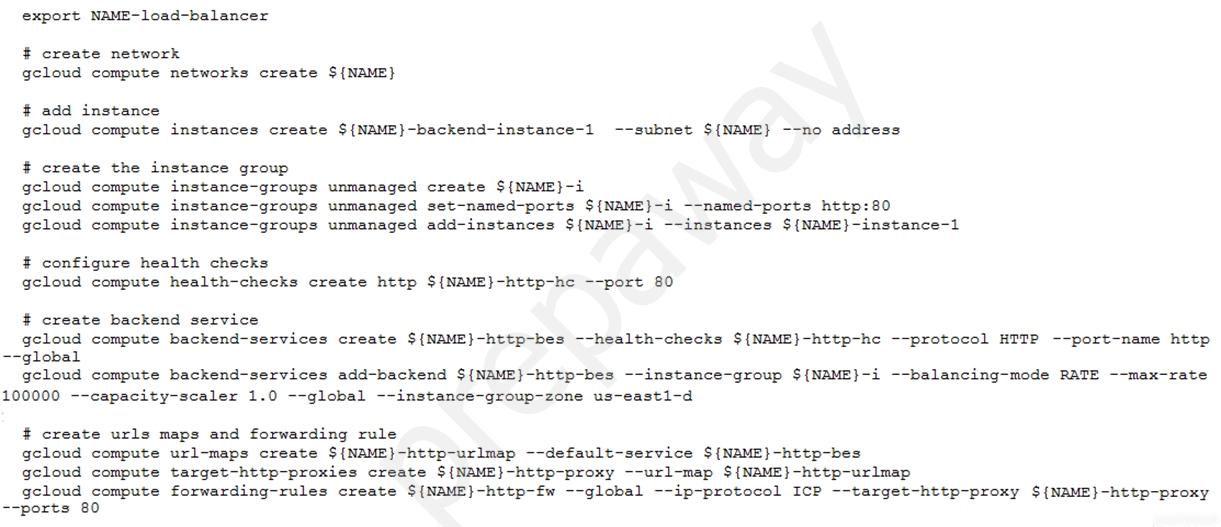
ヘルスチェックのソース IP 範囲 (HTTP(S) ロード バランシングに使用される場合はレガシー ヘルス チェックを含む) は次のとおりです。
35.191.0.0/16
130.211.0.0/22
さらに、ヘルスチェック (ping) がロードバランサー/インスタンスに受信されるため、方向は INGRESS である必要があります。
ソース: https://cloud.google.com/load-balancing/docs/health-checks
C
the source IP ranges for health checks (including legacy health checks if used for HTTP(S) Load Balancing) are:
35.191.0.0/16
130.211.0.0/22
Furthermore it should be direction INGRESS since the health-check (ping) is coming into the load balancer/instance.
source: https://cloud.google.com/load-balancing/docs/health-checks
コメント 1.1Comment 1.1
はい、これに基づいてCを選択します
Yup I would go for C based on this
コメント 2Comment 2
オプション C は、HTTP(s) ロードバランサの背後にある Compute Engine インスタンスのヘルスチェックの失敗の問題に対処するため、正しい選択です。このコマンドは、イングレス ファイアウォール ルールを作成することにより、ロード バランサーのソース IP 範囲からのトラフィックが指定されたネットワーク上のインスタンスに到達できるようにします。これらのソース IP 範囲(130.211.0.0/22 および 35.191.0.0/16)は、Google Cloud ロードバランサによってヘルスチェックのために使用されます。このルールがないと、ロード バランサーがバックエンド インスタンスと通信してステータスを確認できないため、ヘルス チェックが失敗し、その結果、それらのインスタンスにトラフィックがルーティングされなくなります。このファイアウォール ルールを実装すると、ヘルス チェック トラフィックが確実に許可され、トラフィック ルーティングの問題が解決され、ロード バランサーが正しく機能できるようになります。
Option C is the correct choice because it addresses the issue of health check failures for the Compute Engine instances behind the HTTP(s) Load Balancer. By creating an ingress firewall rule, this command allows traffic from the load balancer’s source IP ranges to reach the instances on the specified network. These source IP ranges (130.211.0.0/22 and 35.191.0.0/16) are used by Google Cloud load balancers for health checking. Without this rule, the health checks would fail because the load balancer could not communicate with the backend instances to verify their status, resulting in no traffic being routed to those instances. By implementing this firewall rule, you ensure that the health check traffic is permitted, which should resolve the traffic routing issue and allow the load balancer to function correctly.
コメント 3Comment 3
私ならCと一緒に行きます。
I would go with C.
コメント 4Comment 4
問題を解決するには、次のコマンドを実行する必要があります。
コードをコピーする
gcloud compute firewall-rules createallow-lb --network load-balancer --allow tcp --source-ranges 130.211.0.0/22,35.191.0.0/16 --direction INGRESS
これにより、指定された IP 範囲からロード バランサー ネットワークへの受信 TCP トラフィックを許可するファイアウォール ルールが作成されます。これにより、トラフィックがインスタンス グループとそれに含まれるインスタンスに到達できるようになります。
オプション A は、インスタンスに外部 IP アドレスを追加するために使用されるため役に立ちません。これは、ロード バランサーが機能するためには必要ありません。オプション B は、ロード バランサーとは関係のないインスタンスにメタデータを適用するために使用されるため、必要ありません。オプション D は不正解です。これは、ロード バランサー ネットワークからの送信トラフィックを許可しますが、これはロード バランサーが動作するために必要ありません。
これがお役に立てば幸いです!他にご質問がございましたらお知らせください。
To resolve the problem, you should run the following command:
Copy code
gcloud compute firewall-rules create allow-lb --network load-balancer --allow tcp --source-ranges 130.211.0.0/22,35.191.0.0/16 --direction INGRESS
This will create a firewall rule that allows incoming TCP traffic from the specified IP ranges to the Load Balancer network. This should allow traffic to reach the instance group and the instances it contains.
Option A will not help because it is used to add an external IP address to an instance, which is not necessary for the Load Balancer to work. Option B is not necessary because it is used to apply metadata to an instance, which is not related to the Load Balancer. Option D is not correct because it allows outgoing traffic from the Load Balancer network, which is not necessary for the Load Balancer to work.
I hope this helps! Let me know if you have any other questions.
コメント 5Comment 5
Cが正解です
C is correct
コメント 6Comment 6
C
出口ではなく入口
C
ingress not egress
コメント 7Comment 7
インスタンス上で事前定義された http-server タグを持つ B と言えます。
I would say B with predefined http-server tag on instance.
コメント 7.1Comment 7.1
タグを設定しても、タグに基づいてファイアウォール ルールを設定しない場合は、ヘルス チェック プローブからバックエンド サービスへの接続を作成できません。
even if you set tag, but if you don't set firewall rule based on tag, it still can't create connection from health check probe to backend service
コメント 7.2Comment 7.2
VM 作成時に Http Server をチェックすると、ネットワーク タグ「http-server」を持つ FW ルールが作成されますが、その逆は機能しませんでした。
If you check Http Server on vm creation, a FW rules with network tag "http-server" is created, but it didnt work the other way around
コメント 8Comment 8
私はCを選びます。
I choose C.